DTP CrossPoint 84 Series Matrix Switchers • Operation 49
Worksheet Example 2: Daily Configuration
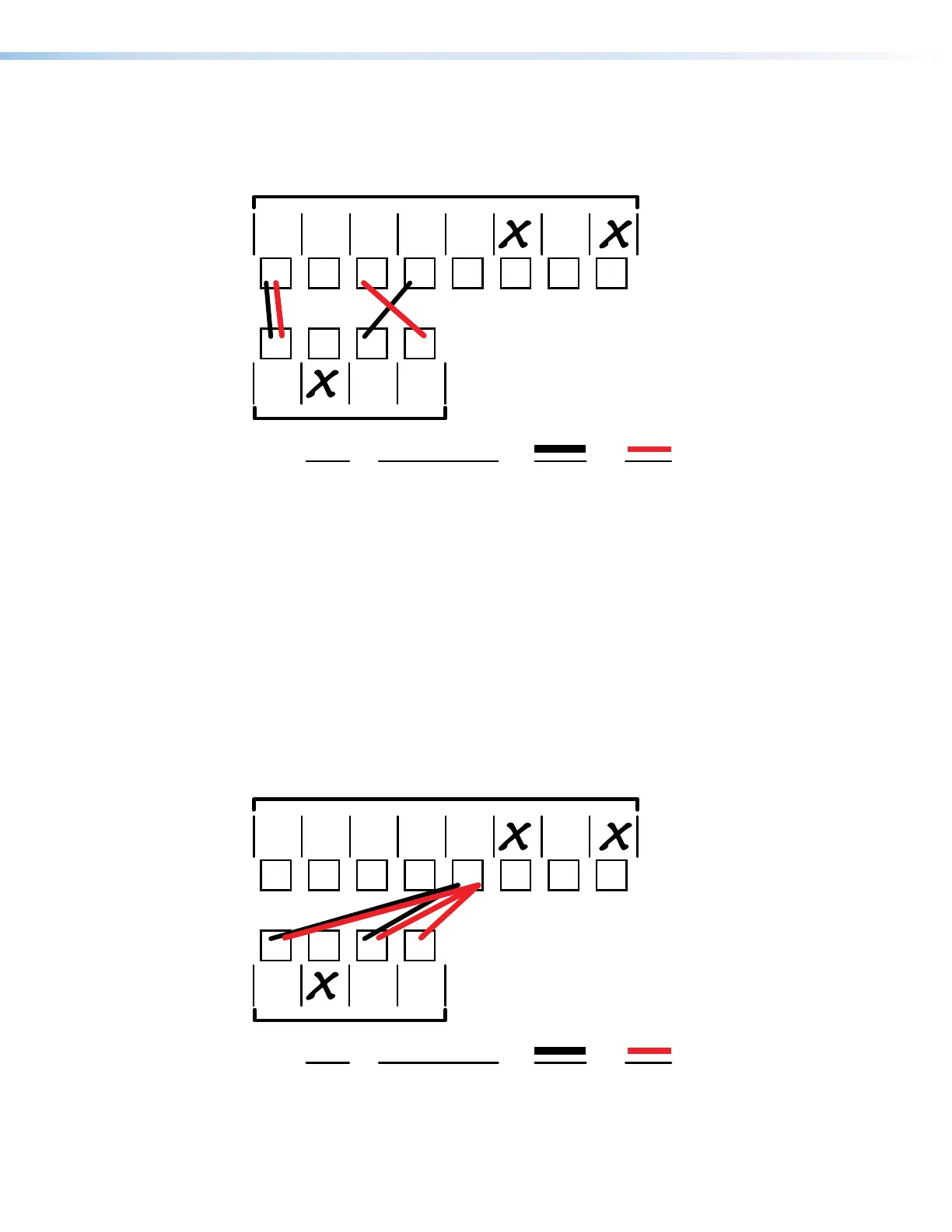
Figure 30 continues from worksheet example 1 by showing the video and audio ties in the
preset 1 configuration. Black lines shows video ties, red lines show the audio ties.
1 2345678
1234
Input sources
Output destinations
Preset # Title: Video: Audio:
Fill in the preset number and use colors, dashes, etc., to make connecting lines.
Indicate if the configuration is for video, audio, or both.
VTG 400/
Audio
System
PC 2PC 1
Weekly status mtg 3
Camera
#2
Camera/
mic - Main
podium
Classroom
FP #1
Podium
monitor
DTP R
HDMI
330/
Audio
System
DTP T
USW 333
Figure 30. Worksheet Example 2: Daily Configuration
In this example:
• The presenter, from the podium camera (input 1), is displayed in the classroom
(output 1).
• Her laptop computer presentation on (input 4) is displayed on the podium (output3).
• Her microphone audio (input 1) is played in the classroom (output 1).
•
Audio fr
om another PC (input 3) is output to a local device via a DTP receiver (output4).
Worksheet Example 3: Test Configuration
The AV system in our fictional organization needs to be fine tuned on a regular basis.
Figure 31 shows a typical test configuration, with an Extron video test generator (input 5)
generating a test pattern to all monitors (outputs 1, 3, and 4). Sound checks are run from a
CD player (input 5) to all audio systems (outputs 1, 3, and 4).
1 2345678
1234
Input sources
Output destinations
Preset # Title: Video: Audio:
Fill in the preset number and use colors, dashes, etc., to make connecting lines.
Indicate if the configuration is for video, audio, or both.
VTG 400/
Audio
System
PC 2PC 1
Test config 4
Camera
#2
Camera/
mic - Main
podium
Classroom
FP #1
Podium
monitor
DTP R
HDMI
330/
Audio
System
DTP T
USW 333
Figure 31. Worksheet Example 3: Test Configuration
30
31



 To Next Page