DTP CrossPoint 84 Series Matrix Switchers • Matrix Software 107
Emulate Mode vs. Live Mode
The DSP Configurator program always starts in Emulate mode. In Emulate mode, you can
perform all of the functions available in the DSP Configurator program, without connecting
a switcher to the computer, and save all of the ties and settings to a configuration file on
your PC. When you open the file via the DSP Configurator program, the program restores
all ties and settings as the current configuration (emulated if in Emulate mode or live, in the
switcher, if in LIve mode) and makes presets saved in the file available for recall.
Synchronizing: pull vs. push
When you switch to LIve mode, after making ties or setting processors in Emulate mode,
you need to synchronize the switcher and the DSP Configurator program. You are given the
opportunity to either:
• Pull data from the switcher and update the configuration of the DSP Configurator
program.
• Push data from the DSP Configurator program to the switcher, overwriting ties, settings,
and presets in the switcher.
You can also switch to LIve mode and then tailor the audio settings in real time, while
listening to the audio output with a critical ear.
Selecting Live mode and pulling data
Switch from Emulate mode to LIve mode as follows:
NOTE: Extron recommends connection via an Ethernet LAN port for DSP Configurator.
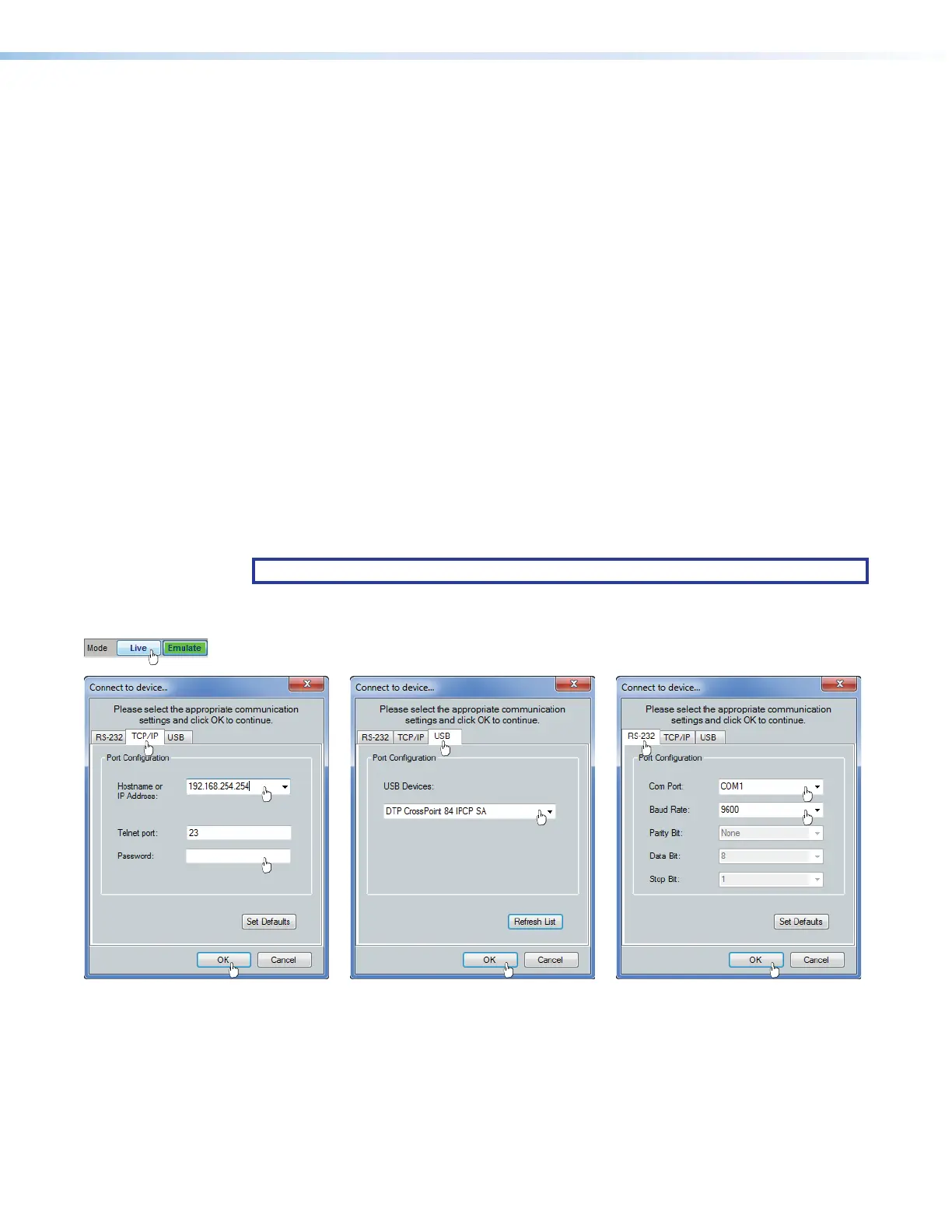
1. Click the Mode Live button (see figure59). The Connect to device window appears,
with either the TCP/IP tab, the USB tab, or RS-232 tab active.
or or
ìì
ìììì
ìììì
ëë
ëëëë
ëëëë
êê
êêêê
êêêê
22
2222
2222
22
2222
2222
ãã
ãããã
ãããã
ää
ääää
ääää
ÝÝ
ÝÝÝÝ
ÝÝÝÝ
ÞÞ
ÞÞÞÞ
ÞÞÞÞ
ÜÜ
ÜÜÜÜ
ÜÜÜÜ
22
2222
2222
11
1111
1111
Figure 59. Selecting Live Mode
2.
If necessary
and as desired (
2
), click either:
• TCP/IP tab (for connection via the LAN port (preferred) — Proceed to step 3).
• USB tab (for connection via the front panel Configuration port — Proceed to step 4).
• RS-232 tab (for connection via the rear panel Remote port — Proceed to step 5).
55



 To Next Page