DTP CrossPoint 84 Series Matrix Switchers • Programming Guide 55
Switcher Error Responses
When the switcher receives an SIS command and determines that it is valid, it performs the
command and sends a response to the host device. If the switcher is unable to perform
the command because the command is invalid or contains invalid parameters, the switcher
returns an error response to the host. The error response codes are:
E01 — Invalid input channel number (out of range)
E10 — Invalid command
E11 — Invalid preset number (out of range)
E12 — Invalid output number (out of range)
E13 — Invalid value (out of range)
E14 — Invalid command for this configuration
E22 — Busy
E24 — Privileges violation (Users have access to all view and read commands [other than
the administrator password], and can create ties, presets, and audio mutes)
E25 — Device not present
E26 — Maximum number of connections exceeded
E28 —
Bad filename or file not found
Using the Command and Response Tables
Symbols used in the table represent variables in the command and response fields.
Command and response examples are shown throughout the table. The SIS commands are
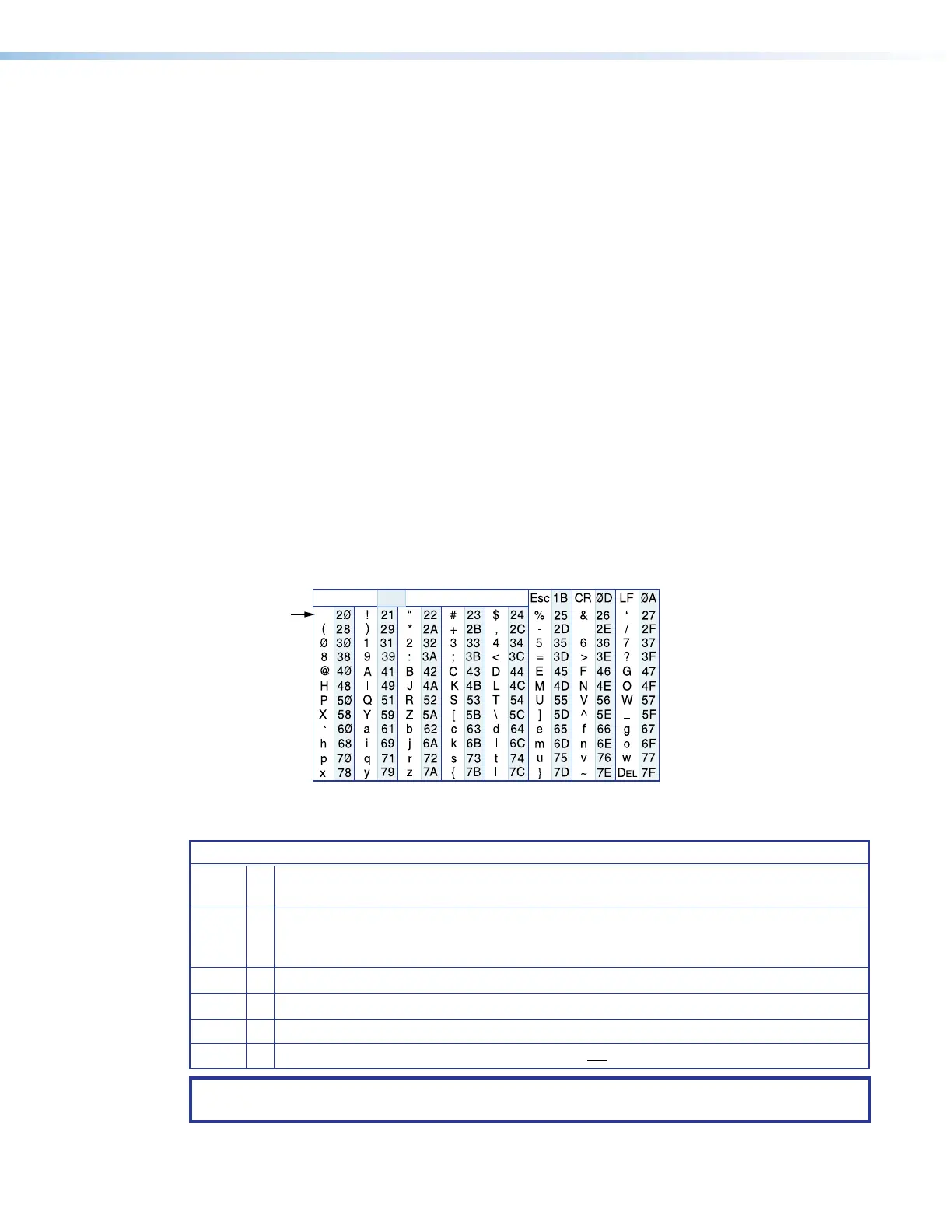
not case sensitive. The ASCII to HEX conversion table below is for use with the command
and response table.
ASCII to Hex Conversion Table
•
General Matrix Switcher Commands
Common Symbol Definitions
]
=
CR/LF (carriage return/line feed), or
Carriage return with line feed (hex 0D 0A)
}
=
Carriage return or pipe symbol (no line feed, hex 0D), or
Carriage return with no line feed (no line feed, hex 0D) (for URL-encoded commands, use the
pipe character, | , instead)
E
=
Escape key, or hex 1B (use W instead of
E for web browsers, or at any time)
|
= Pipe (vertical bar) character (URL equivalent to carriage return)
•
= Space
*
=
Asterisk character (which is a command character, not a variable)
NOTE: For commands and examples of computer or device responses used in this guide, the
character “0” is the number zero and “O” is the capital letter “o.”



 To Next Page