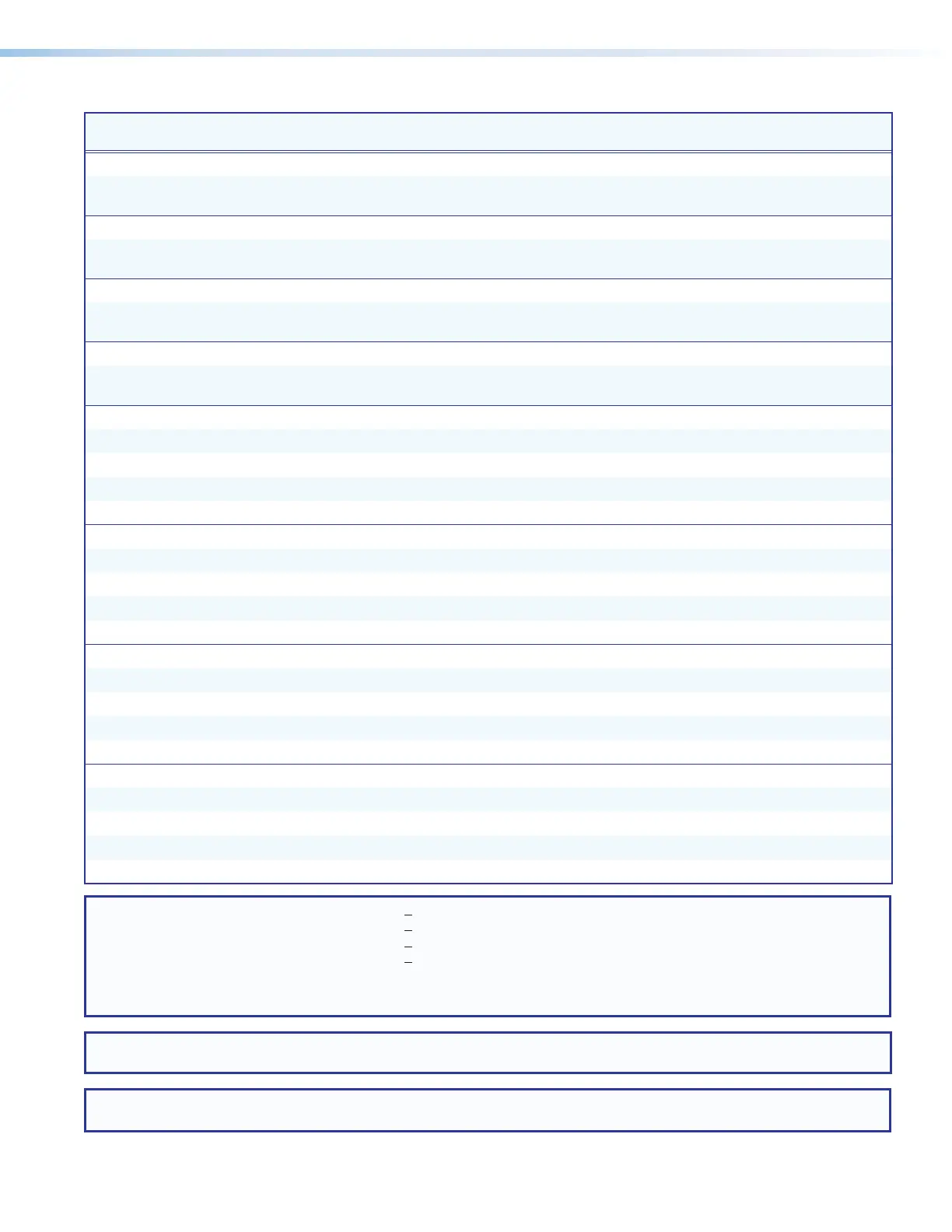
SMP 111 • Remote Communication and Control 86
Command
Function
SIS Command
(Host to Device)
Response
(Device to Host)
Additional Description
Total Pixels
View total pixels E
TPIX
} X%]
Tpix
X%]
Show total pixels for input.
Verbose mode 2/3.
Total Lines
View total lines E
TLIN
} X$]
Tlin
X$]
Show total lines for input.
Verbose mode 2/3.
Active Pixels
View active pixels E
APIX
} X^]
Apix
X^]
Show active pixels for input.
Verbose mode 2/3.
Active Lines
View active lines E
ALIN
} X&]
Alin
X&]
Show active lines for input.
Verbose mode 2/3.
Contrast
Specify a value E X1!
CONT
}
Cont
X1! ]
Sets contrast level to
X1!
.
Increment value E
+ CONT
}
Cont
X1! ] Increments contrast level.
Decrement value E
− CONT
}
Cont
X1! ] Decrements contrast level.
View E
CONT
} X1! ] View current setting.
Brightness
Specify a value E X1!
BRIT
}
Brit
X1! ]
Sets brightness level to
X1!
.
Increment value
E
+ BRIT
}
Brit
X1! ]
Increments brightness level.
Decrement value E
− BRIT
}
Brit
X1! ] Decrements brightness level.
View E
BRIT
} X1! ] View current setting.
Horizontal Shift (Position)
Specific value E X1@
HCTR
}
Hctr
X1@ ]
Set horizontal centering to
X1@
.
Increment value
E
+ HCTR
}
Hctr
X1@ ]
Shift window right.
Decrement value E
− HCTR
}
Hctr
X1@ ] Shift window left.
View E
HCTR
} X1@ ] View current setting.
Vertical Shift (Position)
Specific value E X1@
VCTR
}
Vctr
X1@ ]
Set vertical centering to
X1@
.
Increment value E
+ VCTR
}
Vctr
X1@ ] Shift window down.
Decrement value
E
− VCTR
}
Vctr
X1@ ]
Shift window up.
View E
VCTR
} X1@ ] View current setting.
NOTES:
X$
= Total lines Up to +256 of the default value for the detected resolution
X%
= Total pixels Up to +512 of the default value for the detected range
X^
= Active pixels Up to +512 of the default value for the detected resolution
X&
= Active lines Up to +256 of the default value for the detected resolution
X1!
= Brightness and contrast 1 to 127, 3‑digit response (Default: 064)
X1@
= Horizontal and vertical position The range varies such that the window never goes completely off‑screen (5‑digit response).
X1#
= Horizontal and vertical size 00120 to 04096 (5‑digit response).
NOTE: Horizontal shift and horizontal size values are adjusted in multiples of 8. If a value is entered that is not a multiple of 8, the
closest acceptable value is applied and returned.
NOTE: Vertical shift and vertical size values are adjusted in multiples of 2. If a value is entered that is not a multiple of 2, the
closest acceptable value is applied and returned.
Command and Response Tables (continued)


 To Next Page