Chapter 9 Fieldbus I/O Interfaces
PAGE 9-31
9-3-5 MELSEC-Q Series Parameter Setting (Example)
Start up GX Developer → Prepare PC Series QCPU (Q mode) Project →
Parameter → Network Parameter → Set List of CC-Link
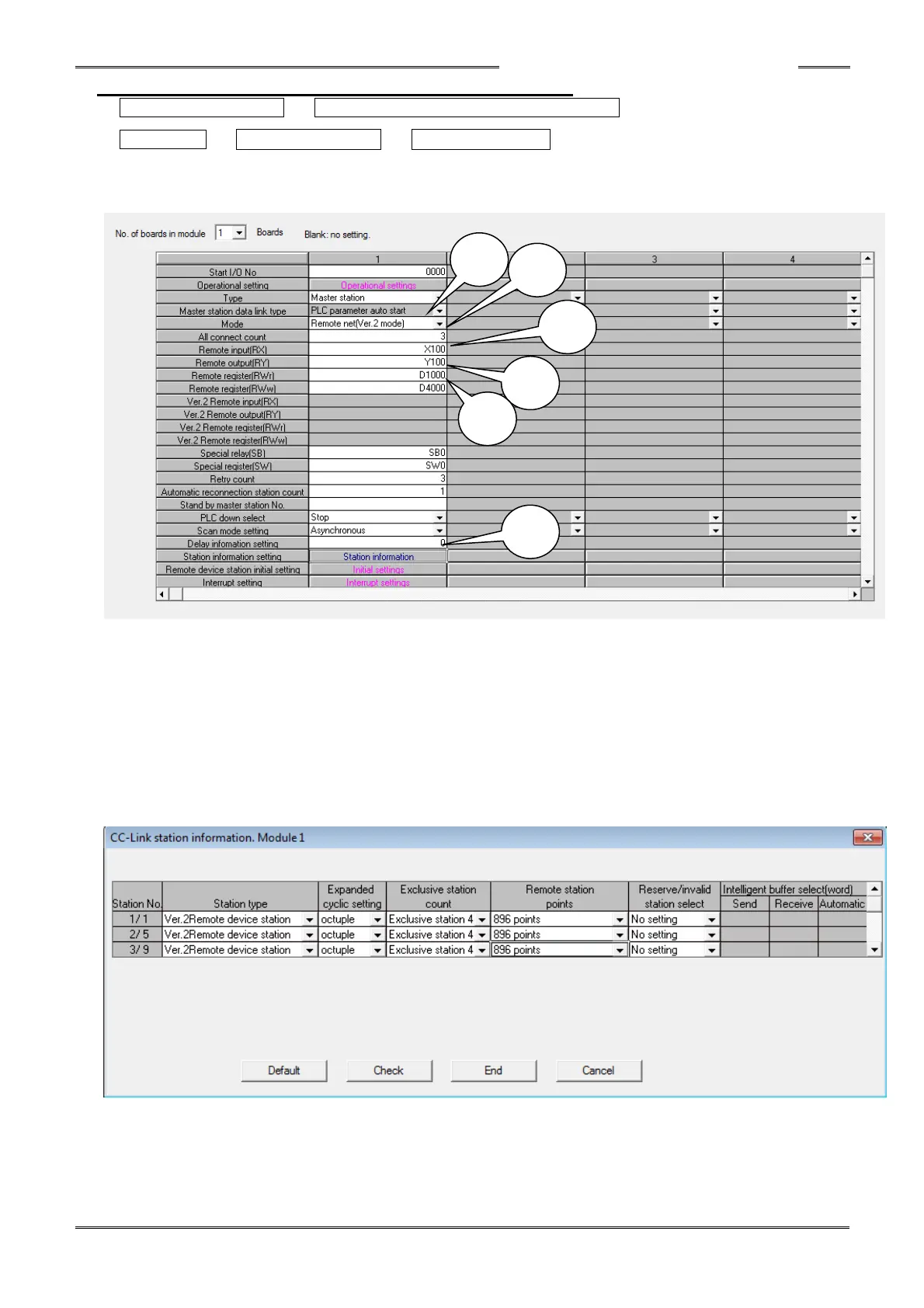
Example of PLC setting using (3) AFC3000 systems (3 CCLINK connections)
1. Select “Remote Net (Ver. 2 Mode)” at Mode Select.
2. Set the All Connect Count (3) for number of connected Remote Device stations
3. Set the refresh device Remote Input (X100) / Output (Y100) at “Remote Output (RX / RY).”
4. Set the refresh device Remote Register read (D1000) at “Remote Register (RWr).”
5. Set the refresh device Remote Register write (D4000) at “Remote Register (RWw).”
* The allocated set values differ according to the station No. of the Controller used.
6. Set the station information at Station Information Setting (the picture below shows an example for reference).
Station information Setting example (#6 above)



 To Next Page