112 FCP-300/FCP-300ECS Manual — P/N LS10145-002FK-E:A 3/12/2021
Section 10: System Operation
The System Operation of the control panel is simple. The Menus guide you step-by-step through the operations. This Section of the man-
ual is an overview of the Operation Menus. Before operating the panel, please read this entire section carefully.
10.1 Default User and Installer Codes
Installer Code: Factory-programmed as 123456.
Multi-site Installer Code: Factory-programmed as 654321.
10.2 Annunciator Description
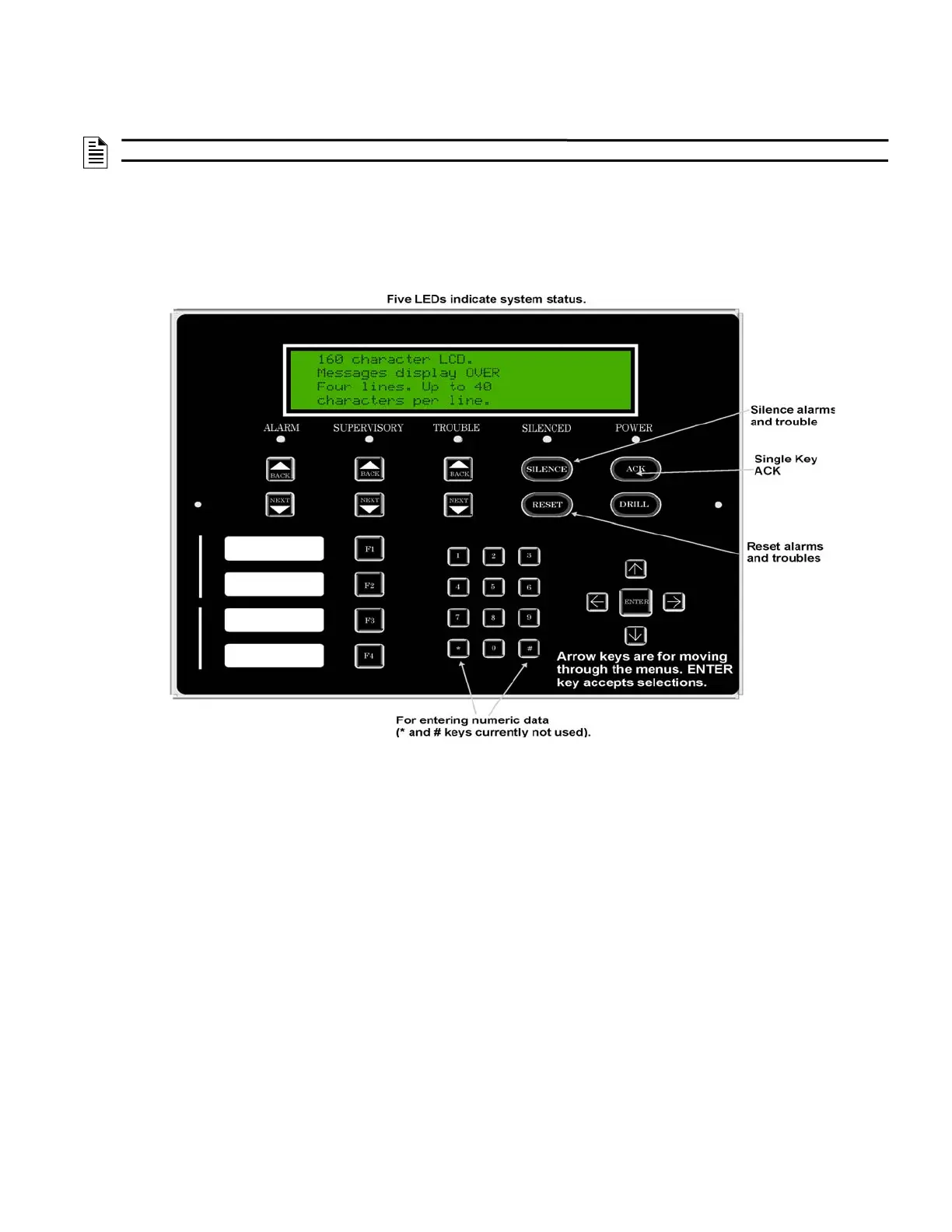
Figure 10.1 shows the annunciator that is part of the control panel board assembly.
Figure 10.1 Control Panel Annunciator
10.2.1 LCD Display
The Control Panel LCD displays the following:
These messages can be entered up to 160 characters, displaying over four lines of 40 characters each. When you press the Annunciator
keys, the Annunciator keys beep
10.2.2 Banner
The Banner is the message that displays on the control panel when the System is in the normal mode (no alarm or trouble condition
exists and menus are not in use). You can create a customized message that will display instead of the internal (default) message. For
information on customizing the banner, see Section 9.6.7,
NOTE: For information on how to modify the user access code profiles, see Section 6.2.5.
• System messages• annunciates alarms • supervisories • troubles • status information • prompts for input



 To Next Page