Configuring SBUS Modules Control Panel Installation
FCP-300/FCP-300ECS Manual — P/N LS10145-002FK-E:A 3/12/2021 45
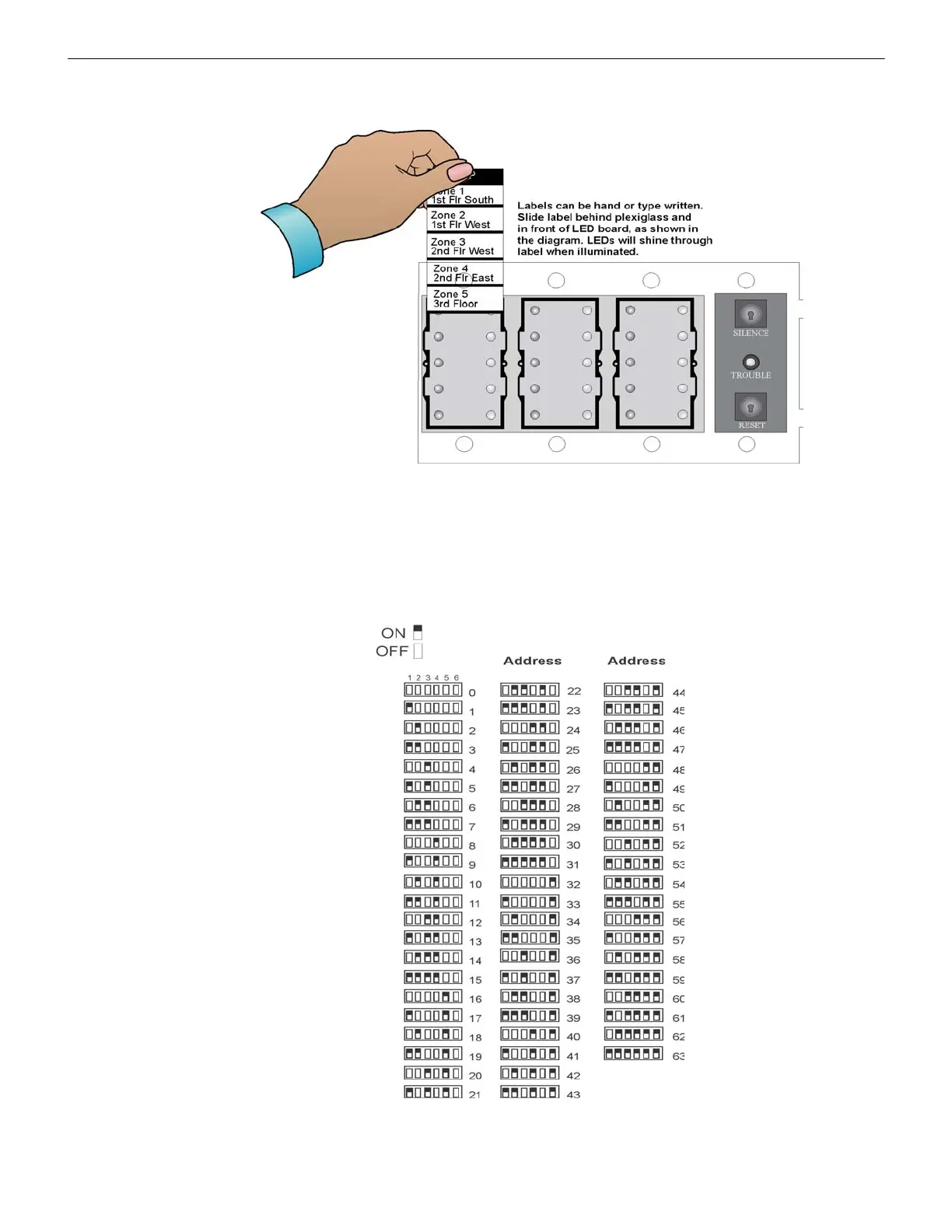
The FIK-5865 ships with a set of zone description labels that can be inserted into the FIK-5865 board assembly. These labels
can be used in a typewriter or can be manually written by hand. Slide the labels under the plexiglass as shown in Figure 4.38.
The LEDs will show through the label when illuminated.
Figure 4.38 Inserting Zone Description Labels
4.12 Configuring SBUS Modules
This Section describes how to configure any System hardware modules that have been added to the System.
4.12.1 Assigning SBUS Module IDs
When you install a hardware module (see Table 4.1 for compatible devices), you must use the DIP switches on the module to
assign an ID# to the module. The Address, zero, is an invalid address and is not allowed.
Figure 4.39 shows all possible DIP switch positions and their correlation to a numerical ID. For example, to select the ID 2,
place the DIP switch 2 in the UP position.
Figure 4.39 Possible module addresses
To edit, add, delete, and View Module List, Refer to Section 9.2.



 To Next Page