38 FCP-300/FCP-300ECS Manual — P/N LS10145-002FK-E:A 3/12/2021
Control Panel Installation FIK-6815 Installation
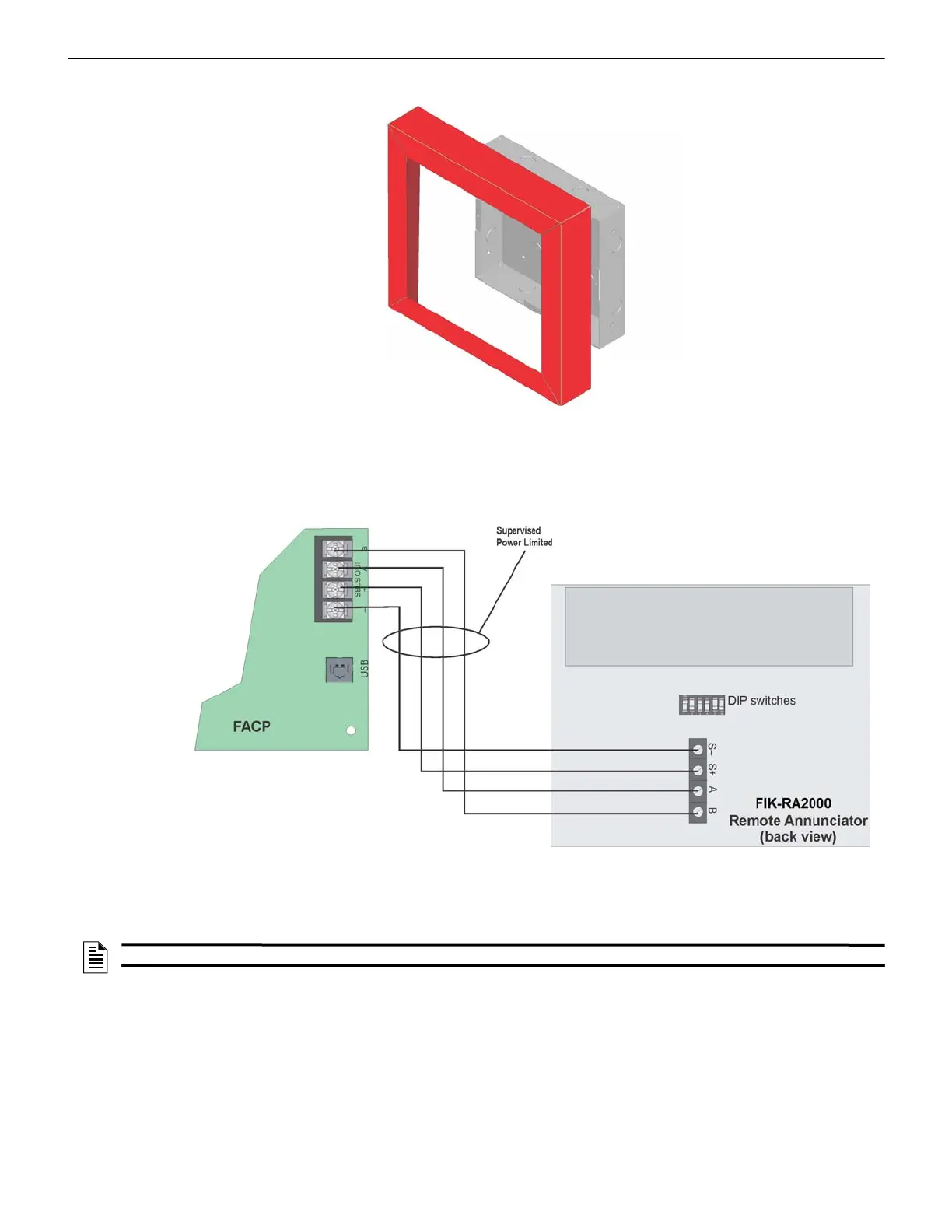
4. Place the trim ring over the back box as shown in Figure 4.25.
Figure 4.25 Installing Trim Ring
5. Attach the door assembly to the back box using screws provided.
6. After the SBUS wiring to the annunciator is complete (described in Section 4.7.2), replace the electronic assembly in the
back box. Place the bezel over the back box and tighten the set screws on the bezel.
4.7.2 FIK-RA2000 Connection to the Panel
Connect the FIK-RA2000 to the panel as shown in Figure 4.26.
Figure 4.26 Model FIK-RA2000 Connection to the Panel
4.8 FIK-6815 Installation
The FIK-6815 SLC expander offers the option to add additional addressable devices. The maximum number of SLC devices
per panel is 300. The number of FIK-6815’s is limited by the maximum number of SBUS devices.
To install the FIK-6815, do the following.
1. Make sure the power is off at the panel.
2. Mount the FIK-6815 in the FCP-300/ECS cabinet or the FIK-RPS1000 cabinet.
3. Use the standoffs located under the control panel board assembly and secure it with the screws provided with the FIK-
6815. For additional information, see the Model FIK-RPS1000 Installation Manual (P/N LS10259-002FK-E).
4. Connect the FIK-6815 to the control panel. (See Section 4.8.1.)
5. Use the on-board DIP switches to select an SBUS ID#. (See Section 4.12.1.)
6. Add the FIK-6815 Module to the System through programming.
The JumpStart
will add the module automatically (see Section 8.1). You can also add it manually (see Section 9.2.2).
NOTE: The FIK-6815 will support Fike, Silent Knight or SWIFT SLC devices.



 To Next Page