94 FCP-300/FCP-300ECS Manual — P/N LS10145-002FK-E:A 3/12/2021
Programming Zone
9.3.1 Edit Zone
You can edit the following zones using the Edit Zone option.
To edit a zone, follow these steps:
1. Enter the Installer Code.
2. Select 7 for the Program Menu.
3. Press 2 to enter the Zone Menu.
4. Press 1 to edit a zone.
5. Enter the zone number, then press ENTER.
Edit Zone Name
6. Press 1 to edit the selected Zone Name.
You can use words to display a descriptive name for a zone.
Edit Zone Properties
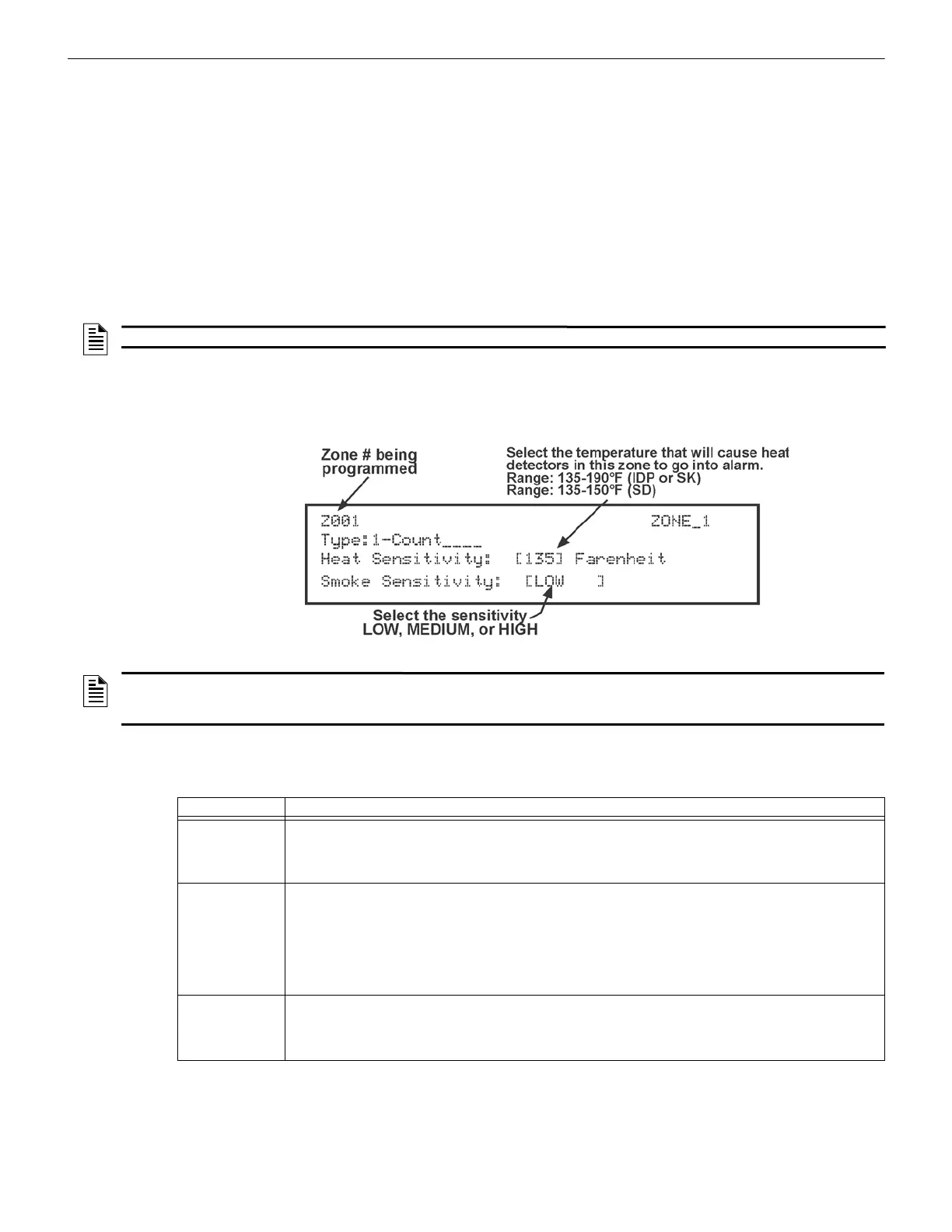
The Zone properties consist of the alarm delay characteristics, heat detector sensitivity, and smoke detector sensitivity.
1. Do steps 1 through 5 in Section 9.3.1.
2. Press 2 to edit the properties of the selected zone.
Figure 9.2 Editing Zone Properties
Alarm Delay Characteristics
The programmed Zone Type is provided for only the user reference. To modify the Zone Type, use the HFSS Programming
Tool. To select the alarm delay characteristics (see Table 9.2), press the up or down arrow.
• zone name • zone output mapping • zone accessory • zone properties (which include, Zone Type and detector sensitivity)
NOTE: To edit names, see Appendix B.
NOTE: You can only see the smoke sensitivity on the FCP-300/ECS if the Daytime/Nighttime Sensitivity is set to off under the System
Options. (See Section 9.6.2). Otherwise, if the Daytime/Nighttime Sensitivity is on, this will bring up a Smoke Sens Day and Night, 2
separate widgets with sensitivity as being either low, med, high for each device.
Type of Delay Description
1-Count
One Count (No Delay). When this option is enabled, an alarm occurs immediately when a single device of
any of the following types goes into alarm:
detector, manual pull, water flow, Aux1 or Aux2.
This operation is considered the most typical operation and is the default for all zones.
2-Count
When this type of alarm delay is used, two or more detectors within the zone must go into alarm in order for
the zone to report an alarm. Switches of type manual pull, water flow, Detector Switch, Aux1 and Aux2 are an
exception; they will cause an alarm when only one switch is in alarm.
When a single detector is in alarm in a 2-Count zone, the System enters a prealarm condition. In a prealarm
condition, the touchpad PZT beeps and the annunciator display indicates that a prealarm has occurred. If the
zone has been mapped to an output group for the prealarm event, the output group will activate. The
prealarm will not be reported to the Central Station.
Alarm
Verification
Alarm verification is an optional false alarm prevention feature that verifies an alarm condition by resetting the
smoke detector. If the alarm condition still exists by the time the reset cycle has completed, the detector will
go into alarm. If the detector is no longer in alarm, no report will go to the Central Station. The alarm
verification sequence is ignored if the zone is already in alarm.
Table 9.2 Alarm Delay Types



 To Next Page