82 FCP-300/FCP-300ECS Manual — P/N LS10145-002FK-E:A 3/12/2021
Programming Overview Programming Using the HFSS Software Suite
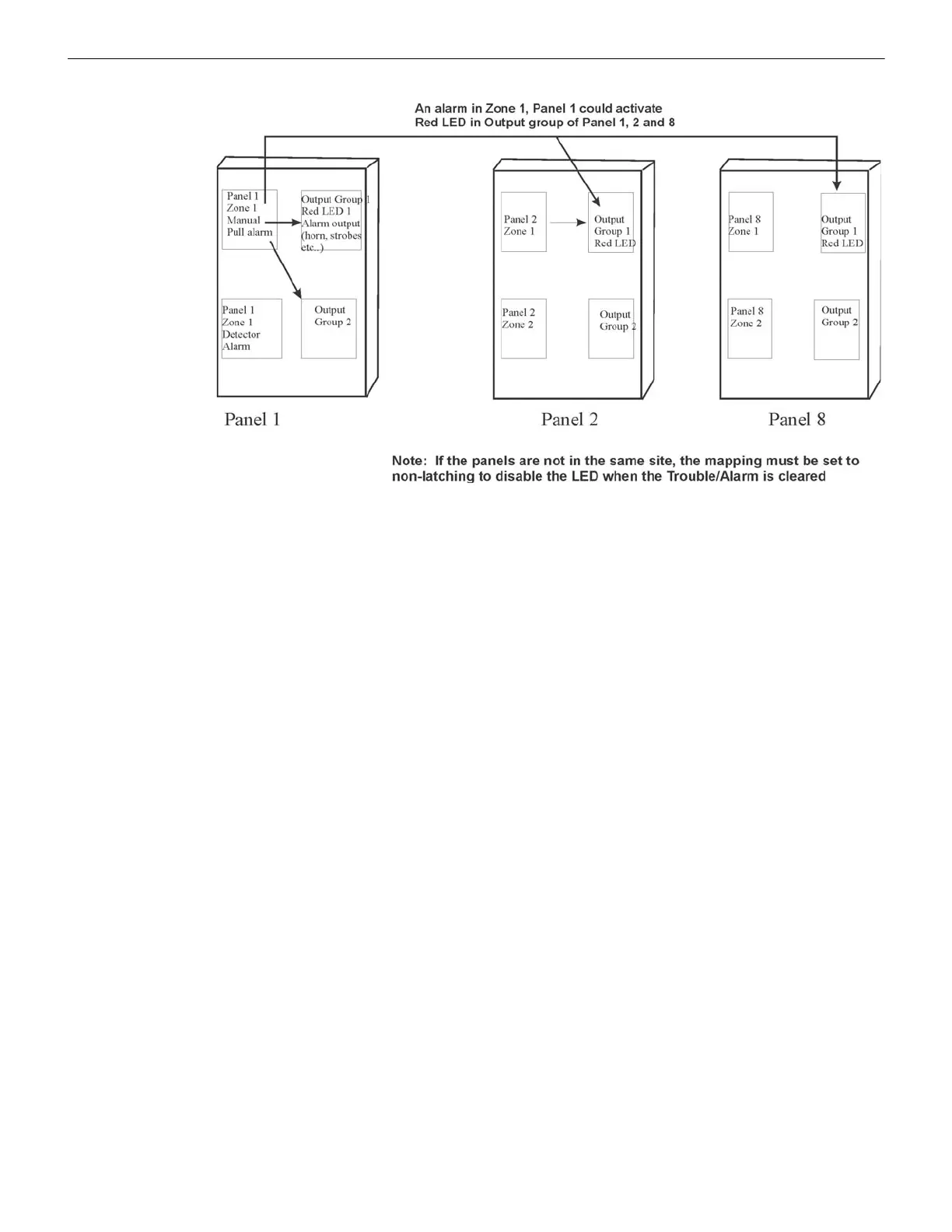
8.2.5 Mapping LED Points for a Networked System
Figure 8.8 Example of Expanding Mapping of LED Points Across Panels
8.3 Programming Using the HFSS Software Suite
You can use the HFSS Programming Tool to program the control panel onsite (the personnel will need to be onsite during the
upload or download process). The HFSS is a software package that lets you easily program the control panel using a Windows-
based computer. HFSS is needed for Mapping. When you use the HFSS tool, you can set up the programming options for the
panel, save the options in a file, then download the file to the panel. You can directly connect to the control panel using the
onboard USB. The updates are available at Fike website, www.fike.com.
8.4 Programming Using an Annunciator
You can program the control panel from a System annunciator, using either the control panel’s on-board annunciator or an
FIK-RA100, FIK-RA1000 or FIK-RA-2000 remote annunciator.
The following subsections describe the programming basics, including a description of the editing keys available for program-
ming and how to navigate and move through the Programming Menus. Section 9 contains the specific information about the
individual programming options.
8.4.1 Entering / Exiting the Panel Programming
To Enter the Programming Mode, do the following steps.
1. Enter the Installer Code (the factory programmed default code is 123456).
2. Select 7 for the Programming Menu. See Section 9 for detailed information and see Section 8.5 for a quick reference
listing of all the programmable options and the JumpStart defaults.
To Exit the Programming Menu, do the following.
When you have completed working with the menus, press the left arrow several times until you are exited from Programming
Mode. There are two prompts that will display.
• The first prompt appears to confirm you intended to leave the Program Menu (select Yes or No as appropriate).
• The second prompt appears to confirm you accept all changes. If you select No, any changes you made since you entered
the Program Menu will have no effect.



 To Next Page