Programming Menu Quick Reference Programming Overview
FCP-300/FCP-300ECS Manual — P/N LS10145-002FK-E:A 3/12/2021 83
8.4.2 Moving through the Menus
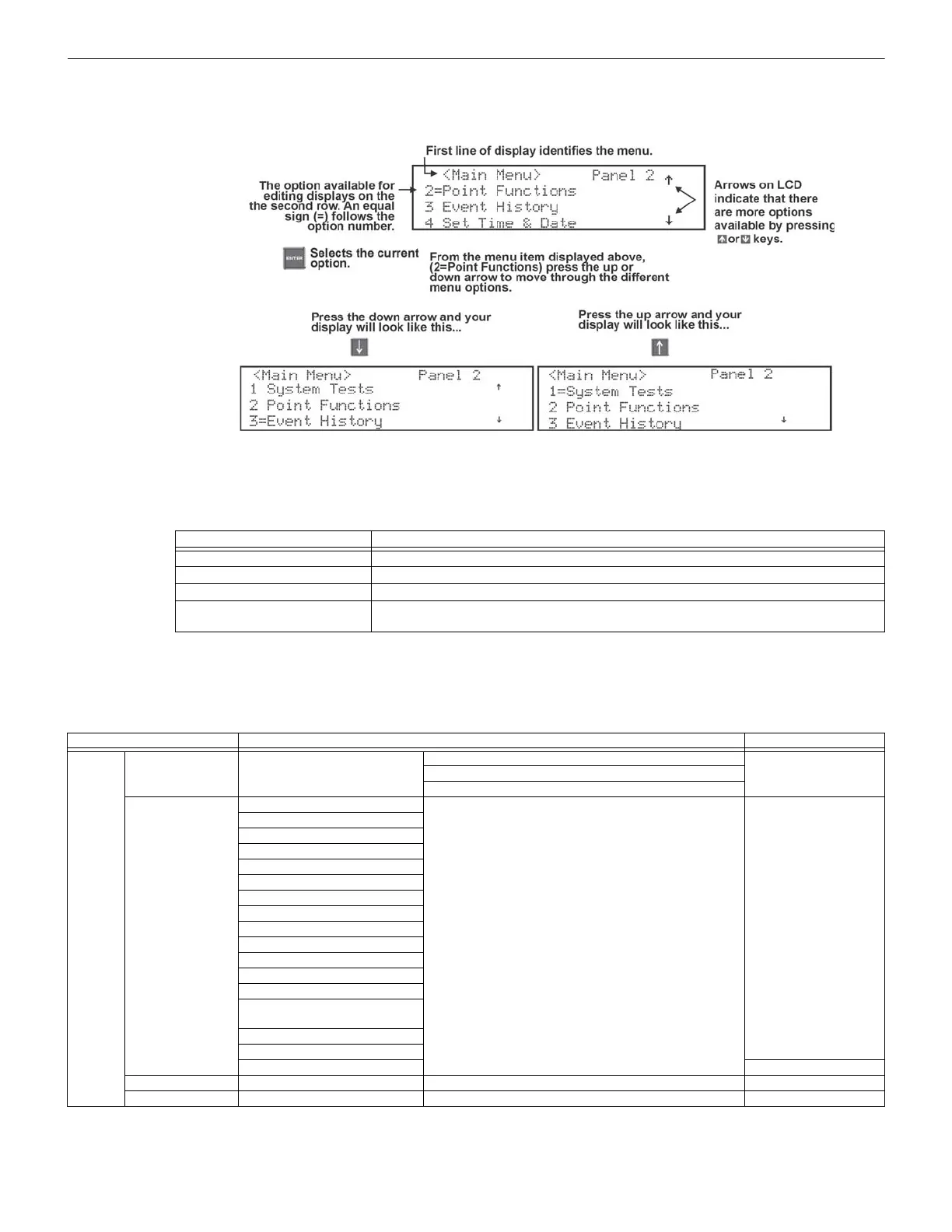
“Moving through the Program Menu” on page 83 shows how to move through Program Menu screens, using the Main Menu
screen as an example.
Figure 8.9 Moving through the Program Menu
8.4.3 Selecting Options and Entering Data
There are several ways to make the programming selections using the control panel depending on which screen you are cur-
rently using. The chart below is a generic explanation.
8.5 Programming Menu Quick Reference
This Section of the Manual lists all the Panel Programming options in the order they appear on the sub-menus. The Default set-
tings are indicated in the text or marked with an asterisk (*). The Comments column provides the Section (if applicable) that
includes the quick reference information which has more detailed information.
Menu Options Do the following
Select from a menu Enter the number of the option.
Enter numeric data Press the appropriate number on the annunciator.
Enter text (alphanumeric data) See “Editing Text Using the Built-In Programmer” on page 206 for complete list of characters
Select from a scrolling list
Use up arrow and down arrow to move through a list of available options. When the option
you want to select is displayed, press ENTER.
Table 8.3 Menu Options
Menu Options/Defaults Comments
Module
Edit Module Select Module
Edit Module ID
Section 9.2.1Enter Module Name
Edit Module specific options
Add Module
FIK-5824-Serial/Parallel/IO
Section 9.2.2
RA-2000 LCD Annunciator
FIK-RA1000 LCD Annunciator
FIK-RA100 LCD Annunciator
FIK-6815-SLC Loop Expander
FIK-RPS1000 Power Supply
FIK-5496 NAC Expander
FIK-5880-LED/IO Module
FIK-5865-LED Annunc. Module
FIK-50W -Voice Amplifier
FIK-125W-Voice Amplifier
FIK-DUAL50W -Voice Amplifier
FIK-INT50W-Voice Amplifier
FIK-NVCM -Network Voice
Control Module
FIK-RVM- Remote Voice Module
FIK-NIC Network Interface Card
Delete Module Select Module Section 9.2.3
View Module List Select Module Section 9.2.4
Table 8.4 Programming Quick Reference Chart



 To Next Page