FIK-RA2000 Remote Annunciator Installation Control Panel Installation
FCP-300/FCP-300ECS Manual — P/N LS10145-002FK-E:A 3/12/2021 35
4.6.2 Connecting the FIK-RA1000 to the Panel
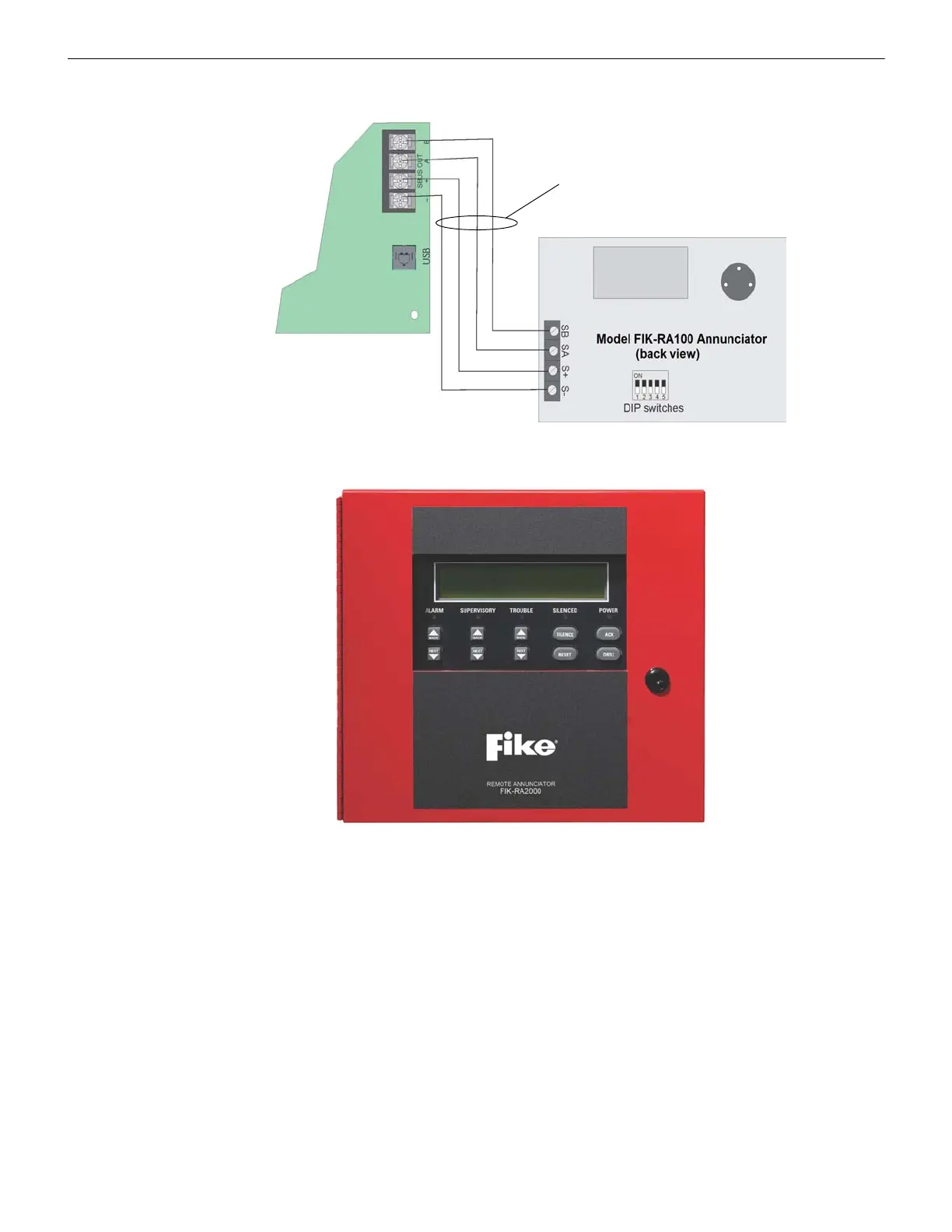
Connect the FIK-RA1000 to the panel as shown in Figure 4.19.
Figure 4.19 Model FIK-RA1000 Connection to the Panel
4.7 FIK-RA2000 Remote Annunciator Installation
The optional Model FIK-RA2000 Remote Annunciator, (see Figure 4.20). The FIK-RA2000 can be surface or flush mounted..
Figure 4.20 Model FIK-RA2000 Remote Annunciator, Front View
The FIK-RA2000 installation involves the following steps:
1. Make sure the power is off at the panel.
2. Mount the FIK-RA2000 in the desired location (see Section 4.7.1).
3. Connect the FIK-RA2000 to the panel (see Section 4.7.2).
4. Use the DIP switches on the back of the FIK-RA2000 to assign an SBUS ID# to the FIK-RA2000.
5. The FIK-RA2000 module must be added to the System through programming. JumpStart
®
will add the module
automatically (see Section 8.1.3). You can also add it manually (see Section 9.2.2). Select a name, if desired (See
“Naming Modules” on page 121.).
Supervised
Power-Limited Class B



 To Next Page