116 FCP-300/FCP-300ECS Manual — P/N LS10145-002FK-E:A 3/12/2021
System Operation Basic Operation
You will be returned to the Main Menu when the reset is complete.
The Communicator is not allowed to be reset when alarms or supervisories are active. The Communicator Reset is not allowed
if any of the following are active:
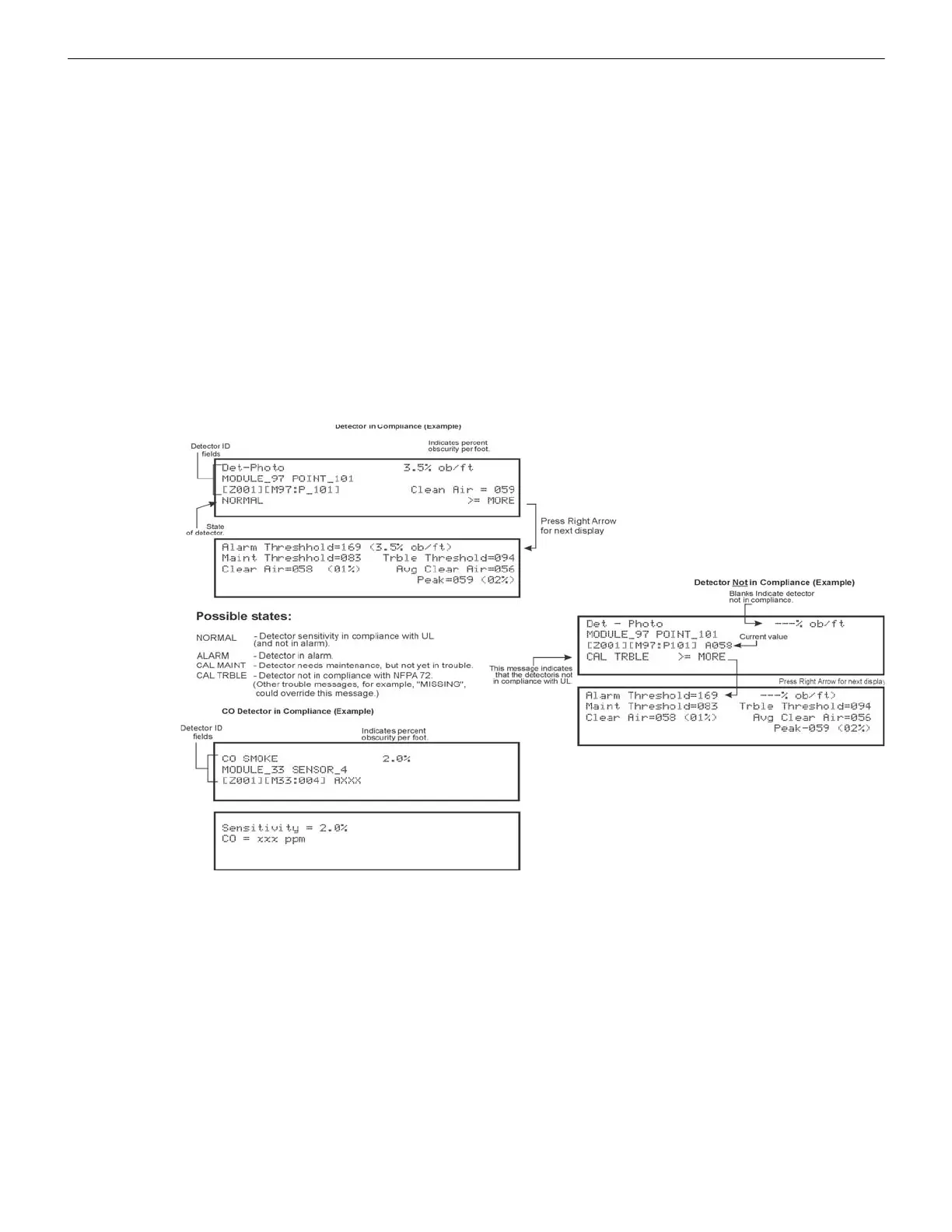
10.4.11 Check Detector Sensitivity Through Point Status
The control panel constantly monitors the smoke detectors to ensure that the sensitivity levels are in compliance with NFPA
72. If the sensitivity for a detector is not in compliance, the panel goes into trouble, generating a CAL TRBLE condition. A
detector enters a CAL MAINT state to indicate that it is approaching an out of compliance condition (but is currently still in
compliance).
When a CAL TRBLE condition occurs, the Central Station receives a Detector Trouble Report (“373” and the zone or point for
Contact ID format; “FT” and the zone or point in SIA format).
To check the sensitivity for an individual detector, follow the steps below.
1. From the Main Menu, press 2 for the Point Functions.
2. Press 2 for the Point Status.
3. Select the module where the point you want to check is located.
4. Enter the number of the point you want to check and press ENTER.
5. A screen similar to those shown in Figure 10.3 will display.
Figure 10.3 Checking Detector Sensitivity Compliance
You can print the detector status by uploading the detector status to the HFSS Programming Tool. Then, from the HFSS, you
can print the detector status.
10.4.12 View Status of a Point
1. From the Main Menu, select 2 for the Point Status.
2. From the list that displays, press ENTER to select the module where this point is located.
3. Next, enter the point to display. The screen that displays will show you if the point has a trouble and will provide the
sensitivity compliance information. (See Section 10.4.11 for complete information about detector sensitivity compliance.)
10.4.13 View Alarms or Troubles
When the System is in alarm or trouble, you can press the down arrow to view the location of an alarm, supervisory or trouble.
10.4.14 System Information
1. From the Main Menu, press 8 to access the System Information Menu.
About Panel
Press 1 to access the About Panel to view the Panel Model, Serial Number and System Version number and date.
• Fire Alarm • CO Alarm • ECS Alarm
• Fire Supervisory • CO Supervisory • ECS Supervisory
• Fire Pre-Alarm



 To Next Page