60 FCP-300/FCP-300ECS Manual — P/N LS10145-002FK-E:A 3/12/2021
Networking Setting the Network ID for each Panel
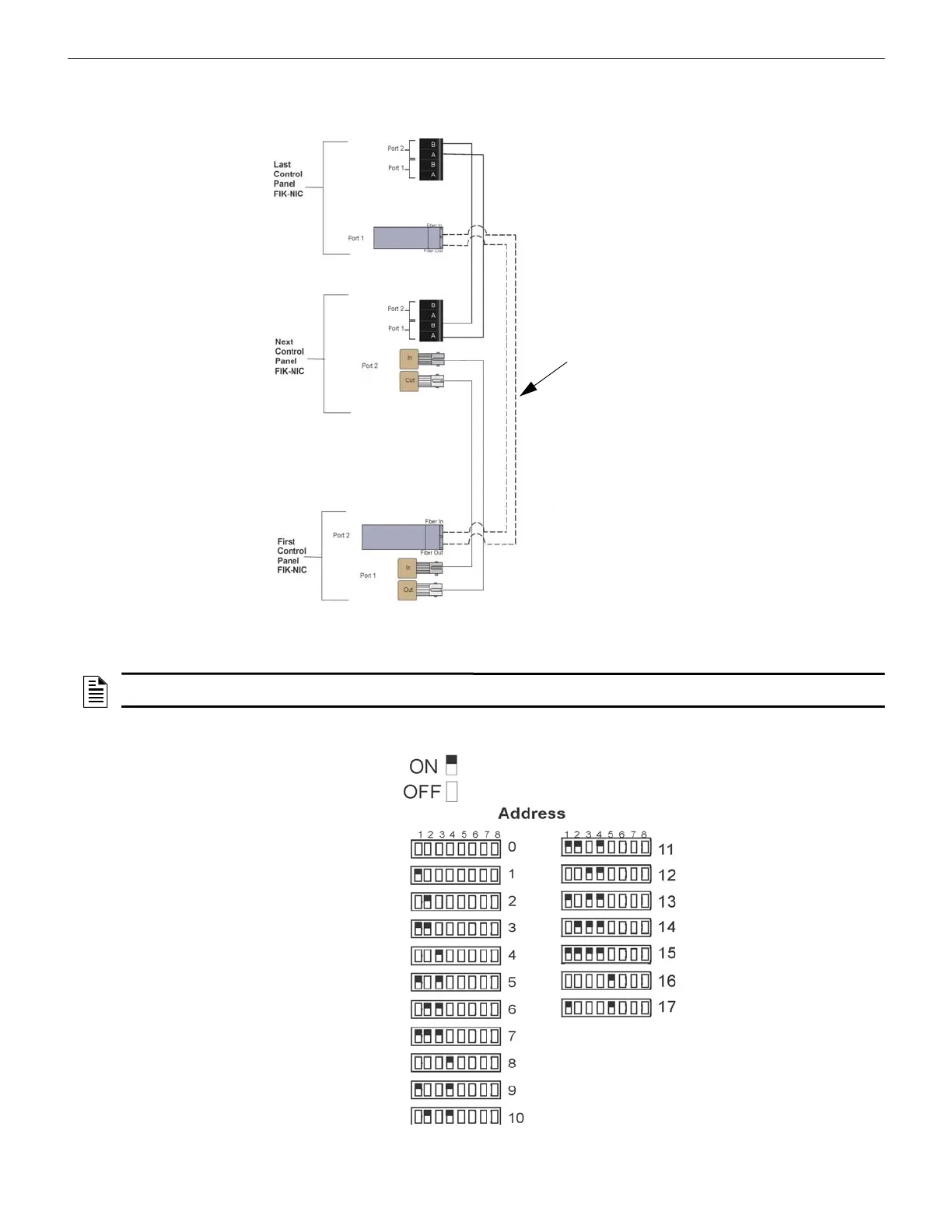
Fiber-Optic and Twisted-Pair Wiring between the Multiple Panels
A mixture of fiber-optic cable and twisted pair wiring between multiple panels is shown in Figure 5.10. Class A cabling is
shown with dotted line.
Figure 5.10 Twisted-Pair and Fiber-Optic Combination Wiring Example
5.4 Setting the Network ID for each Panel
The Network ID for each panel is set using the DIP switch positions 1 through 5. See Figure 5.11 below for possible DIP
switch settings.
Figure 5.11 Network ID Settings
NOTE: It is important that much thought is given when choosing the network IDs for each panel. It is difficult to change the IDs once the
panel programming has begun.



 To Next Page