Measurement
30 MMS
®
Inspection DPM High
Log all climatic values continuously (Log func-
tion): >
The top left corner of the window shows the
remaining time in minutes up to the next save
(e.g,: time intervall 10 min, every 10 minutes, the climate variables
measured and calculated at this point in time are saved; remaining time
to the next save is 9 minutes and 15 seconds); setting the time interval
see page 27.
Stop continuous logging (log function):
During the measurement you can also:
Delete stored climatic values: .
View the run charts of the climatic variables:
, , see also page 35.
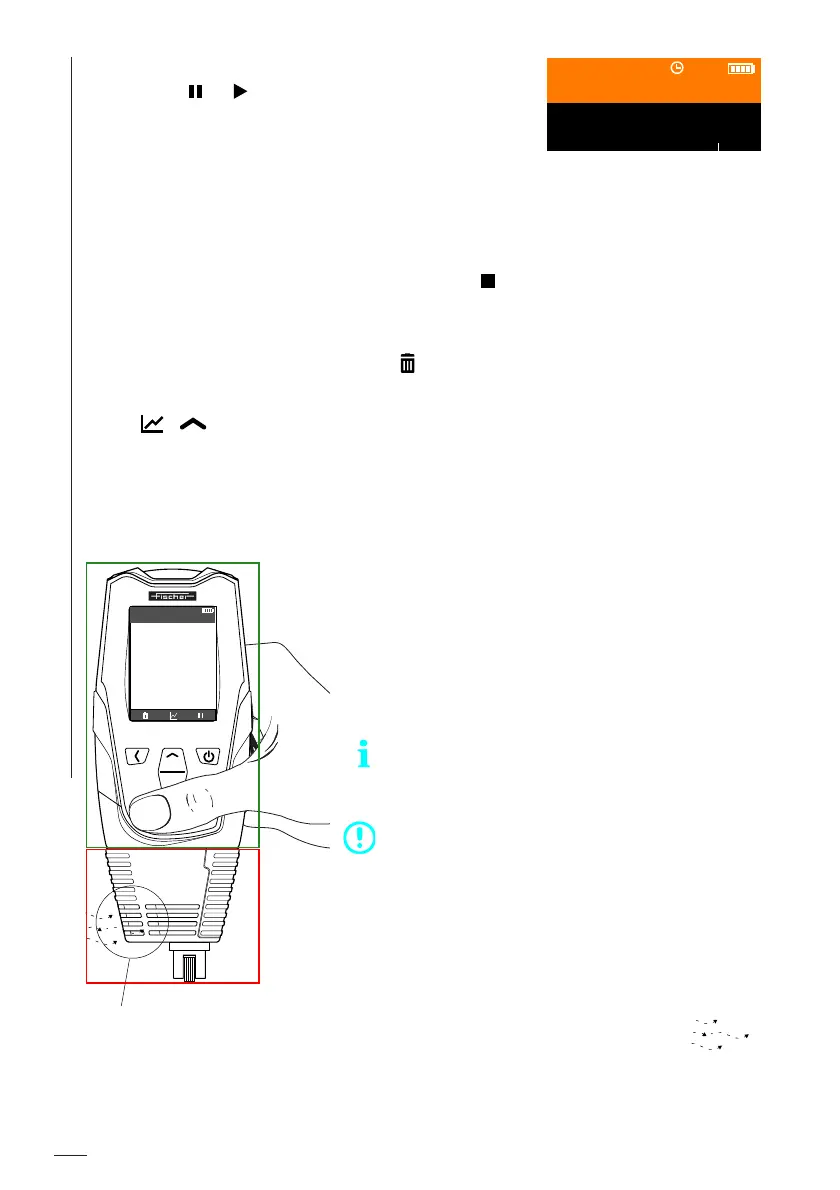
6.4 Correctly holding the gage during the measurement
9:15
Batch 003
RH 34.9 %A
Ta
26 1 °C
The display screen should be
considered only as example.
Keep your hand in the area of the orange
gage housing at all times, this is marked
by the green rectangle in the figure to the
left. This prevents the housing grille from
being covered and the heat radiating from
your hand falsifying the measurement.
Further examples can be found on the next
page.
ATTENTION - Measurement error
Do not hold the lower black gage area in your
hand, this is marked by the red rectangle in the
figure to the left!
► Keep the housing grille in the lower area
of the gage clear. Avoid covering with
hands, material or other objects.
► Allow ambient air to flow unhin-
dered through the housing grille
in the lower area of the gage.
Batch 003
RH
21.6
%A
Ta
25.0
°C
Ts
30.0
°C
Td
2.7
°C
Ts-Td
27.3
°C
n = 5
Air and humidity probes
within the housing grille













 To Next Page