Setting the meter imprint
61
5.1.4 Special features with regard to rate selection
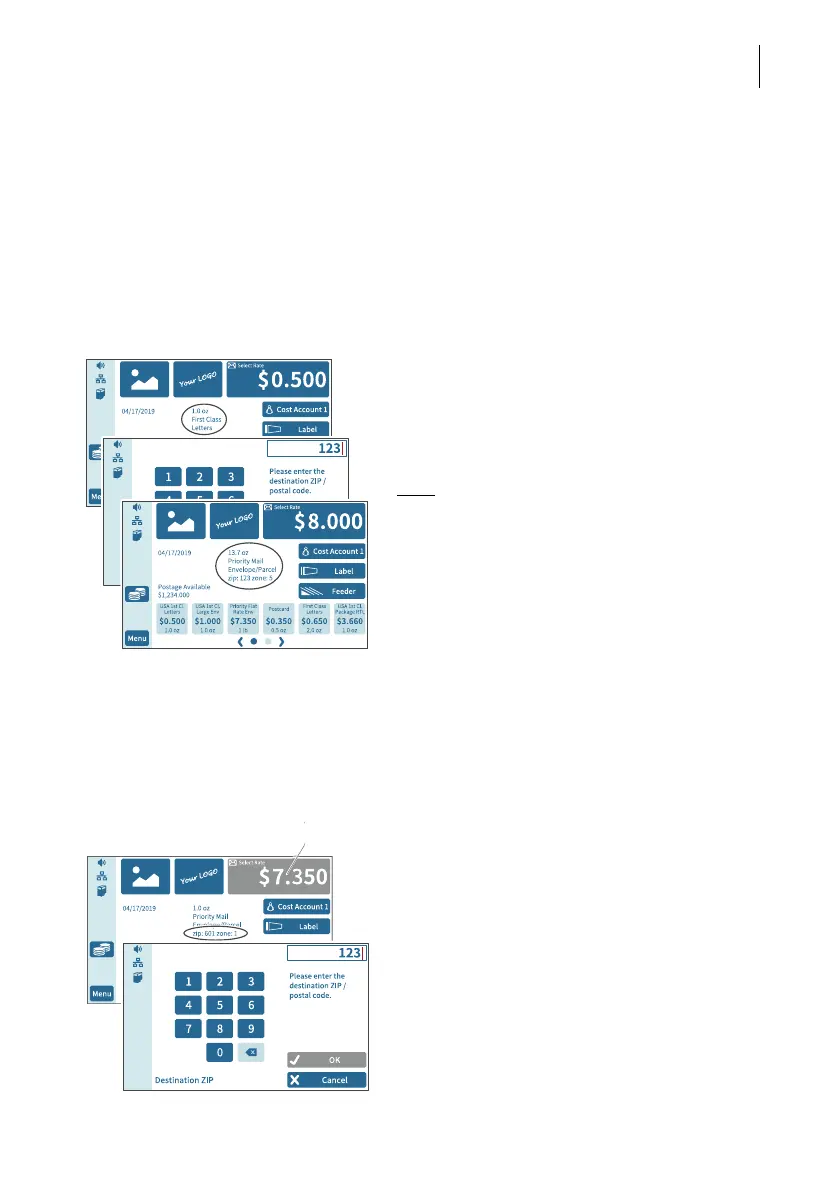
5.1.4.1 Rate chaining
Thanks to the rate chaining feature, PostBase Fusion can automatically switch to a
suitable rate setting when the weight limit for certain products is exceeded. To deter-
mine the zone for products with rates dependent on distance, PostBase Fusion may
prompt you to enter the destination ZIP code when first switching rates.
Example “First Class Mail – Letters” is set for metering.
If the scale detects a mail piece that is too
heavy for First Class Mail, PostBase Fusion
automatically switches to “Priority Mail –
Envelope / Parcel” and prompts you to enter
the destination ZIP code.
Note
: PostBase Fusion memorizes the ZIP
code and will use it again for the next mail
piece to exceed the weight limit. To change
the ZIP code, tap and hold the postage but-
ton (see also chapter 5.1.4.2)
PostBase Fusion will switch the rate settings
back to “First Class …” once the scale deter-
mines a suitable weight.
5.1.4.2 Changing the destination ZIP code
You can change the destination ZIP code for Domestic Mail with rates dependent on
distance directly in the Home screen.
In the Home screen:
• Press the postage button, until the ZIP
code setting menu opens.
• Enter the first three digits of the new
destination ZIP code.
• Confirm with OK.
PostBase Fusion determines the corre-
sponding zone and calculates the new post-
age.
Tap and hold



 To Next Page