Manage shortcuts
95
10 Manage shortcuts
By default, PostBase Fusion offers you the most commonly used USPS products as
rate shortcuts. You can create and store custom shortcuts, depending on the model,
up to 20 shortcuts that will display directly on the Home screen.
You can delete shortcuts, overwrite them or create new ones. Once created, custom
names can be defined and the stored weight can be changed. Whenever a rate
change occurs, the rate tables are updated and shortcuts may be renamed and a new
default assignment may be created.
10.1 Creating and saving rate shortcuts
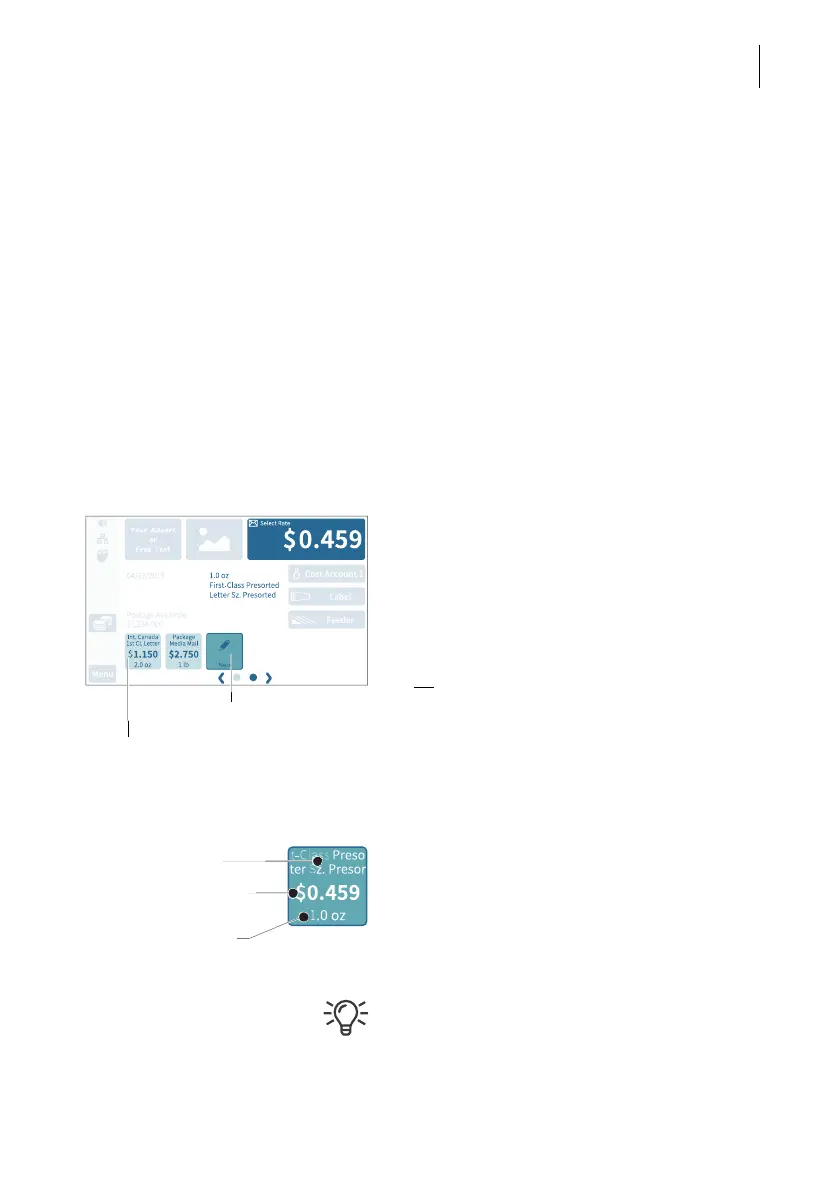
You can always save the postal product and rate in the Home screen as a shortcut
(including the weight). The first rate shortcut is the default used after turning on or
waking up from sleep mode.
• Set the rate and weight that you would like
to save as a shortcut.
To set mailing data and weight, please
read chapters 5.1.2 and 5.1.3.
• Press the button N
EW for about two
seconds.
Or
:
Press on an existing shortcut for about two
seconds to overwrite it with a new assign-
ment.
• To save the shortcut, confirm the query in
the pop-up with Y
ES.
The current selection is displayed on the
shortcut button:
– Name (mailing data, if necessary, strongly
abbreviated)
– Postage
– Weight.
Once all of the storage spaces have been
assigned, the N
EW button will no longer
appear.
Shortcut
(assigned)
Press longer
Name
Postage
Weight



 To Next Page