PostBase Fusion
68
6.2 Setting up / changing cost accounts
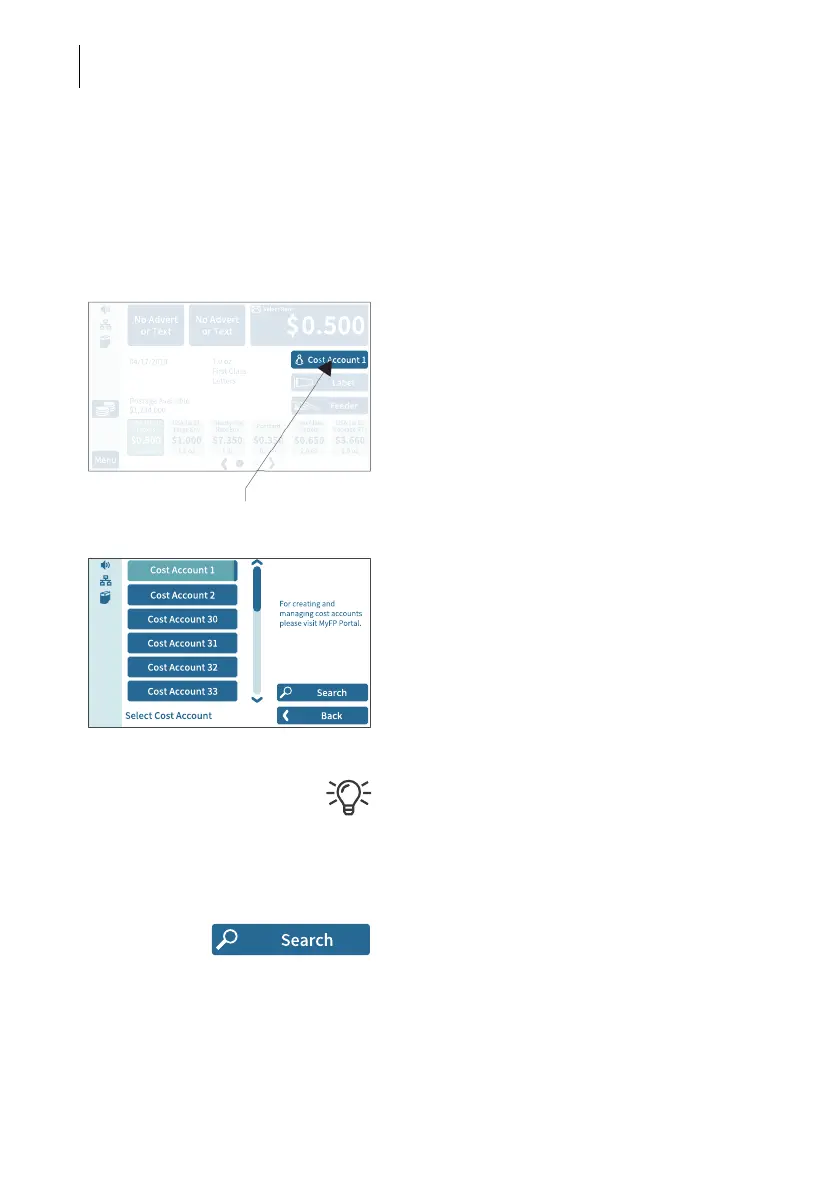
If the cost account function for your mailing system is set up on the MyFP customer
portal, all postage is allocated to the current cost account. The current cost account
is displayed in the Home screen on the cost account button (the button directly below
the postage).
• Tap the cost account button on the Home
screen.
PostBase Fusion opens a selection list with
all available cost accounts. The current cost
account is highlighted in color (light blue with
a dark blue bar). In this example it is
“Cost Account 1”.
• Tap the desired cost account.
PostBase Fusion sets the cost account and
returns to the Home screen.
If users are set up, only the cost accounts
approved for the currently active users will be
available for selection.
Searching for cost accounts / filter list
• Open cost account search with S
EARCH.
You can use the search function to search for
a specific cost account or filter the list. This
way you can get to the desired cost account
quickly, especially for long lists.
Set cost account



 To Next Page