The basics of operation
27
3.7.5 Lists
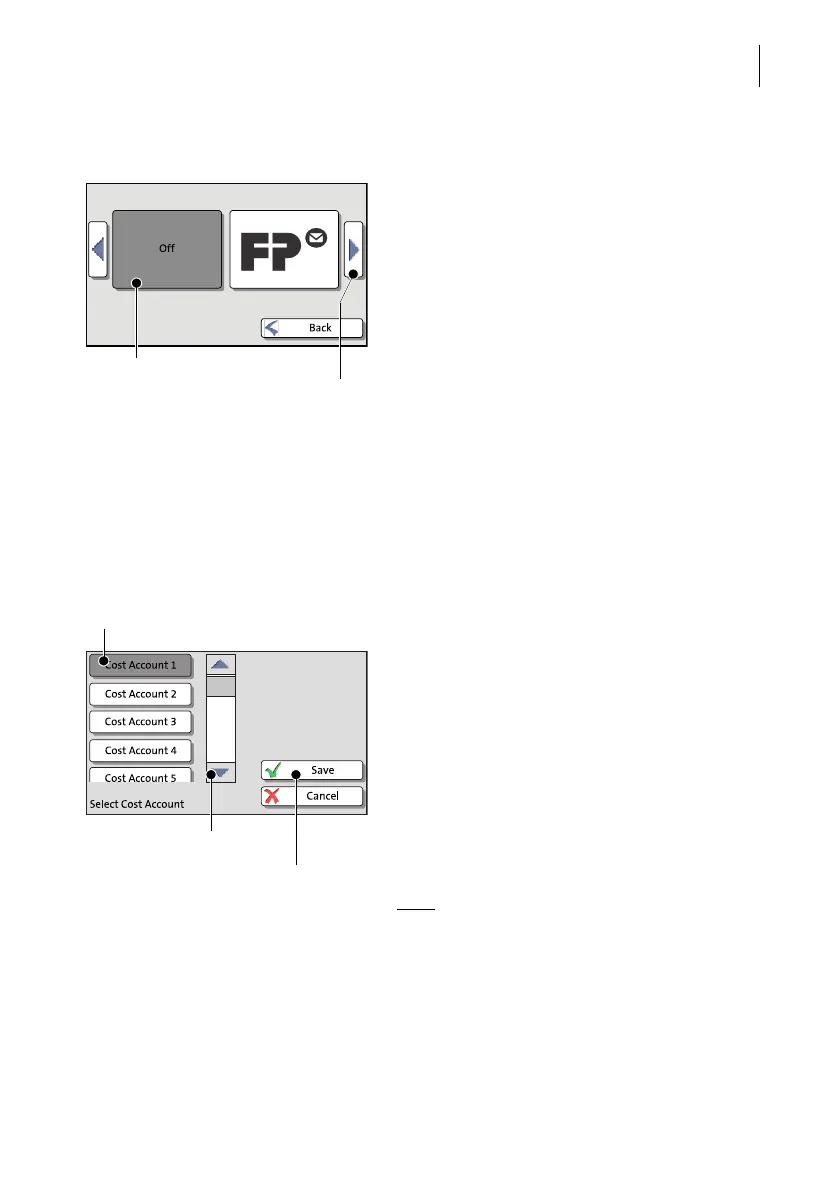
Lists (e.g. for adverts, SMS texts) offer all
available settings in list form. The current set-
ting is shown on a dark background.
Use the arrow buttons to scroll through the
list.
Press the respective button to select one of
the provided settings and return to the Home
screen.
3.7.6 Adjustment menus
A separate menu each opens for editing and selecting settings. There are several
types of adjustment menus, e.g. lists to choose the settings from and input via key-
pad.
Lists
The left area of the display shows the availa-
ble settings. The current setting is shown with
a dark background.
You can scroll the list with a scroll bar if more
than four options are available.
Press SAVE to accept the current settings and
to quit the adjustment menu.
Press C
ANCEL to discard your changes and to
quit the adjustment menu.
Note
: Some lists feature auto-confirmation.
Accounts are set directly after pressing the
respective button, for example.
Current setting
Next page: scroll with
arrow button
Current setting
Accept current
settings
Further available options:
scroll with scroll bar



 To Next Page