Setting the franking imprint
33
4 Setting the franking imprint
Your PostBase One is part of a new generation of Mailmark™ franking machines.
This means you benefit from the many features of this new Royal Mail service like
discounts and traceability. Mailmark™ also comes with a new design of the franking
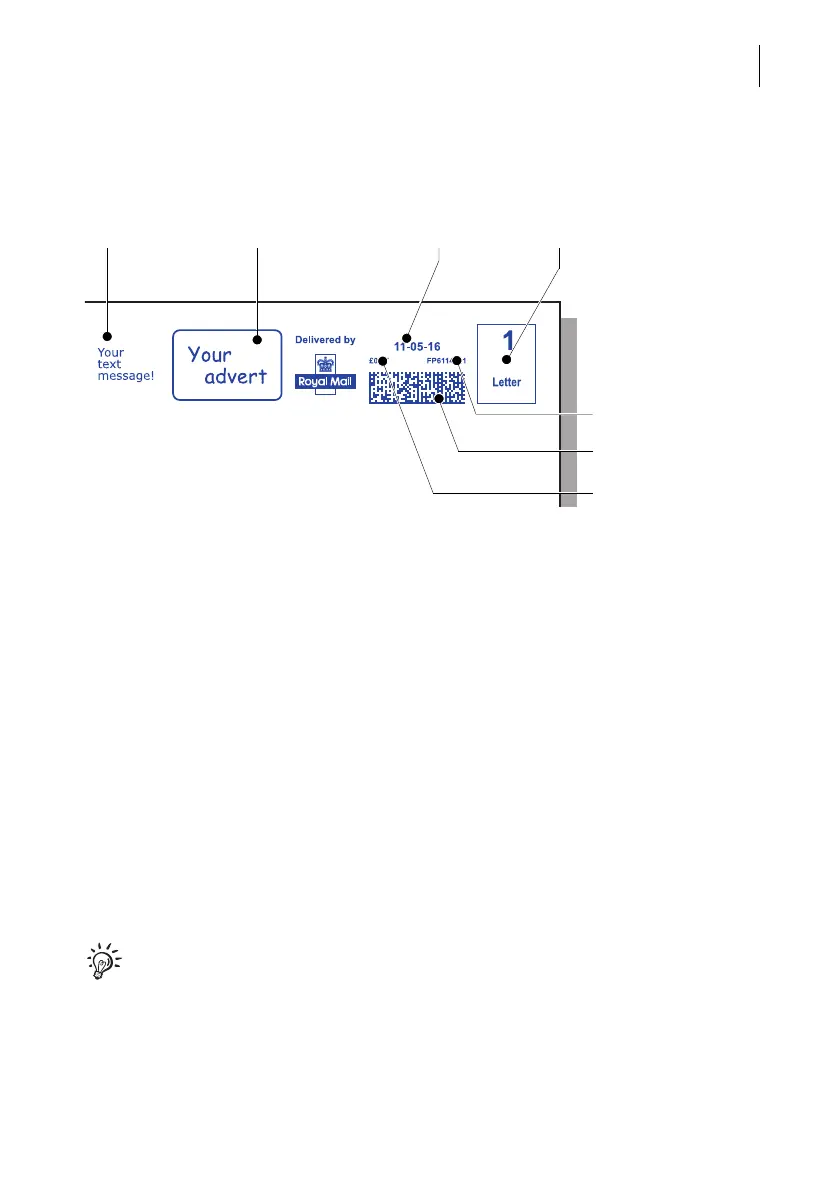
imprint of which the main distinguishing mark is the 2D indicium. In this machine-
readable barcode, all important information is stored.
The illustration shows an example of such a Mailmark™ franking imprint.
Bilingual (Welsh / English) version: You can order the bilingual version of the
‘Delivered by Royal Mail’ mark from FP for a fee. The current print image data is then
downloaded to your PostBase One via the Remote Services function.
This chapter describes the required settings for franking and additional possible
advertising imprints:
– Postage / Royal Mail product (see chapter 4.1)
– Date (see chapter 4.2)
– Advert imprints (see chapter 4.3).
For information on how to use PC software from Francotyp-Postalia to set the
franking imprint (e.g. Navigator), please refer to the manual provided with the
software.
SMS text Advert Date
Postage / Product price
Machine identification
Royal Mail product
2D indicium



 To Next Page