Alternative Carrier Mode
71
11 Alternative Carrier Mode (optional)
PostBase One supports franking mail for dispatch by alternative carriers. To use this
optional function it has to be activated in your PostBase One. Billing occurs according
to your contract with the respective postal service.
In this chapter, you will learn how to start the Alternative Carrier Mode and how to
return to the regular franking mode. The basic features and functions of the Alterna-
tive Carrier Mode are described.
In Alternative Carrier Mode, the special functions ‘Advert Only’ and ‘Print Num-
bers’ are not available.
11.1 Start Alternative Carrier Mode
In the Home screen:
• Press the M
ENU button.
• Select A
LTERNATIVE CARRIER.
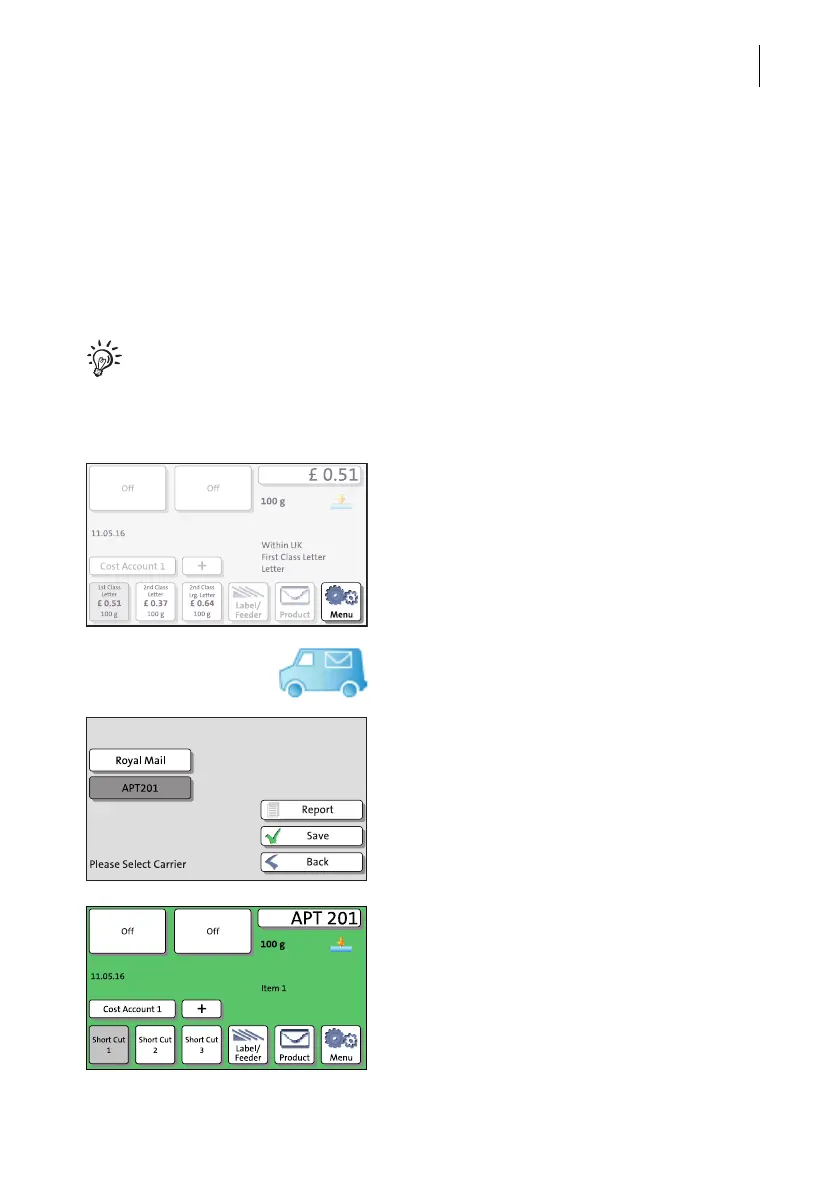
PostBase One opens a list of all available
carriers. The currently set carrier is shown on
a dark background.
You can scroll the list with the scroll bar if
more than four options are available.
• Select the desired carrier.
•S
AVE the selected carrier.
PostBase One switches to the Alternative
Carrier Mode. This mode is easily recognisa-
ble by its green background colour.



 To Next Page