PostBase One Franking System
52
Setting up the feeder
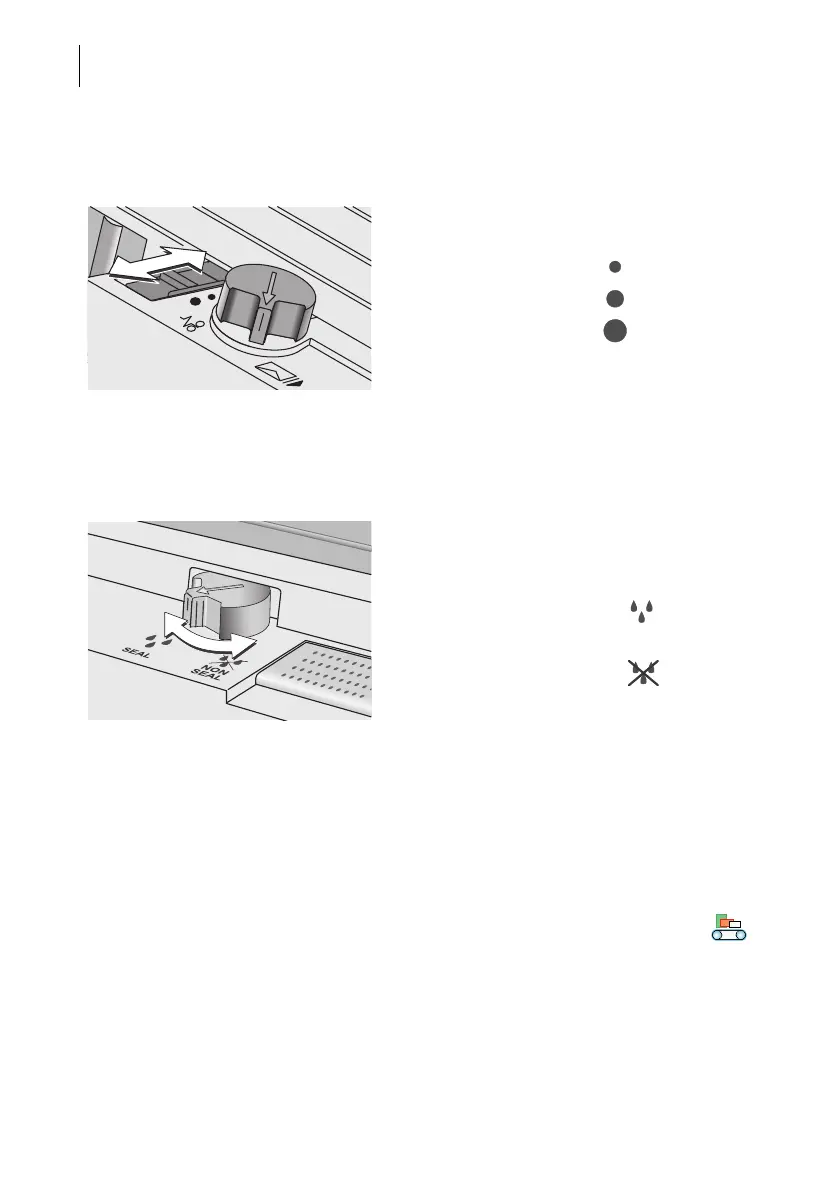
Adjust the letter path to the letter thickness • Adjust the letter path to the thickness of the
mail pieces to be processed.
(See also chapter 3.5.1, page 16.)
Adjust separation • If necessary, check / adjust the separation
settings. Please refer to chapter 3.5.2,
page 17.
Sealing function ON / OFF Switching the sealing function on / off
(PostBase One with sealer)
• On the sealer: Turn the envelope sealing
switch to the corresponding position.
(See also chapter 3.6, page 21.)
Dynamic weighing YES / NO Check the dynamic scale‘s status
(PostBase One with dynamic scale)
If you want the dynamic scale to detect letter
size and weight:
• Make sure that the product is set to
‘Dynamic’.
Only when the Home screen shows the
icon as the current weighing mode, the
‘dynamic weighing’ function is active. Other-
wise the dynamic scale only transports let-
ters.
Letter thickness: Letter path:
– 2 mm Narrow
– 3 mm to 5 mm Medium
– more than 5 mm Maximum
Moisten / seal letters
(sealing function ON)
SEAL
Sealing function OFF
NON
SEAL



 To Next Page