Gamatronic Electronic Industries Ltd.
Power+ Technical Guide 61
5.3 SETTING THE NUMBER OF UPS MODULES
(The default system password is 8 left arrows [8x”
<
”]. To change the password, see 11.2,
“
Setting Password Level 1” on page 86.
1.
From the Main Screen, press Ent to display the Main Menu
2. Select "7>SETUP" (Figure 5-1).
3. Enter the password and press Ent (default password is 8 x “<”).
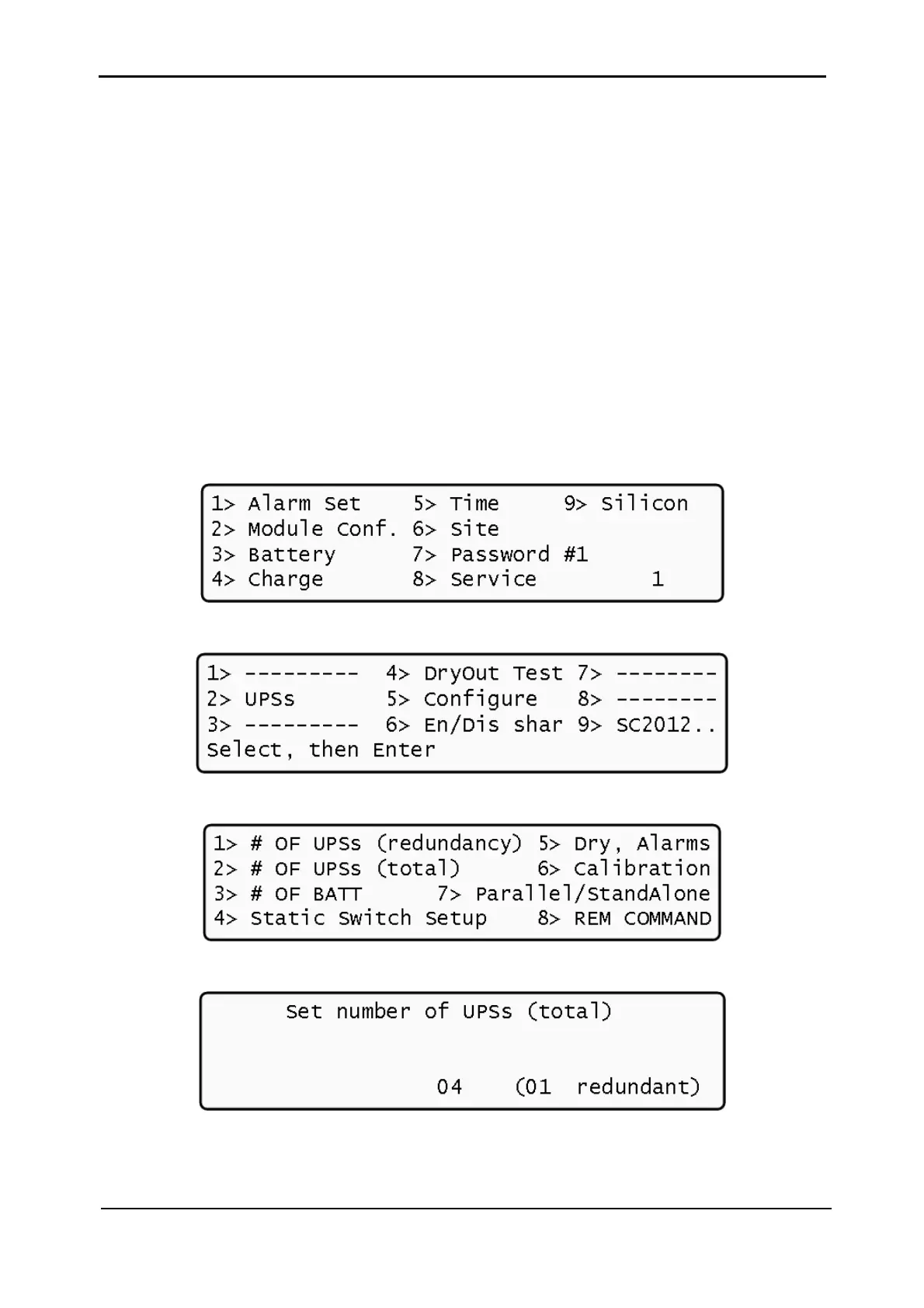
4. Select "8>Service" (Figure 5-14).
5. Select "5>Configure" (Figure 5-15).
6. Select "2> # of UPSs" (Figure 5-16).
7. Set the number of UPS modules by using the ► and ◄ keys (Figure 5-17).
8. Press Enter to complete the setup.
The controller applies and saves the new number of modules.
Figure 5-14: Controller menu #2
Figure 5-15: Controller menu #3
Figure 5-16: Controller menu #4
Figure 5-17: Number of UPS modules











 To Next Page