60 0000010291
001
5.3 Cleaning procedure
Caution!
Make sure the shutters for the cooler of the hydraulic unit are closed or cov-
ered when using a pressure cleaner.
Caution!
Close the control panel cover when using a pressure cleaner.
Moving the ma-
chine
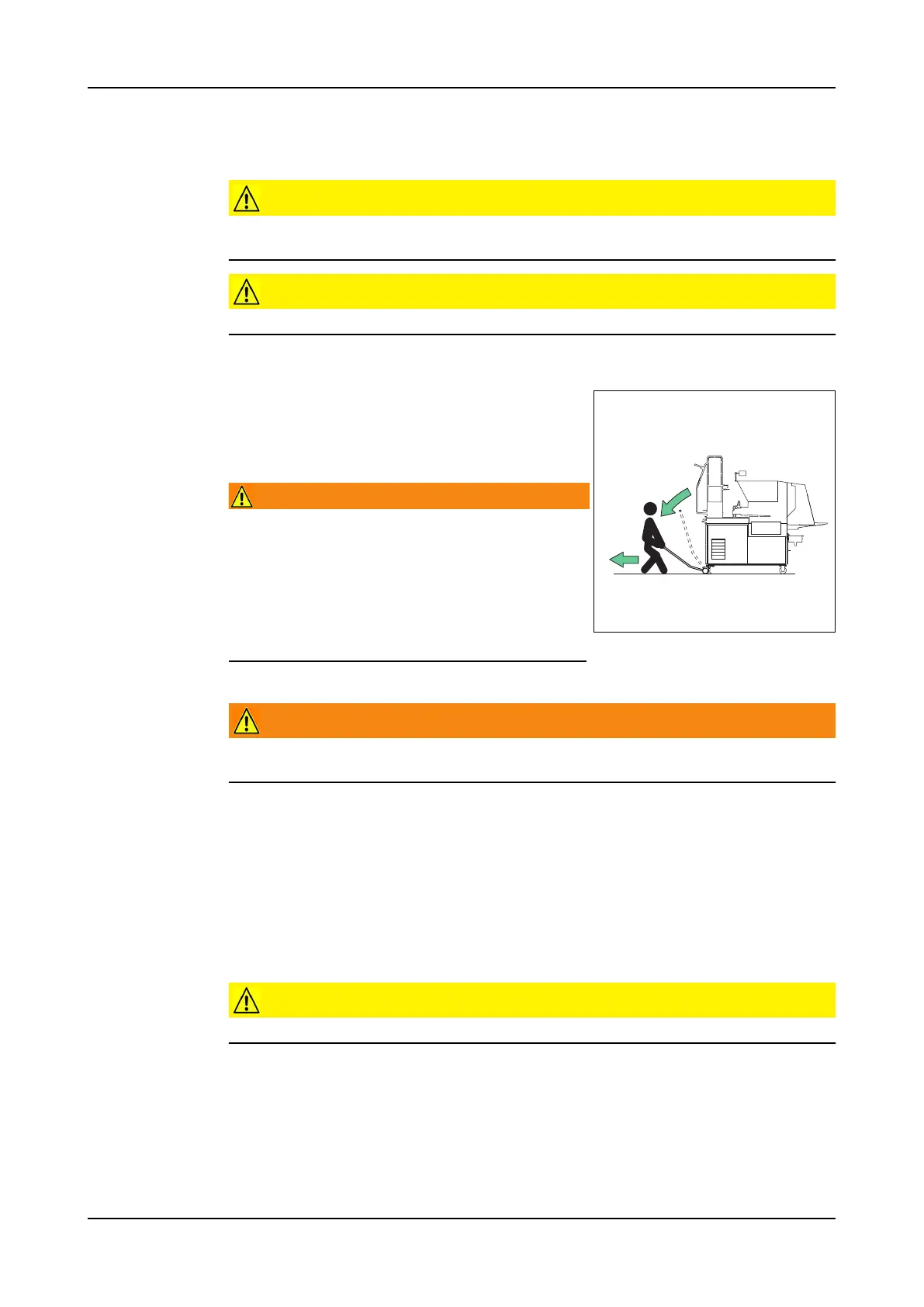
It can sometimes be useful to move the machine to another location for cleaning.
To move the machine:
1. Connect the transportation lever.
2. Move the machine.
3. Remove the transportation lever.
Warning!
Do not let go of the transportation le-
ver when it is loaded. The transporta-
tion lever will slam up and can cause
personal injury.
To use the transportation lever safely,
a distance of 2,5 meter should be kept
clear of obstacles.
5.3.1 Hopper
Warning!
Use only the steps and platform to reach the position for cleaning the hop-
per.
1. Disassemble the forming unit and the press block. Refer to sections 4.3.2 and
7.3.11 .
2. Close the front cover.
3. Push the Hydraulics button to turn on the hydraulic pump.
4. Use the steps to climb onto the platform.
5. Push the foot-button on the platform to rotate the augers.
6. Clean the hopper. Use a pressure cleaner.
Caution!
Do not stick the pressure cleaner nozzle between the augers.



 To Next Page