0000010291 89
001
7.3.4 Manual operation
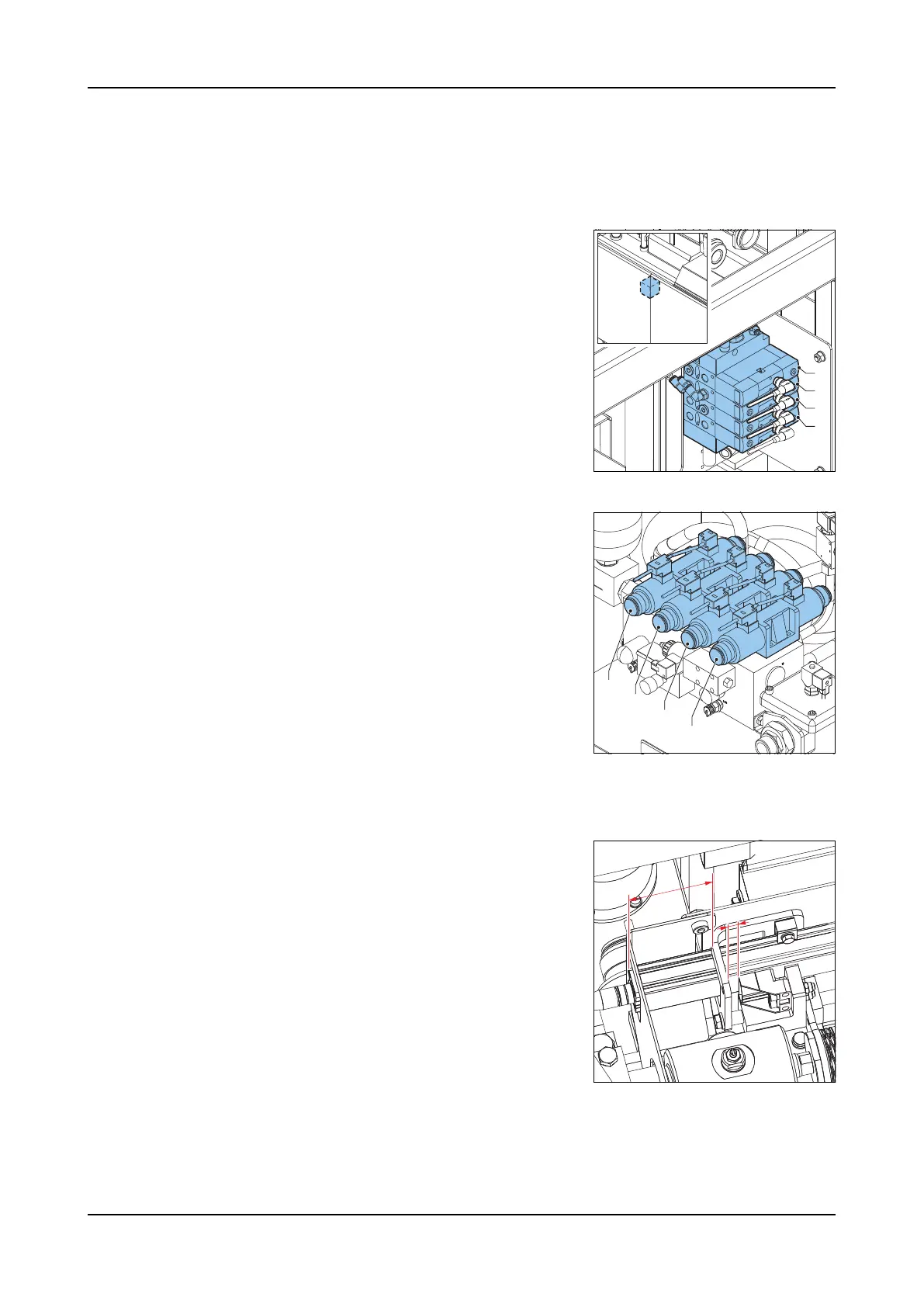
The pneumatic and hydraulic valves can be operated manually.
Pneumatic
valves
Use a pin to push on the blue buttons to operate the valves.
A The knockout cylinders.
B The hopper lifting cylinders.
C The radiator shutters cylinder.
D The knockout air blast.
Hydraulic
valves
Turn the knobs on the sides of the valves to operate the valves.
A Augers
B Form plate drive
C Press block left
D Press block right
7.3.5 Linear position sensor calibration
The zero point needs to be calibrated if new software is installed or if the form
plate cylinder or the linear position sensor is replaced.
1. Check if the linear position sensor is aligned
proper Y = ± 63 mm.
2. Go to screen 3350 (Manual).
3. Push the Hydraulics button. The hydraulic
unit starts.
4. Touch the Left icon. The form plate moves
in.
5. Touch and hold the Right icon. The form
plate moves out and the value x = ± 13 mm.
6. Hold the Right icon for several seconds till
the message appears that the form plate is
positioned. The linear position sensor zero point is now calibrated.
7. Touch the ACK icon.
8. Push the Hydraulics button. The hydraulic unit stops.
A
B
C
D
A
B
C
D
Y
X



 To Next Page