
 Need help?
Do you have a question about the General Dynamics URC-200 (V2) and is the answer not in the manual?
Describes the purpose and key functions of the URC-200 (V2) transceiver.
Lists the main features offered by the URC-200 (V2) transceiver, including its capabilities.
Details the technical specifications and performance metrics of the URC-200 (V2) transceiver.
Outlines available purchase options to extend frequency range or change tuning/channel spacing.
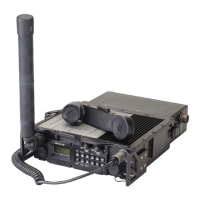
Provides a description of the URC-200 (V2) transceiver and its main components.
Provides instructions for unpacking the transceiver and verifying its contents.
Contains necessary information for preparing the URC-200 (V2) transceiver for use.
Step-by-step guide on how to properly connect the handset to the transceiver.
Instructions for correctly attaching the UVU-100 LOS antenna to the transceiver.
Procedure for safely detaching and removing the antenna from the transceiver.
Guidance on optimal placement and antenna sighting for effective LOS communication range.
Explains the overall functional architecture and modes of the URC-200 transceiver.
Details the operation and internal components of the URC-200 transceiver's receiver.
Describes the types of RF signals the receiver can accept and process.
Details the various output signals generated by the URC-200 transceiver's receiver.
Explains the functional blocks and operation of the URC-200 transceiver's transmitter.
Describes the operational features specific to the 30-90 MHz frequency option.
Guidance on optimal placement and antenna sighting for effective LOS communication range.
Identifies and describes the URC-200 (V2) front and rear panel controls, indicators, and connectors.
Explains how to use the transceiver's keypad and interpret information displayed on the LCD.
Step-by-step guide to configure the transceiver for normal operation and various modes.
Procedure for powering on the transceiver and initial setup of controls.
How to reset preset channels to default values.
Controls the display and keyboard backlighting intensity and on/off state.
Toggles the internal loudspeaker on or off, indicated by an annunciator.
Activates the display to show signal strength or output power readings.
Describes how to set up and store channel configurations for quick access.
Procedure for selecting a specific preset channel to be displayed and used.
Steps to enter and set receive and transmit frequencies for a channel.
How to toggle between AM and FM modulation modes for a selected channel.
Switching between Plain Text (audio) and Cipher Text (data) modes for a channel.
Saves configured frequencies, modes, and other parameters into memory for a channel.
Describes procedures for special operating modes like Beacon, Guard, and Scan.
Activates or deactivates the SCAN MODE to cycle through selected channels.
Activates the BEACON MODE to transmit a sweeping emergency audio signal.
Displays voltages of internal power supplies and batteries in meter mode.
Step-by-step procedure for enabling basic voice (Plain Text) operation.
Discusses limitations and potential impact of EEPROM write cycles on transceiver life.
Details how to operate the URC-200 (V2) remotely using control units or a PC.
Describes the pin characteristics of the remote connector used for control.
Specifies data rates and logic levels for remote control configuration.
Explains the RS-232 data communication protocol for configuration and status inquiries.
Lists and explains the specific remote control command codes for transceiver operations.
Provides instructions for cleaning the exterior of the URC-200 (V2) transceiver.
Describes system-level tests to check all operations of the URC-200 (V2) Radio Set.
Details manual tests to check operating parameters using specific test equipment.
Lists the necessary tools and test equipment for performing manual system tests.
Covers various tests to evaluate the performance of the transceiver's receiver circuits.
Tests receiver sensitivity and distortion for FM PT signals.
Tests receiver sensitivity for FM CT signals.
Tests receiver sensitivity and distortion for AM PT signals.
Tests receiver sensitivity for AM CT signals.
Measures the audio response of the transceiver in CT mode.
Tests the sensitivity of the squelch circuit for proper operation.
Verifies the proper operation of the transceiver's scan function.
Checks the accuracy and functionality of the signal strength meter.
Covers tests for evaluating the performance of the transceiver's transmitter circuits.
Tests transmitter frequency accuracy and FM power output.
Tests FM PT signal deviation and distortion levels.
Tests FM CT signal deviation and distortion levels.
Tests AM power output, PT % modulation, and PT distortion.
Tests AM CT % modulation and CT distortion levels.
Verifies the functionality and output power of the beacon mode.
Details the internal power supply voltages and their tolerance ranges.
Describes how to measure and the expected range for the transceiver's input voltage.
Lists the internal voltages and their specified tolerance ranges for checking.
Procedure to display internal power supply and battery voltages via the front panel.
Instructions for inspecting the transceiver for signs of wear, corrosion, or damage.
Provides information on error messages and their descriptions for troubleshooting.
Guidelines for properly packing the hardware for shipping.
Specifies the recommended storage temperature, humidity, and altitude.
Details the interface connector characteristics for power, handset, and remote connections.
Information on the rack-mounted system, its components, and operation.
Explains the basic interface and operation of the rack-mounted system components.
Instructions for installing the rack-mounted system components.
Details the operational procedures for the UAC-350, URC-200, and UPA-55H in the rack system.
Steps for operating the UAC-350 power supply within the rack system.
Procedures for operating the URC-200 (V2) transceiver in the rack system.
Steps for operating the UPA-55H power amplifier in the rack system.
Procedure to test the overall functionality of the rack-mounted system setup.
Guidance for troubleshooting issues with the rack-mounted system setup.
Outlines procedures for removing and replacing system components in the rack.
Steps to remove the URC-200 transceiver and its interface box from the rack.
Procedure for removing the UPA-55H Power Amplifier from the rack mount system.
Steps to remove the UAC-350 Power Supply from the rack mount system.
Information on the portable backpack system configuration and operation.
Depicts and describes the main components and interfaces of the Backpack System.
Step-by-step instructions for installing the portable backpack system components.
Details the operational procedures for the UAD-100A, URC-200, and backpack system.
Steps for operating the UAD-100A uninterruptable power supply.
Procedures for operating the URC-200 (V2) transceiver in the backpack system.
Instructions for operating the system using battery power without AC connection.
Guidance for troubleshooting issues with the portable backpack system.
Guidelines for removing and replacing components of the backpack system.
Explains the purpose of the warp adjustment for fine-tuning frequency accuracy.
Lists the necessary equipment for performing the crystal warp adjustment procedure.
Diagram and instructions for configuring the test equipment for warp adjustment.
Methods to check the software version required for the warp adjustment procedure.
Step-by-step guide to perform the crystal warp adjustment for frequency tuning.
 General
| Brand | General Dynamics |
|---|---|
| Model | URC-200 (V2) |
| Category | Transceiver |
| Language | English |

 To Next Page