Use
Installing or removing a Quick Lock device (camera, LMD or handle mount)
4
VOLISTA
IFU 01781 EN 19
67 / 106
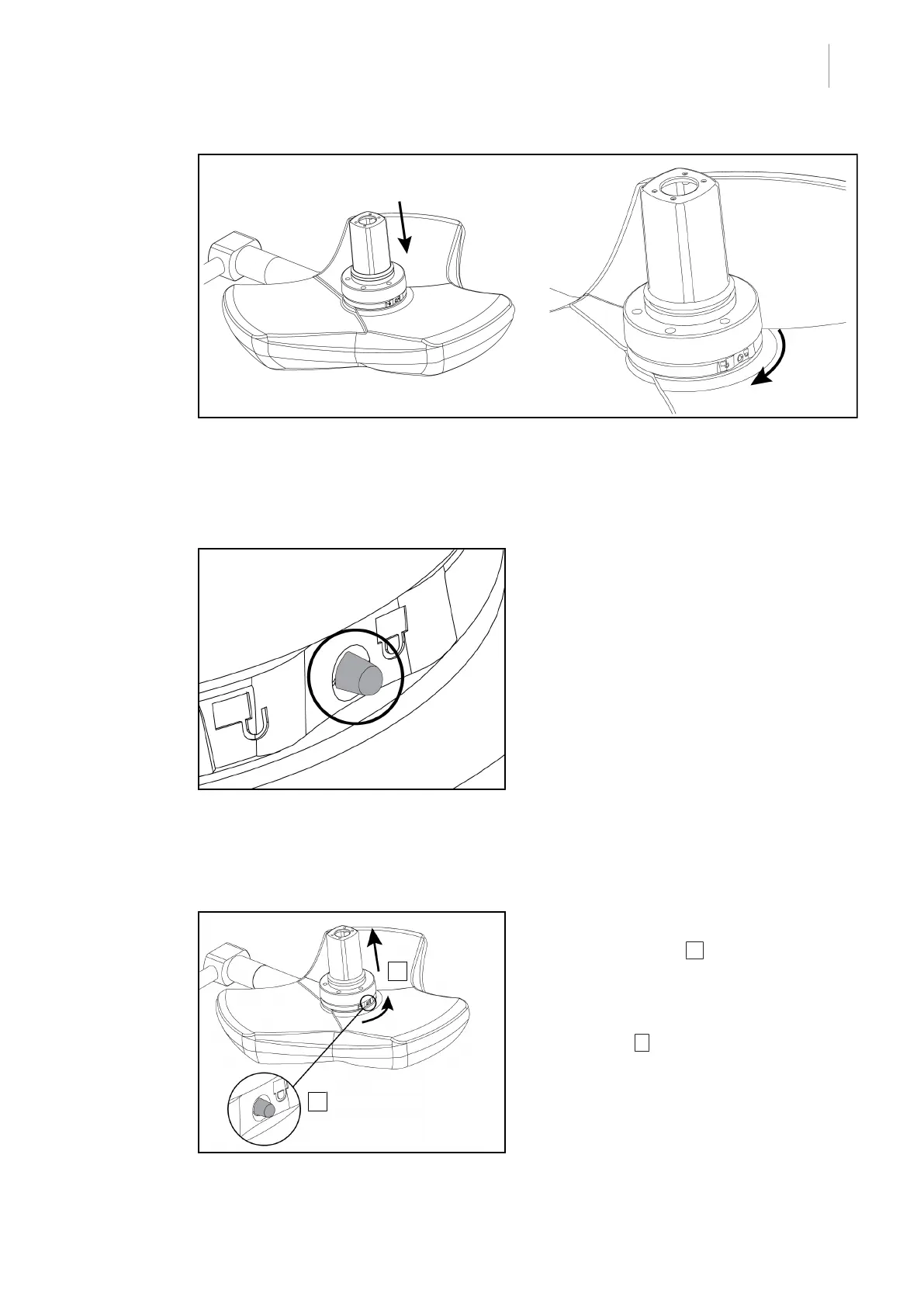
Fig.78: Presenting the camera against the lighthead
1. Insert the camera into the lighthead until the camera base plate is fully flush against the un-
derside.
2. Using both hands, turn the camera base plate clockwise until it clicks into place.
Fig.79: Locking the camera in place on the
lighthead
1. Check that the camera is correctly in place
and that the locking button protrudes cor-
rectly from its recess.
2. Move the lighthead using the handle, to
check that the system is correctly in place.
3. Check that the camera subassembly turns
freely through 330°.
Ø The device is installed.
4.4.3 Removing the device
Fig.80: Removing the lighthead
1. Press the locking button.
2. Keep the button 1 pressed and, using
two hands, rotate the base of the device
anticlockwise.
3. Remove the Quick Lock camera by pulling
upwards (2.
Ø The device is removed.











 To Next Page