4
Use
Settings and functions
80 / 106
VOLISTA
IFU 01781 EN 19
4.6.3.2 Timer
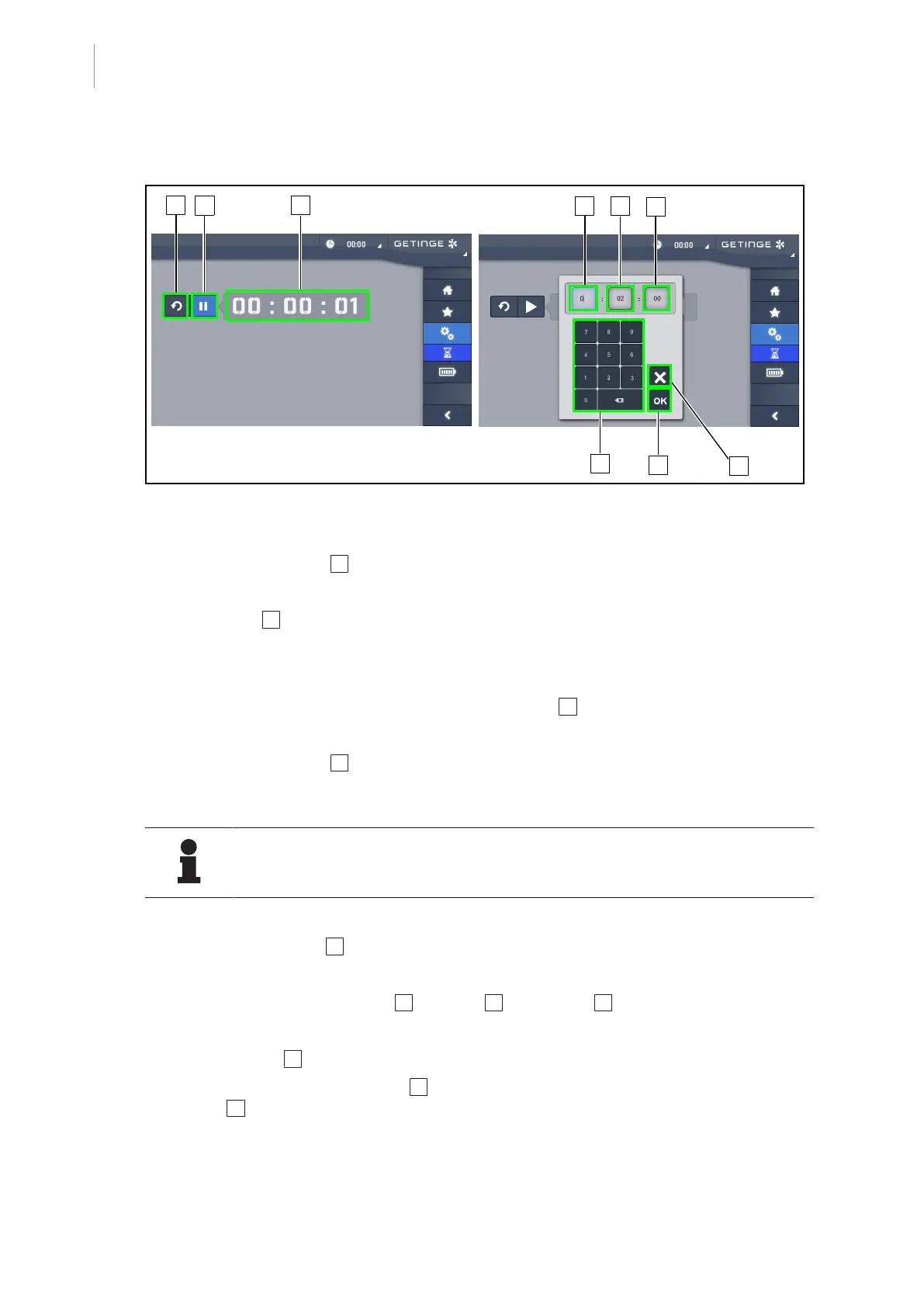
Fig.97: Timer page
Starting and resetting the timer
1. Press Pause/Activate 2 to start the timer.
Ø The timer starts.
2. Press Reset 1 to reset the counter.
Ø The timer returns to the value defined previously.
Stopping and restarting the timer
1. Once the timer has been started, press Activate/Pause 2 to temporarily stop the timer.
Ø The counter starts flashing.
2. Press Activate/Pause 2 to restart the timer.
Ø The counter stops flashing and resumes counting.
NOTE
The timer counter flashes orange when the configured time has elapsed.
Setting the timer
1. Press Counter Timer 3 .
Ø The timer setting window is opened (see above).
2. Select the field to be set: Hours 4 , Minutes 5 or Seconds 6 .
Ø The selected field turns blue.
3. Use the keypad 7 to enter the desired value.
4. After entering the fields, press OK 9 to store the values entered. To cancel changes, press
Cancel 8 .
Ø The timer setting window disappears and the timer is ready to be started with the entered
value.











 To Next Page