Use
Settings and functions
4
VOLISTA
IFU 01781 EN 19
75 / 106
4.6 Settings and functions
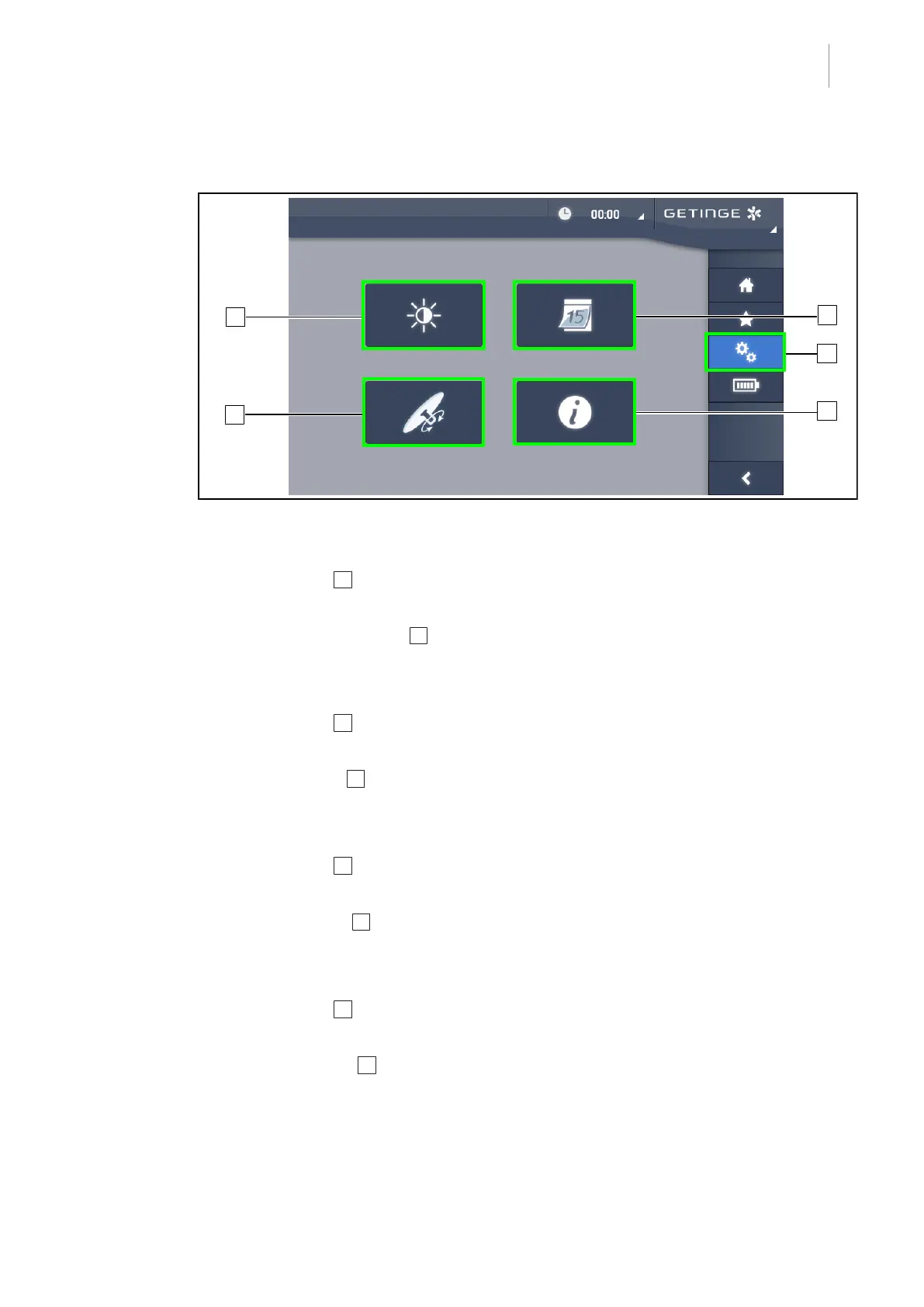
Fig.92: Touchscreen control panel settings page
Adjusting the screen brightness
1. Press Settings 1 in the menu bar.
Ø The Settings page is displayed (see above).
2. Press Screen Brightness 2 .
Ø The brightness setting page is displayed.
Setting the date and time and using the stopwatch/timer
1. Press Settings 1 in the menu bar.
Ø The Settings page is displayed (see above).
2. Press Date/Time 3 .
Ø The page for date and time settings and stopwatch/timer functions is displayed.
Adjusting the tilt handle (on Volista only)
1. Press Settings 1 in the menu bar.
Ø The Settings page is displayed (see above).
2. Press Tilt Handle 4 .
Ø The tilt handle adjustment page is displayed.
Accessing configuration information
1. Press Settings 1 in the menu bar.
Ø The Settings page is displayed (see above).
2. Press Information 5 .
Ø The configuration information page is displayed.











 To Next Page