Use
Settings and functions
4
VOLISTA
IFU 01781 EN 19
81 / 106
4.6.4 Tilt handle
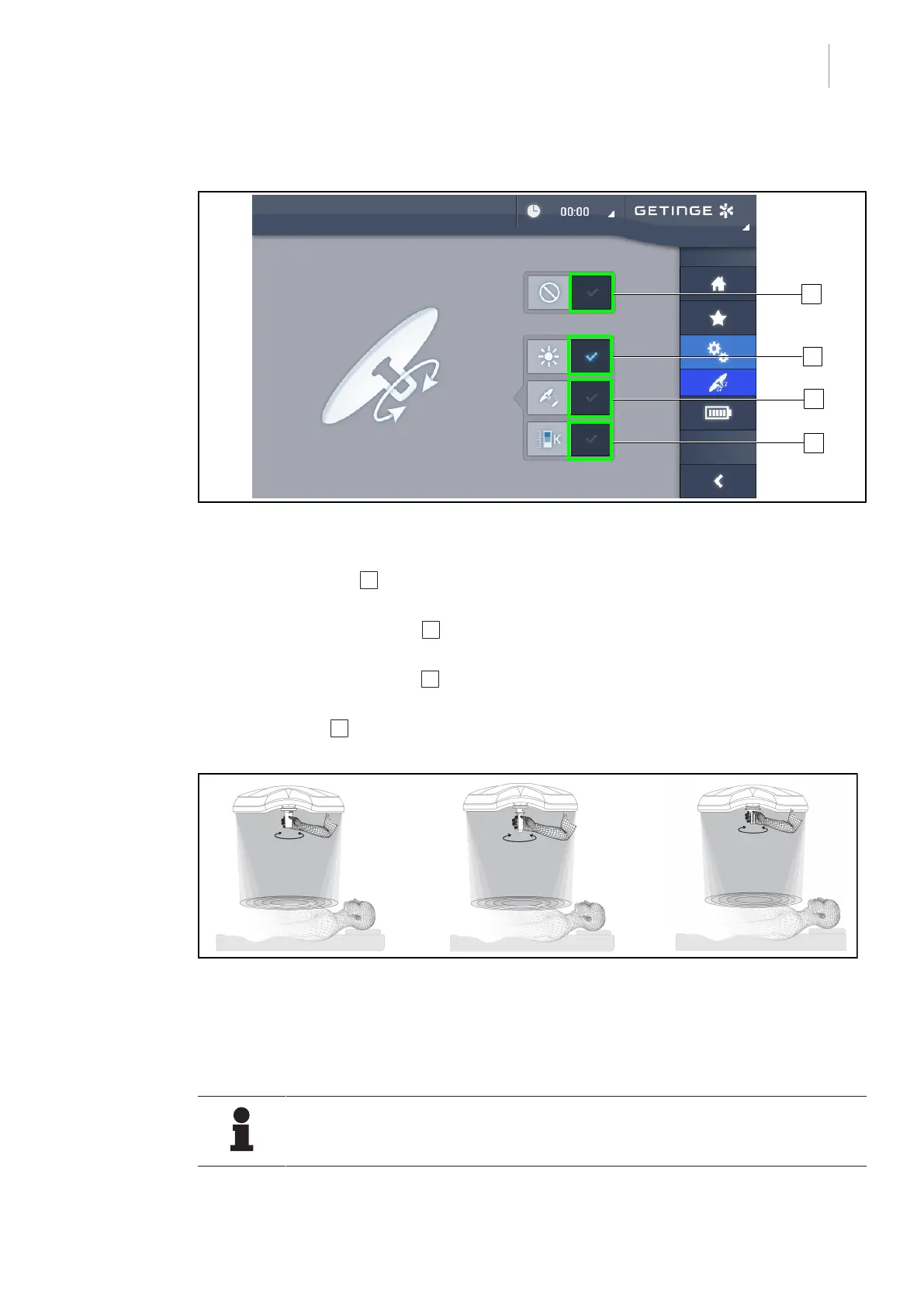
Fig.98: Tilt handle configuration
Configuring the tilt handle
1. Press Illumination 1 so that the tilt handle can be used to adjust the light intensity level of
the lighthead.
2. Press Light Field Diameter 2 so that the tilt handle can be used to adjust the diameter of
the light field of the lighthead.
3. Press Colour Temperature 3 so that the tilt handle can be used to adjust the colour tem-
perature of the lighthead(s).
4. Press Inactive 4 so that the tilt handle is inactive and can not be used to adjust the illumina-
tion.
Fig.99: TILT handles
Adjusting the illumination using the tilt handle
1. Turn the handle to adjust the light intensity, light field diameter or colour temperature to the
chosen setting.
NOTE
The TILT handle does not have limit stops.











 To Next Page