Use
Using the camera
4
VOLISTA
IFU 01781 EN 19
71 / 106
4.5.2.2 From the touchscreen control panel
NOTE
When using the touchscreen control panel, the camera may be turned on or off in-
dependently of the light.
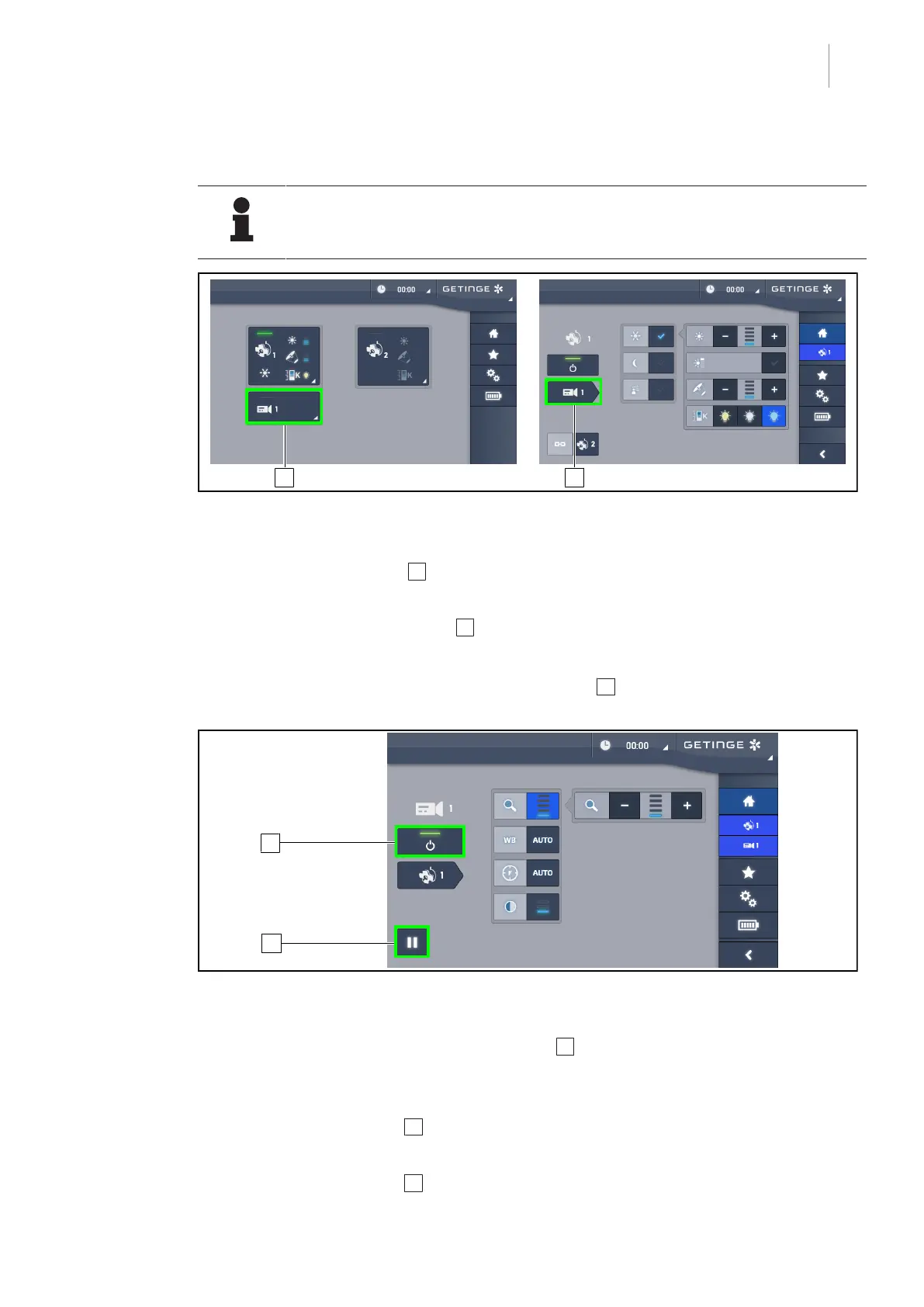
Fig.85: Turn on the camera
Turning a camera on via the home page
1. Press the active Camera 1 button.
Ø The activated button is lit green and the image is displayed on the screen.
2. Press the active Camera button 1 again to access the camera page.
Turning the camera on via the lighthead page
1. From the lighthead page, press the Camera shortcut 2 .
Ø The camera page is displayed and the camera is turned on.
Fig.86: Camera page
Turning off the camera
1. From the camera page, press Camera ON/OFF 3 to turn off the camera.
Ø The button becomes unlit and the camera is turned off.
Pausing the camera
1. Press the Camera pause 4 button to pause the camera.
Ø The button is lit blue and the transmitted image is frozen.
2. Press the Camera pause 4 button again to resume video transmission.











 To Next Page