4
Use
Using the camera
72 / 106
VOLISTA
IFU 01781 EN 19
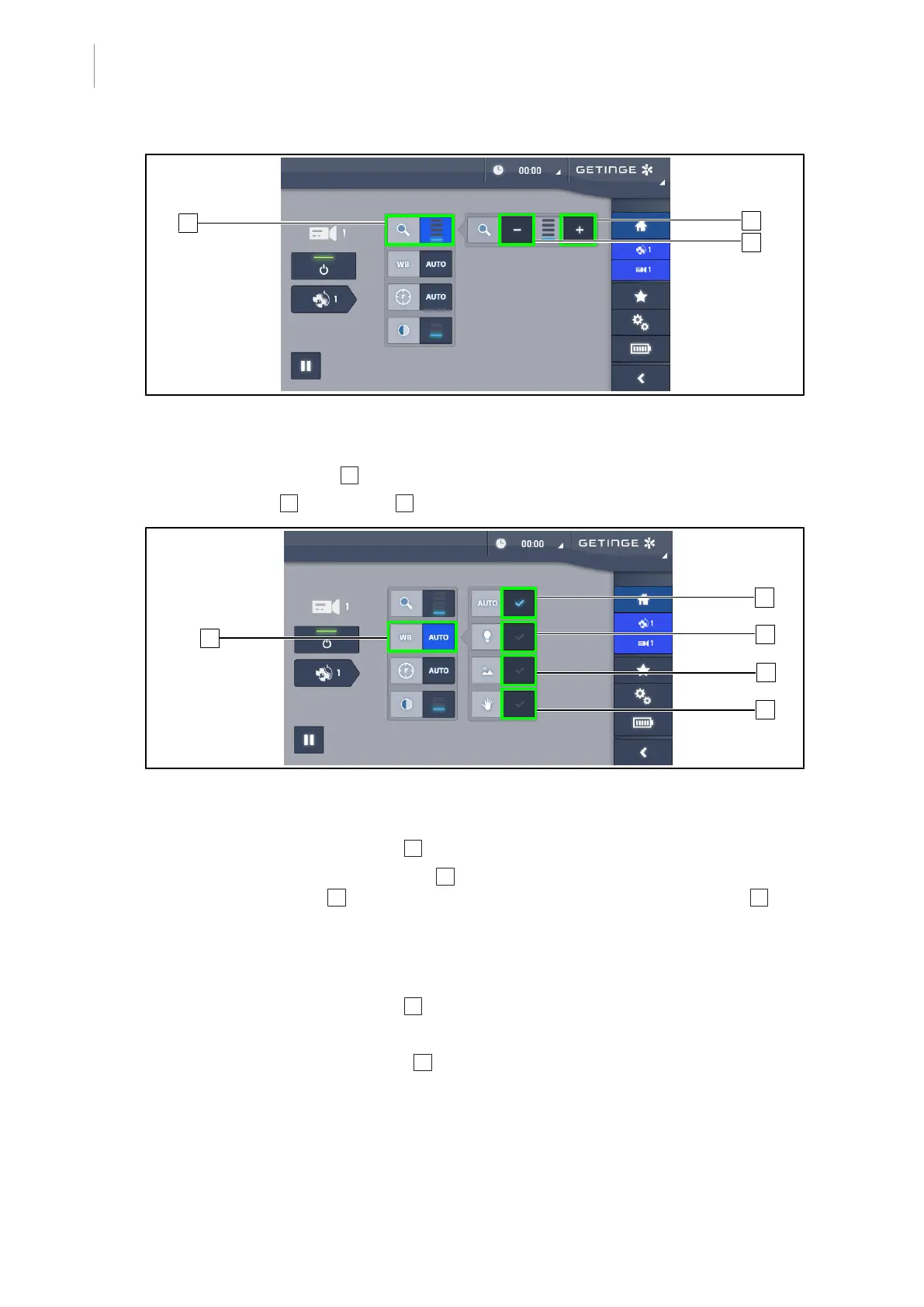
Fig.87: Zoom control
Zooming in and out
1. Press the Zoom button 5 to access the zoom adjustment menu.
2. Press Zoom in 6 or Zoom out 7 to adjust the size of the image on screen in real time.
Fig.88: White balance
Adjusting the white balance automatically
1. Press the White Balance button 8 .
2. Press the Automatic balance button 9 to set the white balance automatically or the
Artificial light button 10 to set the white balance to 3200K or the Daylight button 11 to set
the white balance to 5800K.
Ø The selected button is lit blue and the white balance is applied.
Adjusting the white balance manually
1. Press the White Balance button 8 .
2. Place a uniform white surface under the camera.
3. Press the Manual balance button 12 twice to set the white balance on the basis of the tar-
get under the camera.
Ø The selected button is lit blue and the white balance is applied.











 To Next Page