Use
Using the camera
4
VOLISTA
IFU 01781 EN 19
73 / 106
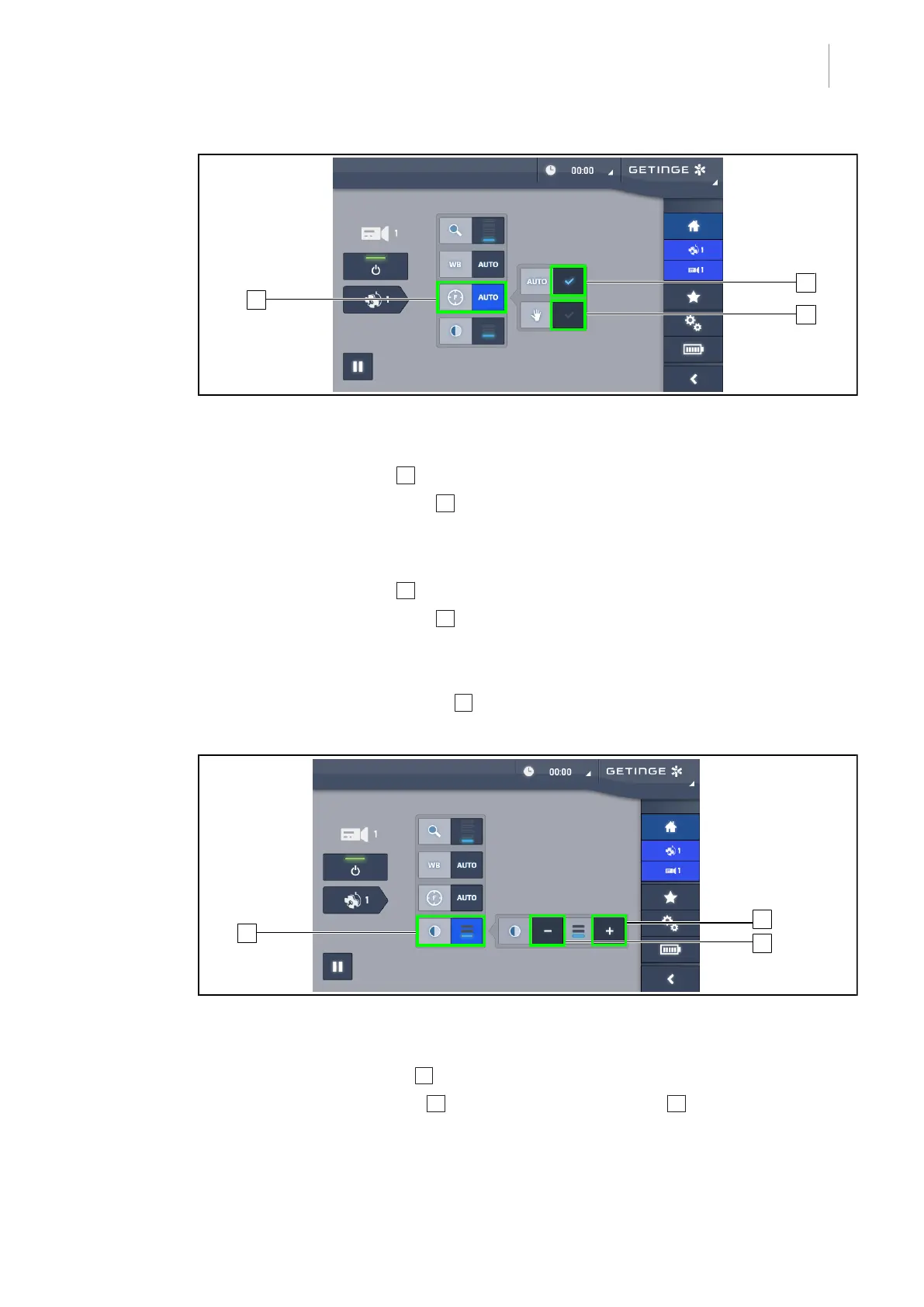
Fig.89: Setting the focus
Setting the focus automatically
1. Press the Focus button 13 to access the focus adjustment menu.
2. Press the Auto Focus button 14.
Ø The button is lit blue and the camera focus is set to automatic.
Setting the focus manually
1. Press the Focus button 13 to access the focus adjustment menu.
2. Press the Auto Focus button 14.
Ø The button is lit blue and the camera focus is set to automatic.
3. Position the camera at the desired distance.
4. Press the Manual Focus button 15.
Ø The button is lit blue and the camera focus is fixed.
Fig.90: Contrast adjustment
Adjusting the contrast
1. Press the Contrast button 16 to access the contrast adjustment menu.
2. Press the Increase contrast 17 or Decrease contrast buttons 18 to select one of the three
contrast levels.











 To Next Page