4
Use
Settings and functions
82 / 106
VOLISTA
IFU 01781 EN 19
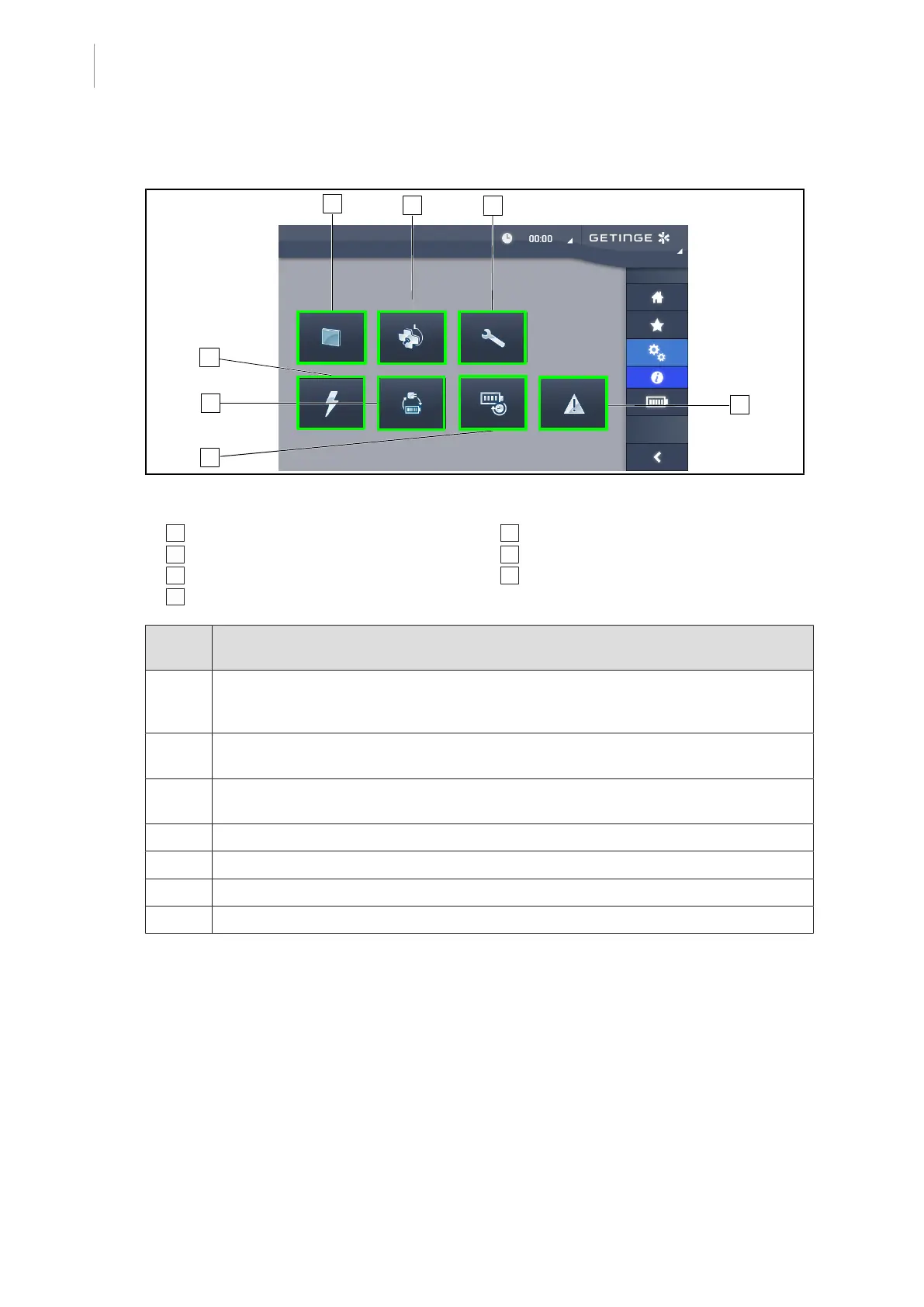
4.6.5 Information
Fig.100: Information page
1 Touchscreen control panel
2 Lightheads
3 Maintenance
4 Power supply
5 Battery backup
6 Battery lifetime
7 Faults
Part
No.
Possible action
1 Press the Touchscreen control panel button to display the software version and up-
date date, the touchscreen control panel reference, serial number and date of installa-
tion.
2 Press Lightheads to display information about the lighthead(s) installed: product ref-
erence, serial number, options available, usage hours.
3 Press Maintenance to display the dates on which maintenance was performed and
the Getinge contact details.
4 Press Power supply to display a history of power cuts.
5 Press Battery Backup to display a history of battery backup tests.
6 Press Battery lifetime to display a history of battery lifetime tests.
7 Press Faults to display a history of faults.
Tab.15: All information menus











 To Next Page