Gilson 157/159 UV-VIS Detectors User’s Guide 4-3
Maintenance
4
Flow Cell Maintenance
Clean the Lens in the Flow Cell
All available flow cells, except the adjustable pathlength flow cell, use a lens that may need to be cleaned.
The adjustable pathlength
flow cell uses fiber optics that
may need to be cleaned. For
more information, refer to Clean
the Fiber Optics in the Flow Cell
(Adjustable Pathlength
Flow Cell Only) on page 4-4.
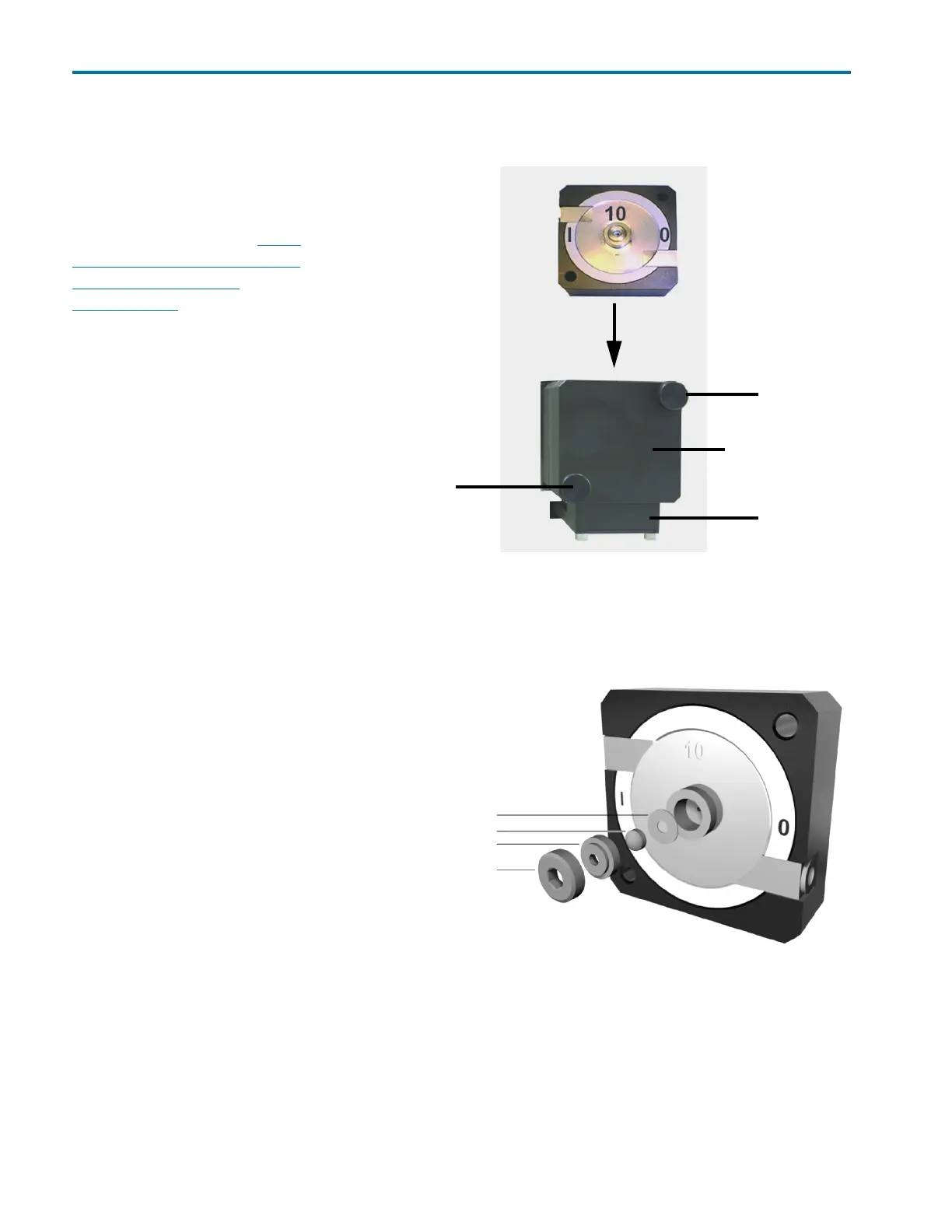
To clean the lens in the flow cell:
1 Turn detector off and
disconnect power cord.
2 Remove the flow cell:
a) Hold the flow cell
securely with your hand,
and then unscrew the
knurled-head screws of
the cover plate.
b) Slide the carriage of the
flow cell holder away
from the detector.
c) Pull the flow cell toward
the front, and then lift
the flow cell up and out.
3 Loosen the threaded ring
with the 3 mm hexagonal
spanner included with the
flow cell.
4 Remove the lens holder
with tweezers or by gently
tapping on a clean surface.
5 The lens is protected by a
PTFE seal. This must be
renewed every time the
lens is disassembled.
6 Remove the lens and clean
with a clean, soft cloth, or
with an appropriate solvent
in an ultrasonic bath for a
minimum of 10 minutes.
Make sure that the clean
lens is not touched by
fingers.
7 Assemble the flow cell and make sure that the new PTFE seal does not interrupt the light path.
8 Tighten the threaded ring with the hexagonal spanner to avoid damage to the lens.
knurled-head
knurled-head
carriage
cover plate
Figure 4-1: Flow Cell Removal
screw
screw
PTFE seal
lens
lens holder (compression part)
threaded ring
Figure 4-2: Flow Cell Lens Cleaning














 To Next Page