Front Panel Control
B
B-6 Gilson 157/159 UV-VIS Detectors User’s Guide
Main Menu
Main Menu
Navigation
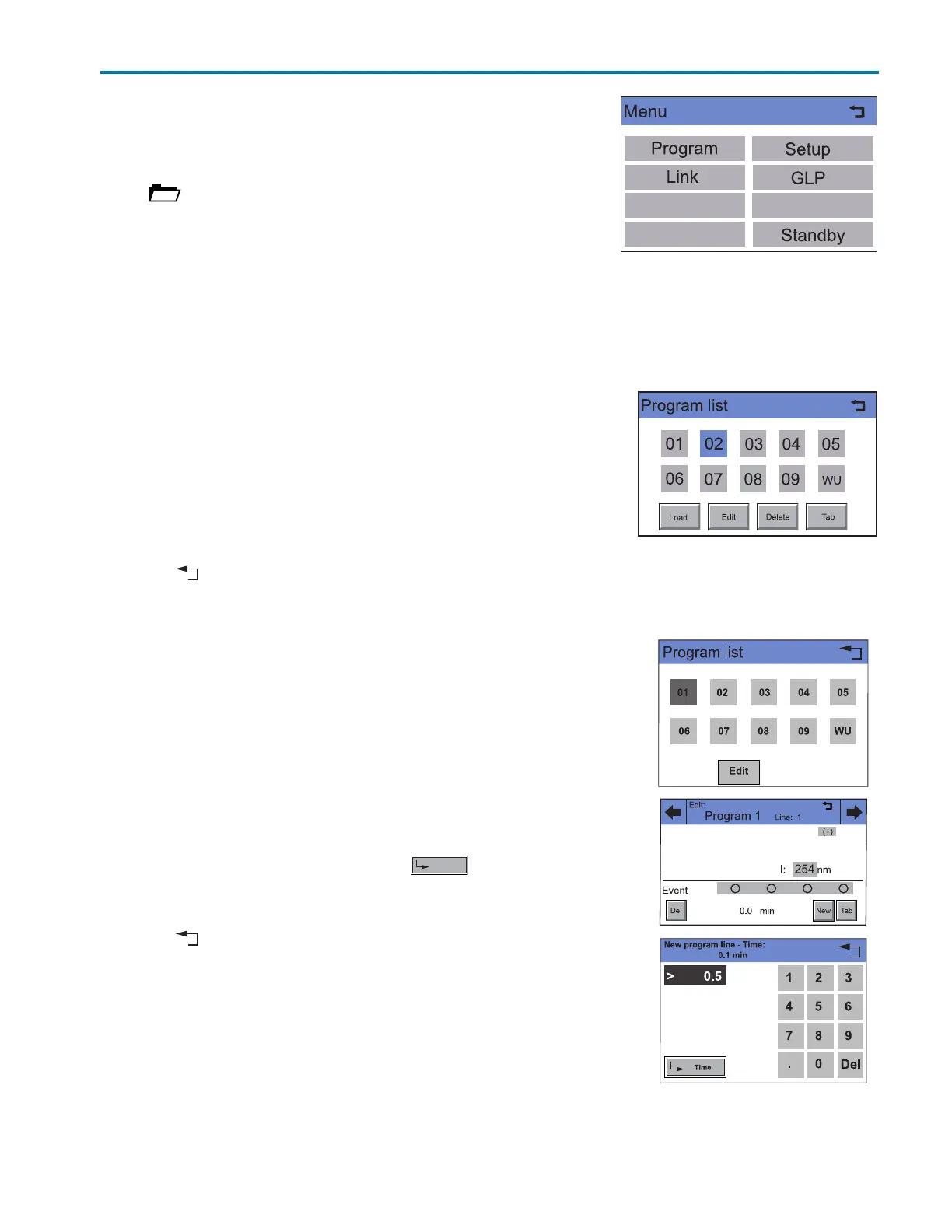
Touch in the status display to go to the Main menu.
The individual menus are opened by touching the its name.
Program Menu
The detector can store ten programs with 99 program lines each. Program
10 (WU) is reserved for a wake-up program for a time-delayed execution of the links or programs.
The individual programs are labeled with numbers.
Navigation
1Touch Program to display the program list.
2 Touch the desired program number to edit, open or delete the program.
3Touch Load to run a program.
4Touch Edit to enter the edit mode.
5Touch Delete to delete a program.
6Touch Tab to display a program line in a table.
7 Touch to go to a higher level, or hold for two seconds to go to the
Main menu.
Creating a Program
Note: Occupied programs are represented by large displayed numbers,
and free programs are represented by small displayed numbers.
Procedure
1Touch Program to display the program list.
2 Touch the desired program number and then Edit to edit the program.
(Diagram A)
3 Enter the desired signal options.
4 Enter the desired wavelengths and then to save.
5 Enter the event settings.
6Touch New to specify the time. (Diagram B).
7 Touch to go to a higher level, or hold for two seconds to go to the
Main menu.
A
B
C
Figure B-6: Creating a Program














 To Next Page