Gilson 157/159 UV-VIS Detectors User’s Guide B-9
Front Panel Control
B
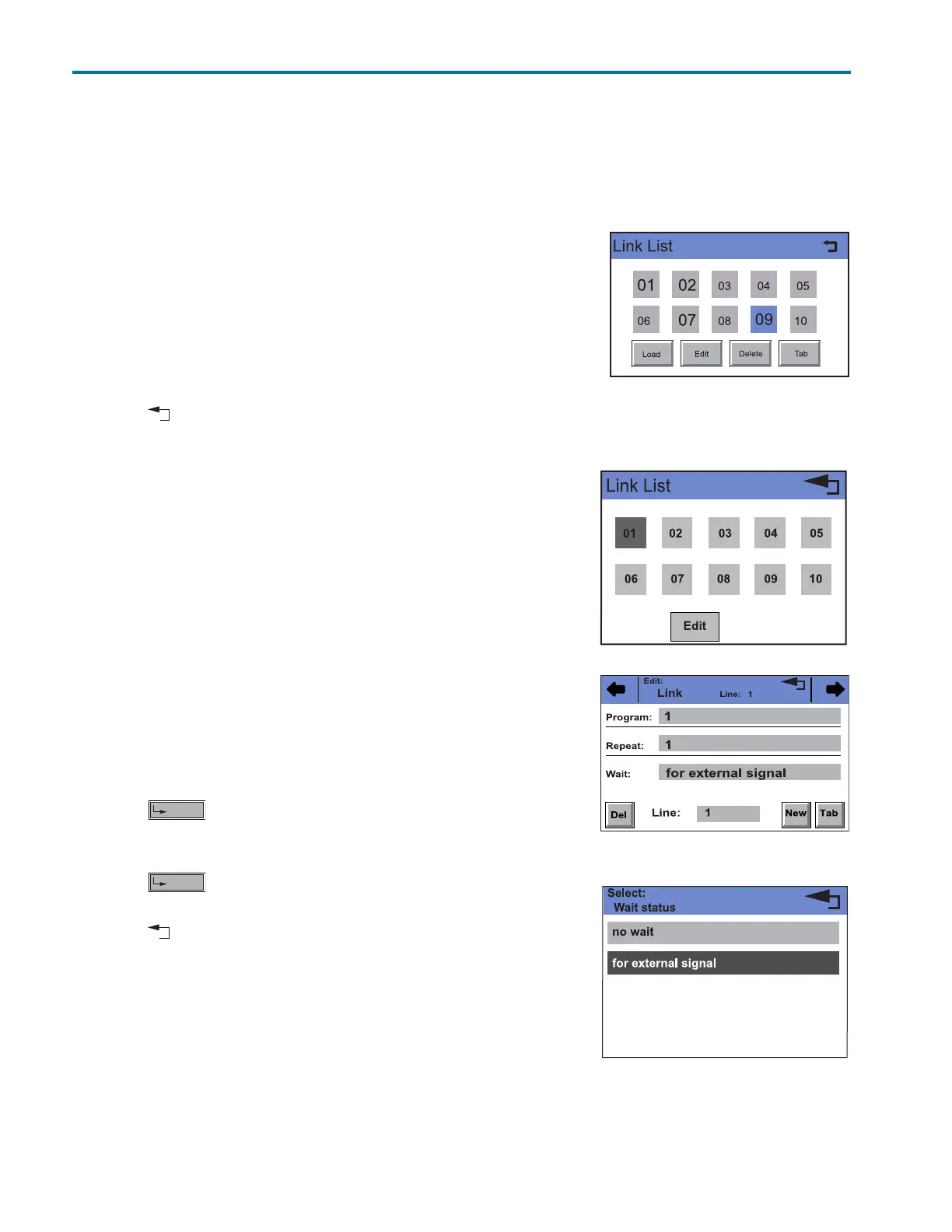
Link Menu
Link Menu
Links contain connections between existing programs, which can be defined and edited, like the programs
themselves.
A maximum of 10 links between defined programs can be created and saved.
Navigation
1Touch Link to display the Link list.
2 Touch the desired link number to edit, open or delete the link.
3Touch Load to run a link.
4Touch Edit to enter the edit mode.
5Touch Delete to delete a link.
6Touch Tab to display the program line.
7 Touch to go to a higher level, or hold for two seconds to go to the
Main menu.
Creating a Link
A link can contain up to 99 lines (line).
Each link contains
• the number of a to be connected program (line program, 1
through 9),
• the number of repetitions (line repeat,1 through 99)
• the wait status i.e., waiting for an external signal (for external
signal) or continue without interruption (no wait).
Procedure
1Touch Link to display the Link list (Diagram A).
2 Touch the desired link number to edit the link.
3 Enter program number (Diagram B).
4 Touch to save the settings.
5 Enter the number of repetitions (Repeat) for the previously
specified program.
6 Touch to save the settings.
7 Select the desired option for wait (Diagram C).
8 Touch to go to a higher level, or hold for two seconds to go to
the Main menu.
A
B
C
Figure B-13: Creating a Link














 To Next Page