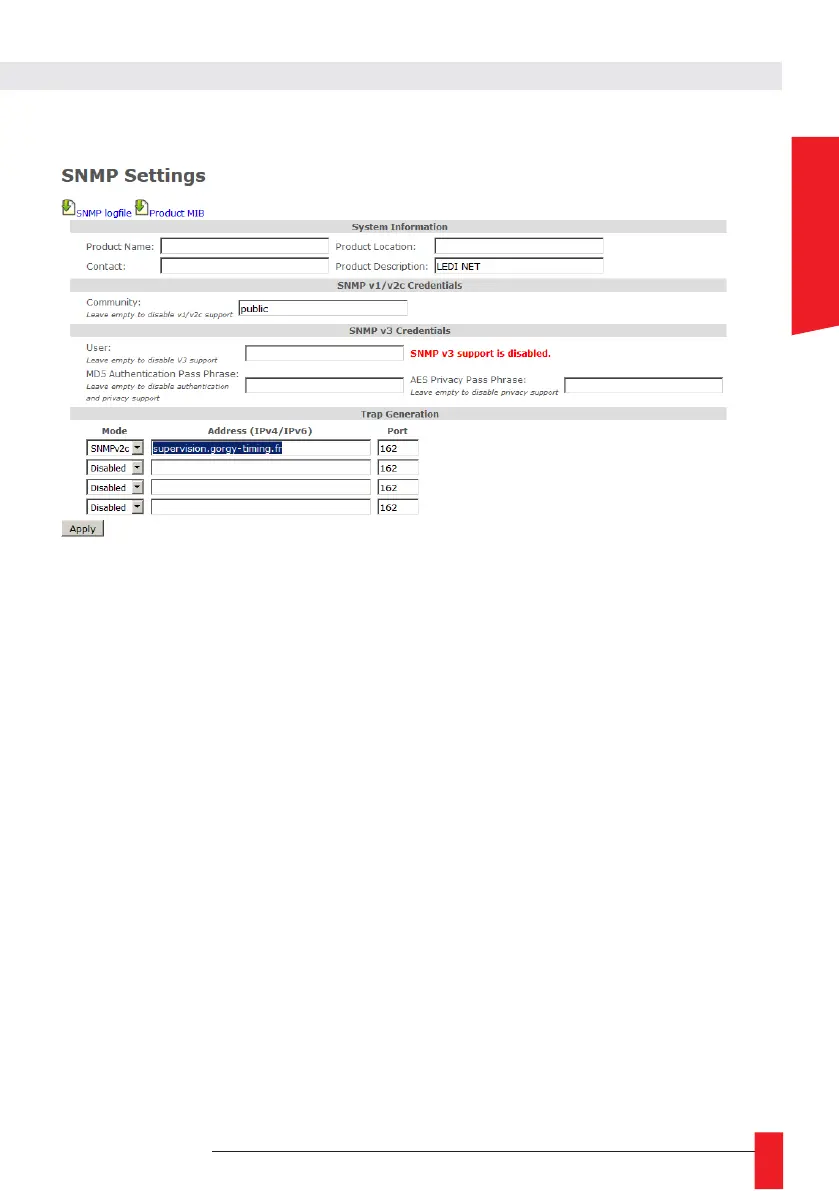
6.1.5. SNMP settings web page
On this page, you can set SNMP (Simple Network Management Protocol) server settings to supervise
your product.
► System Information:
You can set the field «Product Name», «Contact» and «Product Location» as you want to easily identify
your product on the network.
N.B: You should keep "Product Description" to its default value ("LEDI
®
NET") to avoid breaking
compatibility with some Gorgy Timing software.
► SNMP v1/v2c Credentials:
Set the community as you want to restrict SNMP server to talk only to SNMP client or SNMP trap
server which uses the right community settings.
► SNMP v3 Credentials:
For better security, Gorgy-Timing product can use SNMPv3 protocol which allows pri-vacy and
authentication features.
Basically for SNMPv3, you just need an username. SNMPv3 client must know this name to
communicate with your products the same way that with the community for SNMPv1/2c. This
SNMP packet can be easily read from network and community settings found.
► By setting « MD5 Authentication Passphrase », you will enable authentication of SNMPv3
packets so SNMPv3 client must know this password to send pac-kets with the correct MD5
hash or they will be dropped. This MD5 Authentica-tion Passphrase will not be directly present
in the SNMPv3 packets but request content will still be readable on the network.
N.B: Authentication Passphrase must be at least 8 characters long.
► By setting "AES Privacy Passphrase", you will enable AES-128 encryption of SNMPv3
packets. So, the GORGY-TIMING product will only answer to encryp-ted packets which use
the same Privacy passphrase. Privacy Passphrase and all SNMPv3 request content will not
be readable in the SNMPv3 packet granting privacy on network.
N.B: Privacy Passphrase must be at least 8 characters long.



 To Next Page