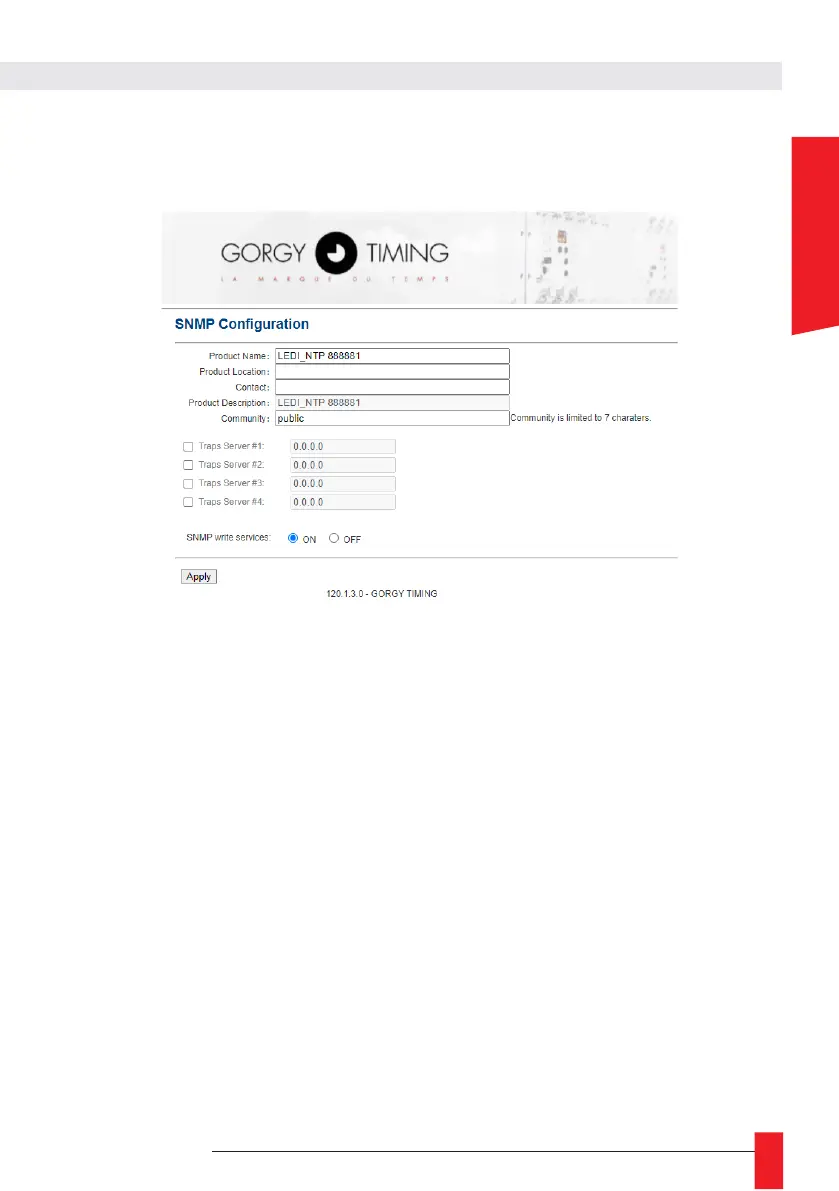
6.2.9. SNMP configuration web page « SNMP Configuration »
A. SNMP Configuration by web page
This page allows you to configure the parameters of the SNMP (Simple Network Management Protocol)
supervision server.
► Product Name: This pre-filled field refers to the name of the product. It is available on its label on
the back.
► Product Location: This field identifies the location of the product.
► Contact: This field allows you to fill in a contact.
► Product Description: This pre-filled field refers to the name of the product on its label on the back.
It cannot be modified.
Note: The maximum length of the fields described above is 50 characters. The characters available for
password selection are the 95 printable ASCII characters (except /=\):
!"#$%&'()*+,-.0123456789:;<>?@
ABCDEFGHIJKLMNOPQRSTUVWXYZ[]^_`
abcdefghijklmnopqrstuvwxyz{}~
► Community: The default community name is "public". This field is limited to 7 alphanumeric
characters. Only the devices indicating this community name can communicate with the product
with the SNMPv1 or SNMPv2 protocol.
► Génération de Traps: The product can spontaneously send information to an SNMP Trap server
(up to 4 IPv4 Trap server addresses) to alert on certain events. These are listed in the following
table.



 To Next Page