► Temperature Alternation : you can set the duration of the time display (0s = OFF to 15s)
alternating with the other information to be displayed (time, date, text...).
► Display Tenth: Displays the tenth of the data which will replace the second character of the unit
(e.g. 21°5 instead of 21°C).
► Temperature Sensor: Choice of sensor identified by its number, its name (as entered in the
Sensor Settings Page) and its current value. You can also choose not to display any sensor
(displaying --:-- instead) or to display all the data of the active sensors alternately.
► For this 2nd point, we could therefore have for example the time for 6 seconds then the indoor
temperature for 4s then again the time for 6 seconds and the indoor humidity for 4 seconds, all on
the same display.
6.1.13. Stopwatch web page
In this page, you can configure the stopwatch and the display of the stopwatch on the LEDI or
LEDIWORLD. Among the configurations available, there are in particular the setting of the start and/or
end value of the stopwatch, the programming of an automatic start, the millisecond or infinite stopwatch
options...
Warning: This page is only available if the option "STOPWATCH Web Page" has been added to
the clock when ordering.
Warning: The Stopwatch web page allows you to configure only ONE product at a time. If you
want to start several stopwatches in a synchronized way, you will have to use the GTChrono
software (CDG035). Please contact our Sales or Support Department for more information
about this software.
A. Stopwatch dashboard
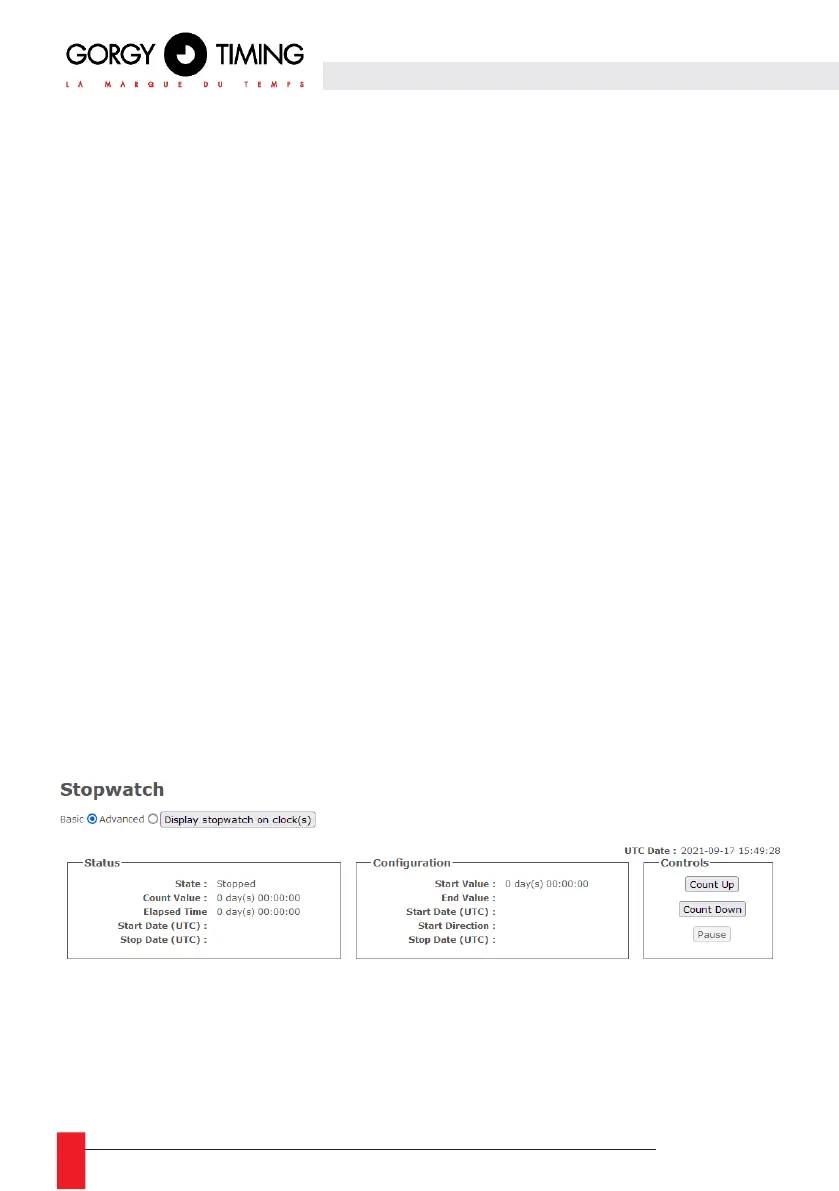
On the upper part of the Stopwatch page of an LEDI is the stopwatch dashboard which allows you to
have a feedback on the status and configuration of the stopwatch as well as the control buttons which
allow you to display/hide the stopwatch mode on the displays, start (counting or decounting), restart or
pause the stopwatch
The stopwatch web page has 2 modes of use: a basic mode: to make quick counts and an advanced
mode for more advanced configurations (automatic start, counting, options..).
N.B: Even if it is not displayed, the stopwatch can continue to count up/down in the background.



 To Next Page