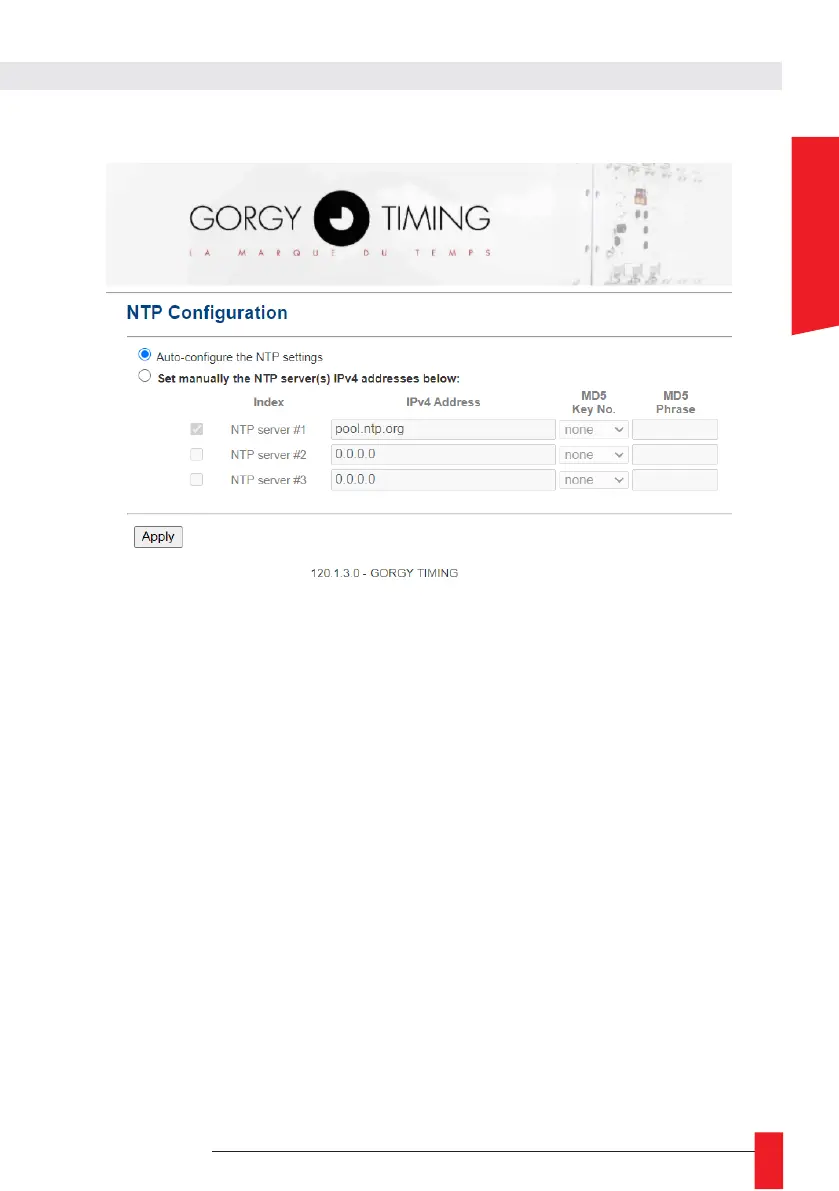
6.2.3. Time input web page « NTP Configuration »
Ce This page allows you to configure the NTP client to receive time information in two ways.
► Either the search for a server is done automatically (Auto-configure the NTP settings)
during the life of the product, which means that depending on the responses received, the
NTP server targeted as the time source for the product may change in the same subnet.
► Either it is possible to manually select up to three NTP servers (Set manually the NTP
server(s) IPv4 addresses below), and in this case at least one NTP server must be set to
allow the clock to synchronize.
IP addresses and server names (requires the use of a DNS server) can be used. MD5
authentication is also available to authenticate NTP packets (up to 8 keys).
The order of the servers defines the priority of their use. The NTP client chooses the first
server in the list that responds correctly to its requests. If it fails, it tries the next server and so
on.
N.B: Be careful, the product deals only with UTC time (international reference time).
In France, in summer time, the legal time is 2 hours ahead of UTC, in winter time, the legal time is 1
hour ahead of UTC.



 To Next Page