GSE Scale Systems - 93
Chapter 11 Local F-Keys Technical Reference Manual
Chapter 11 Local F-Keys
11.1 Local F-Keys (Invoke Macros)
Macros are small software programs (programmable
functions) which you can create to automatically perform
a repetitious operation. The 574 has the capability from
the front keypad to directly invoke up to five different
macros which have been pre-programmed to the
customer’s specifications.
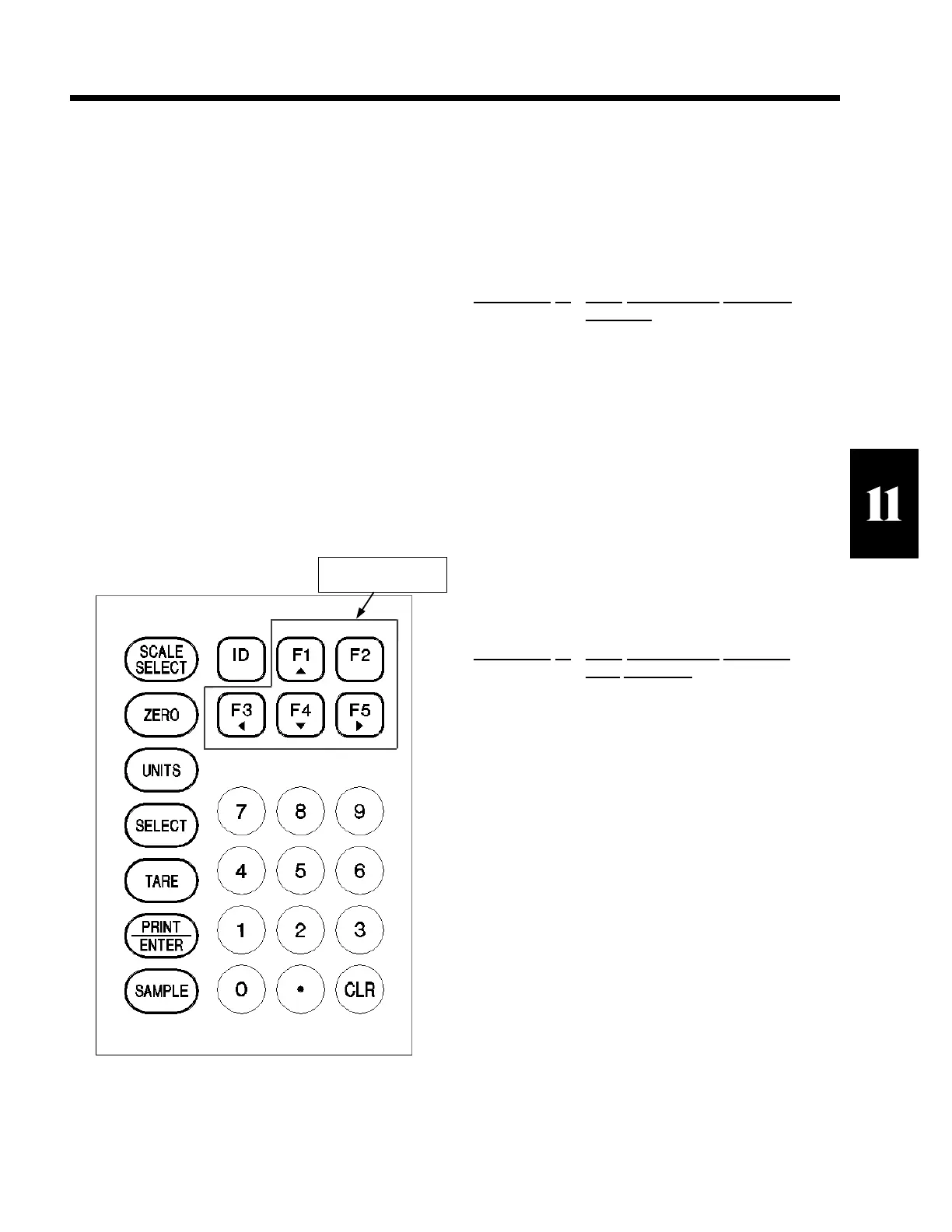
The 574 provides five front panel keys, F1 thru F5, for
directly invoking macros 1 thru 5 (Refer to figure 17,
Local Macro Keys). Pressing one of these keys will
immediately start the corresponding macro. The macros
may be set up to perform whatever commands are
required for an application. For instance an
ACCUMULATION routine, a ACCUMULATE AND
PRINT ROUTINE, RESET A REGISTER, etc. or a
complete series of commands and or prompts may be
performed by a Macro. Refer to Chapter 16 Macro
Programming Operations for information regarding the
operation, setup and capabilities of
Macros.
The F-Keys will repeat when held down. Be careful to
invoke the macro once.
11.2 Basic Local F-Key Macro Examples
EXAMPLE
#1 Local Accumulation Operation
(quantity)
Press <F1> to invoke macro 1. The macro can be
programmed to execute any commands from chapter 16
Macro Operations. However, this example will simply
execute a "quantity accumulation" operation. Simply
place the following characters into macro #1 “31%s.%
I1%s”. The previous characters should appear in the
macro table as shown. The following example is
formated as an ASCII file to be uploaded to a 574.
Macro #1 Serial Upload Format
801%s23640%i%e%c%e Gain access to macro 1.
31%%s%e Access qty. total register.
.%%I%e Accumulate qty.
30%%s Return to quantity mode.
%z
EXAMPLE
#2 Local Accumulation (quantity)
Print
Operation
Press <F2> to invoke macro 2. The macro can be
programmed to execute any commands from chapter 16
Macro Operations. However, this example will execute
a "quantity accumulation and print" operation. Simply
place the following characters into macro #2 “6%s.%I
%1%s1%Q”. The previous characters should appear in
the macro table as shown. The following example is
formated as an ASCII file to be uploaded to a 574. Refer
to chapter 15 Communications to setup your custom
printout. Note that the factory has applied a default
custom transmit in the unit. This is also presented in
chapter 15 Communications. The custom transmit
should be modified to include the quantity accumulation
register if it is to appear on the transmission.
Macro #2 Serial Upload Format
802%s23640%i%e%c%e Gain access to macro 2.
31%%s%e Access qty. total register.
.%%I%e Accumulate qty.
30%%s%e Return to quantity mode.
1%%Q%e Print 1st custom transmit.
%z
SECTION - 11.2
Local Macro Keys
Figure 17 Local Macro Keys



 To Next Page