Model 574 Programmable Counting System (PCS)
212 - GSE Scale Systems
descending order. If an exact
match of ID 1 and ID 2 is
found, the matching records
are sorted according to the
stored gross in ascending
order.
20.9 Installing the DATABASE Option
PARTS SUPPLIED:
The DATABASE option consists of a RAM Module, and
a copy of a database installation manual.
INSTRUMENT REVISION LEVEL
In order to install the option into a Model 574, the main
board revision level must be PC746A or newer (revision
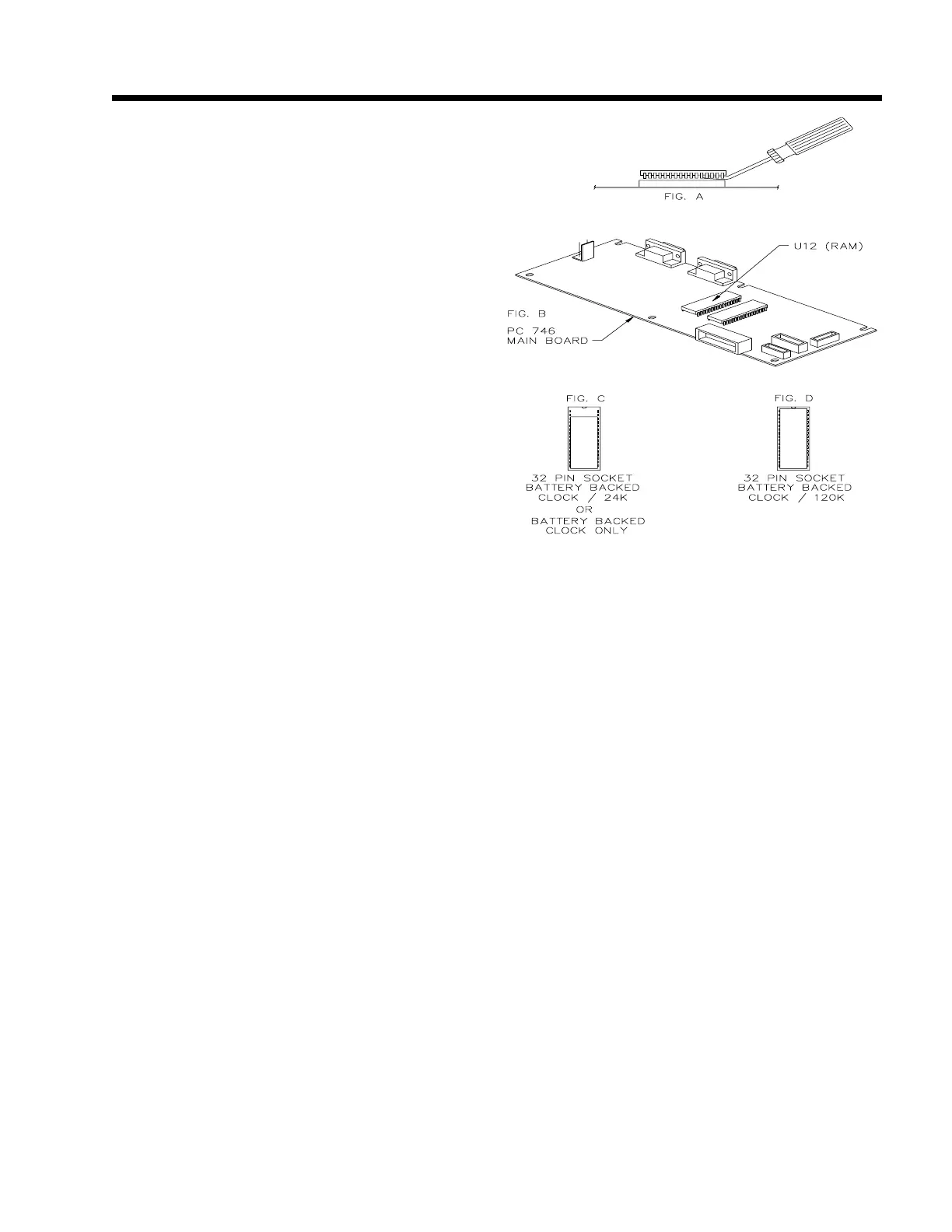
B, etc...). Refer to figure 31 Database Option installation
on Main Board.
INSTALLATION
a. Disconnect the unit from the AC power source.
b. Open the unit by removing the (11 phillips
head screws on the underside of the unit. Refer
to chapter 2 for removal of top instructions.
c. Carefully remove the RAM U12, from its
socket by gently prying a small screwdriver
between the chip and its socket, a little at a
time at each end. This RAM should be saved
for possible future service requirements.
d. Insert the supplied RAM Module, marked
200550-00TD1, into the U12 socket, being
careful to locate the end with the molded in
circle toward the top edge of main board. Be
very careful not to bend any of the pins on the
module when installing it.
e. Re-assemble the unit. Refer to chapter 2 for re-
assembly instructions.
20.10 PRINT FORMAT
When using the "Print dbase" operation, the format for
the transmitted information is fixed and will conform to
the following rules:
a. At the top of the first page, headings are
printed followed by a blank line. The headings
consist of the names of the parameters. If
custom names have been defined (using
parameters P600 - P694 and P701 - P711) then
these defined names will be used, otherwise the
default names of parameters will be used in the
header.
b. The width of each column of data is set to one
plus the larger of the data size and the column
size.
c. A space is transmitted between each column to
provide separation between columns. All
widths specified below do not include the space
between columns.
d. The normal printed data size for numeric
variables is 8 characters. However if the value
is too large to be represented in 8 characters
then additional characters are sent for that row,
disrupting the alignment of the remainder of
that row's data. Data for which units are
appropriate will have the data converted to the
current units as previously selected in the
weigh modes and the units name will be
appended.
e. The time / date parameter's format is dependent
Figure 31 Database Option installation on Main Board



 To Next Page