GSE Scale Systems - 217
Chapter 20 Database (OPTION) Technical Reference Manual
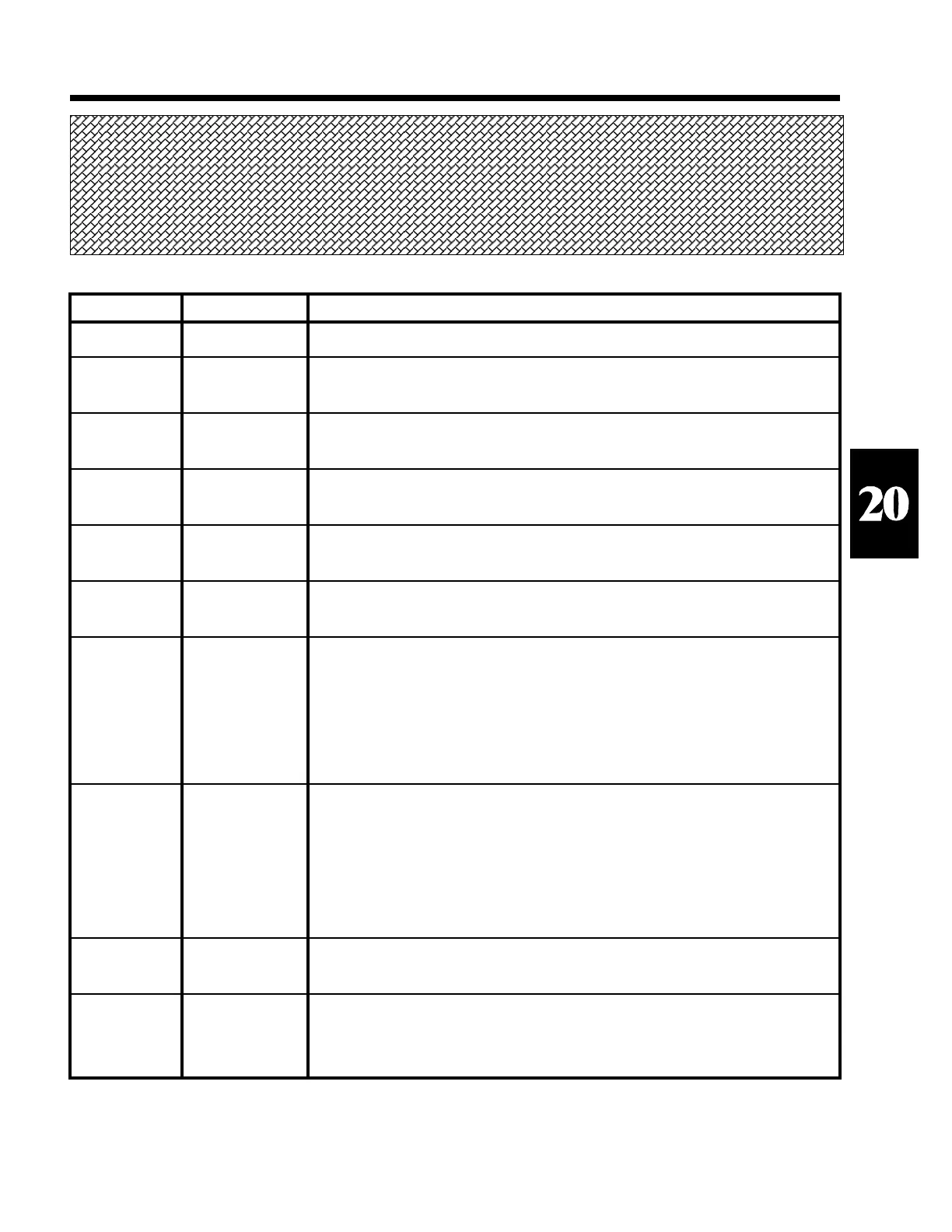
Error Number
0
1
2
3
4
5
6
7
8
9
Error Message
"Done"
"Entry Error"
"Invld dbase"
"Invld Colmn"
"Not Found"
"OutOf Memry"
"Bad Data"
"Bad Link"
"Funct Abort"
"IDtoo Long"
Error Description
No error occurred.
Bad entry. The entry did not meet the criteria for the parameter being accessed.
Possibly entering alpha data into a numeric parameter.
Invalid database selection. The database being selected has not been defined (ie
not setup).
Invalid column selection. The specified column is not defined in the current
database.
Record not found. During a recall operation, the value being searched for has not
been located.
Out of Database Memory. There is insufficient remaining unused memory to
perform the requested database operation.
Check-sum error. Each record stored in the unit's database has a checksum stored
to insure the integrity of the stored data. This is a numeric value stored within the
row which a calculated sum of all the individual bytes within each row. Each
time a row is accessed it's checksum is tested. If the checksum does not add up
correctly then it is likely that some of the data in the row is corrupted. This
situation should not normally occur. If it does occur, it may be due to a hardware
defect or a large ESD occurrence.
The list of rows stored in the current database is corrupt. This situation could
cause significant problems. Some stored rows may no longer be accessable while
others may be sharing the same memory space as other records. This is another
error which should not normally occur. Possible causes may be similar to those
for "Bad Data". If this error occurs, it is recommended that all database setups
and all database records be downloaded and saved and then reset the database. If
this error occurs more than once then the indicator should be serviced.
Operation aborted. The search, print, sort, or upload was aborted. This would
normally be due to the operator pressing the <CLR> key.
The number of characters being recalled into an ID (parameters 21 - 26) was
longer than the ID is defined to be (per setup parameter P700 -710). Thus the ID
data had to be shortened while it was being recalled.
Table 38 Database Error Codes
SECTION - 20.16



 To Next Page