GSE Scale Systems - 285
Chapter 32 Remote Display Operation Technical Reference Manual
P281.X UNITS
This parameter allows for enabling or disabling the remote
450 or 550’s <UNITS> key. If enabled it will have an
effect on the master unit. When this key is pressed it will
send a units operation command recognized by another
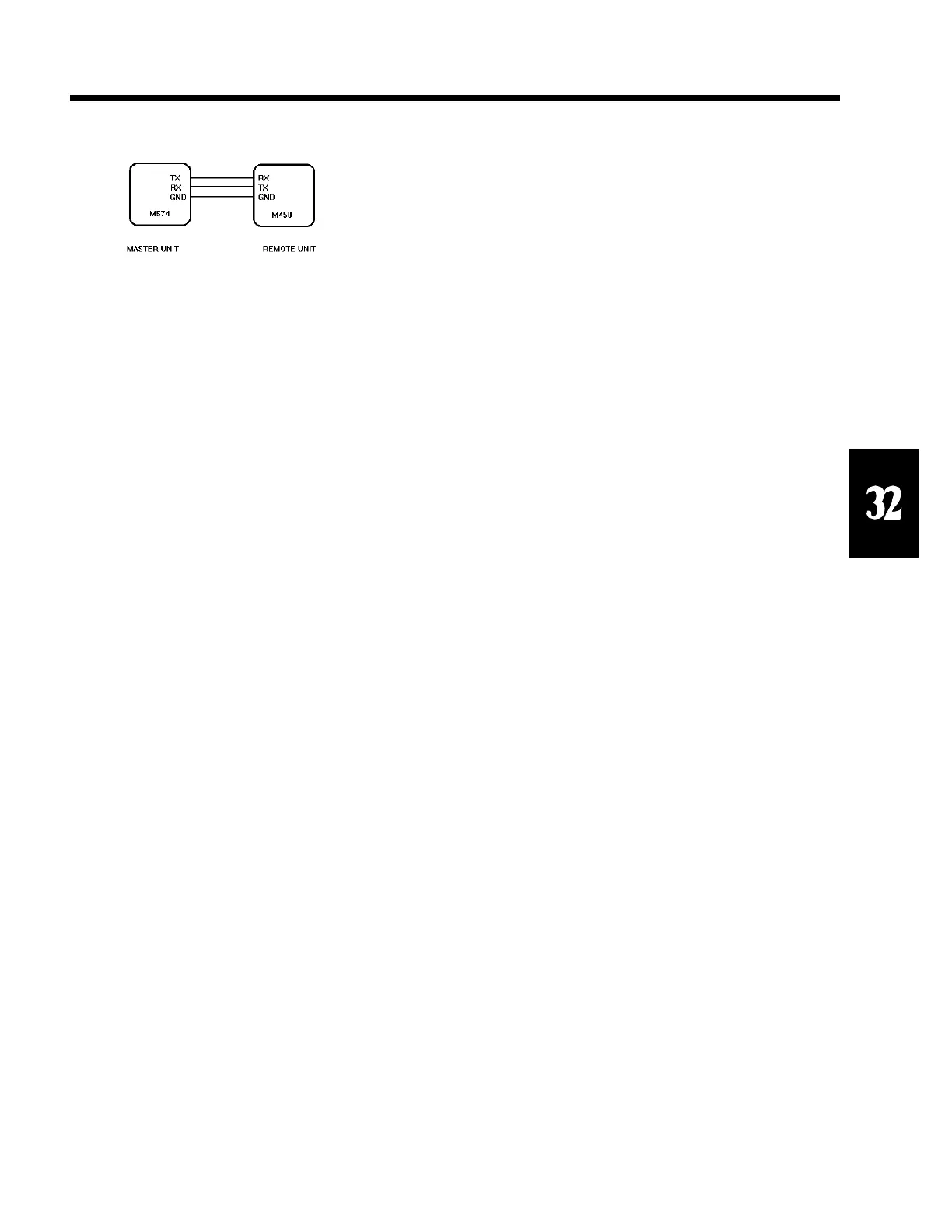
GSE indicator. Both a TX, RX and GND line must be
connected between the two units COMM Ports for remote
key operation. Both units must be set for software
handshake (Xon). If this parameter is disabled the
<UNITS> key will have no effect on the master unit.
P282.X SELCT
This parameter allows for enabling or disabling the remote
450 or 550’s <SELECT> key. If enabled it will have an
effect on the master unit. When this key is pressed it will
send a select operation command recognized by another
GSE indicator. Both a TX, RX and GND line must be
connected between the two units COMM Ports for remote
key operation. Both units must be set for software
handshake (Xon). If this parameter is disabled the
<SELECT> key will have no effect on the master unit.
P283.X ID ( <PRINT> + <UNITS>)
This parameter allows for enabling or disabling the remote
450’s <PRINT> + <UNITS> key combination. This is
the <ID> key on a 550. If enabled it will have an effect on
the master unit. When this key is pressed it will send a %i
operation command recognized by another GSE indicator
to step backwards one step in the ASCII table selection.
Both a TX, RX and GND line must be connected between
the two units COMM Ports for remote key operation. Both
units must be set for software handshake (Xon). If this
parameter is disabled the %i will have no effect on the
master unit.
P284.X PRINT
This parameter allows for enabling or disabling the remote
450 or 550’s <PRINT> key. If enabled it will have an
effect on the master unit. When this key is pressed it will
send a print operation command recognized by another
GSE indicator. Both a TX, RX and GND line must be
connected between the two units COMM Ports for remote
key operation. Both units must be set for software
handshake (Xon). If this parameter is disabled the
<PRINT> key will have no effect on the master unit.
P285.X TARE
This parameter allows for enabling or disabling the remote
450 or 550’s <TARE> key. If enabled it will have an
effect on the master unit. When this key is pressed it will
send a tare operation command recognized by another
GSE indicator. Both a TX, RX and GND line must be
connected between the two units COMM Ports for remote
key operation. Both units must be set for software
handshake (Xon). If this parameter is disabled the
<TARE> key will have no effect on the master unit.
P286.X ENTER
This parameter allows for enabling or disabling the remote
550’s <ENTER> key. If enabled it will have an effect on
the master unit. When this key is pressed it will send an
enter operation command recognized by another GSE
indicator. Both a TX, RX and GND line must be
connected between the two units COMM Ports for remote
key operation. Both units must be set for software
handshake (Xon). If this parameter is disabled the
<ENTER> key will have no effect on the master unit.
P287.X CLEAR
This parameter allows for enabling or disabling the remote
450 and 550’s <CLEAR> key. If enabled it will have an
effect on the master unit. When this key is pressed it will
send a clear operation command recognized by another
GSE indicator. Both a TX, RX and GND line must be
connected between the two units COMM Ports for remote
key operation. Both units must be set for software
handshake (Xon). If this parameter is disabled the
<CLEAR> key will have no effect on the master unit.
P288.X NUMBR
SECTION - 32.6
Figure 50 Remote display connections for Remote Keys



 To Next Page