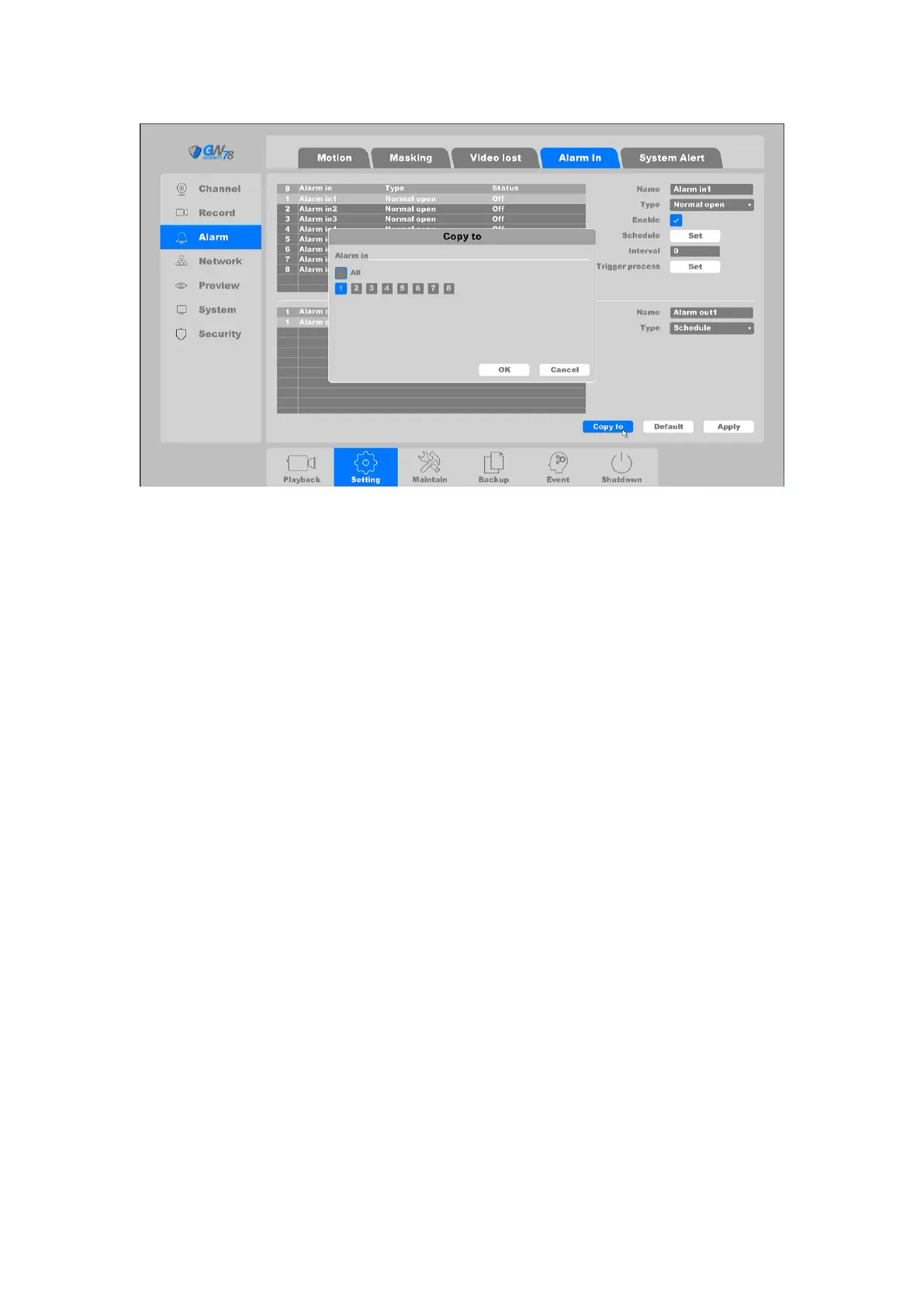
Figure 4-42 Alarm In
The Alarm input device is a device which can detect the surveillance area using sensors such as
infrared sensor or temperature sensor, and when the environment is been changed, the sensor
will trigger and alert the status.
Name: Set the name of the Alarm input device.
Type: Normal Open/Normal Close. It means the system supports those external sensor
alarms which have two statuses: Open and Close. When the status switches from Open –>
Close, or from Close–>Open, alarm will be triggered.
Enable: Alarm in enable toggle.
Schedule: Set time slot to detect video loss.
Interval: Set the time interval of each Alarm when triggered.
Action: Set the handling action of alarm in detection; please take the setting of chapter
4.3.3.1 motion detection for reference.
Alarm output device is a device which can output warning signal such as sound or light, to remind
the user that there´s alarm are triggered.
Name: Set the name of the Alarm output device.
Type: Three types: Schedule/Manual/Stop. Schedule means the alarm output device
will be activated when the NVR detects the alarm. Manual means the alarm output device
will be activated after choosing the Manual and press the button Apply. Stop means the
alarm output device is not on-guard.
After all the settings finished, click the button Apply to save all changes.
You can also click Copy to to pass the same settings to another port.



 To Next Page