Note:
If our IP camera’s IP address is not in the same segment with the NVR the NVR can still
find the IP camera, but the NVR may not be able to pull a video stream from the camera. It is
recommended to change the IP address of the IP camera first to match the internal IP or if the
NVR doesn't have a built-in POE the IP address of the NVR
4.3.6.2 Encode
By configuring the encode parameters you can define the parameters which affect the image
quality, such as: Compression type, Resolution, Frame Rate, Bit Rate Type, Quality, etc.
The NVR supports Dual Stream Encode, we can set the main stream encode and sub stream
encode on this screen.
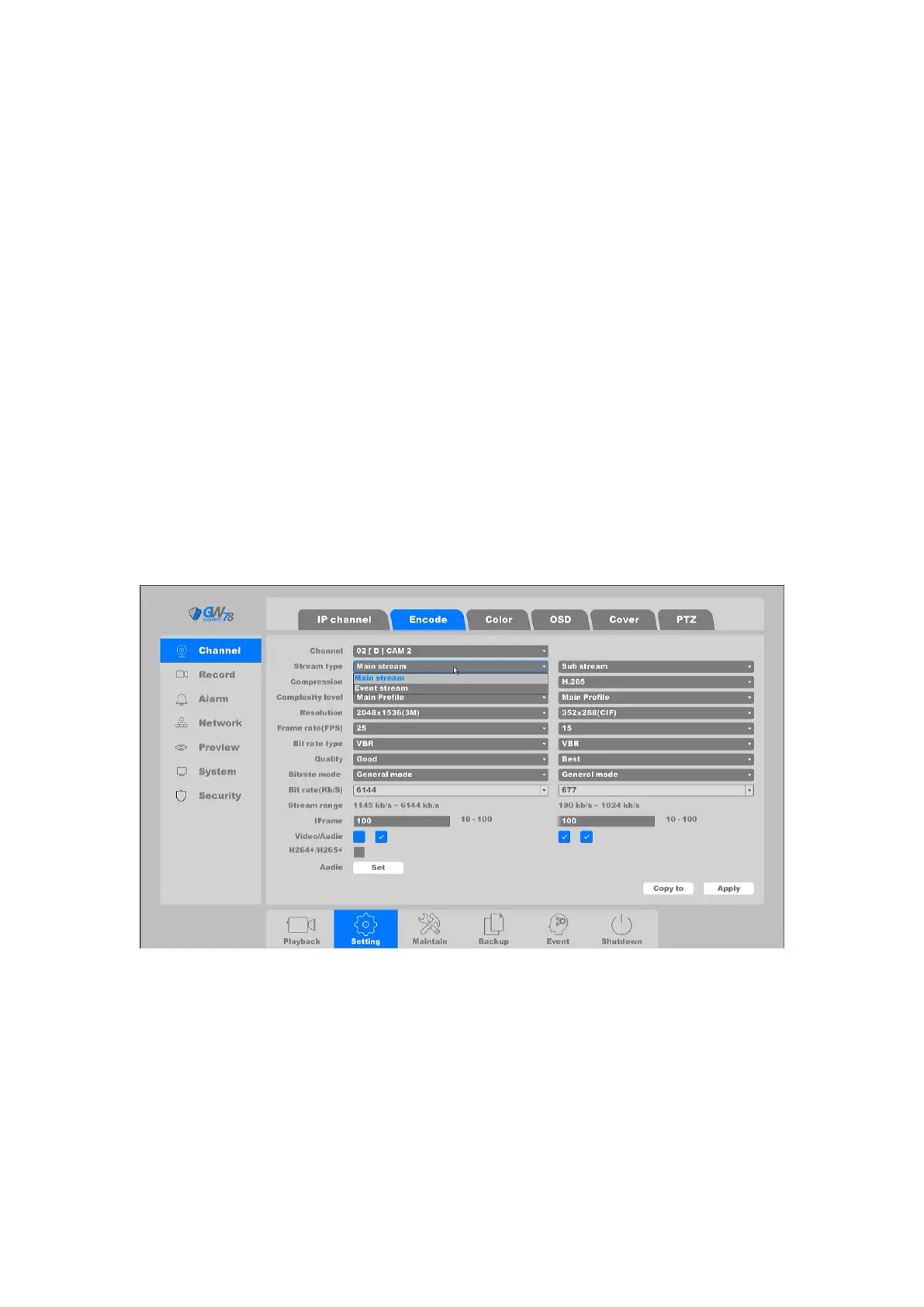
Click on the "Setting -> Channel -> Encode”, as shown in figure 4-54.
Figure 4-54 Encode
Channel: Select the channel to configure.
Stream Type: Main Stream/Sub Stream/Event Stream/Mobile Stream
Compression: H.265 is the compression protocol for encoding. Also supported is
H.264 IP cameras.
Resolution: The resolution of the encoding record.
Frame Rate (FPS): The number of frames per second in the encoding video.



 To Next Page