Close: function disable
Auto: defog automatically
Manual: adjust the effect manually
NR Level: 0-6
Defog: Close/Auto/Manual
Smart light: close/manual/auto
Table 4-4 IP Camera advanced setting
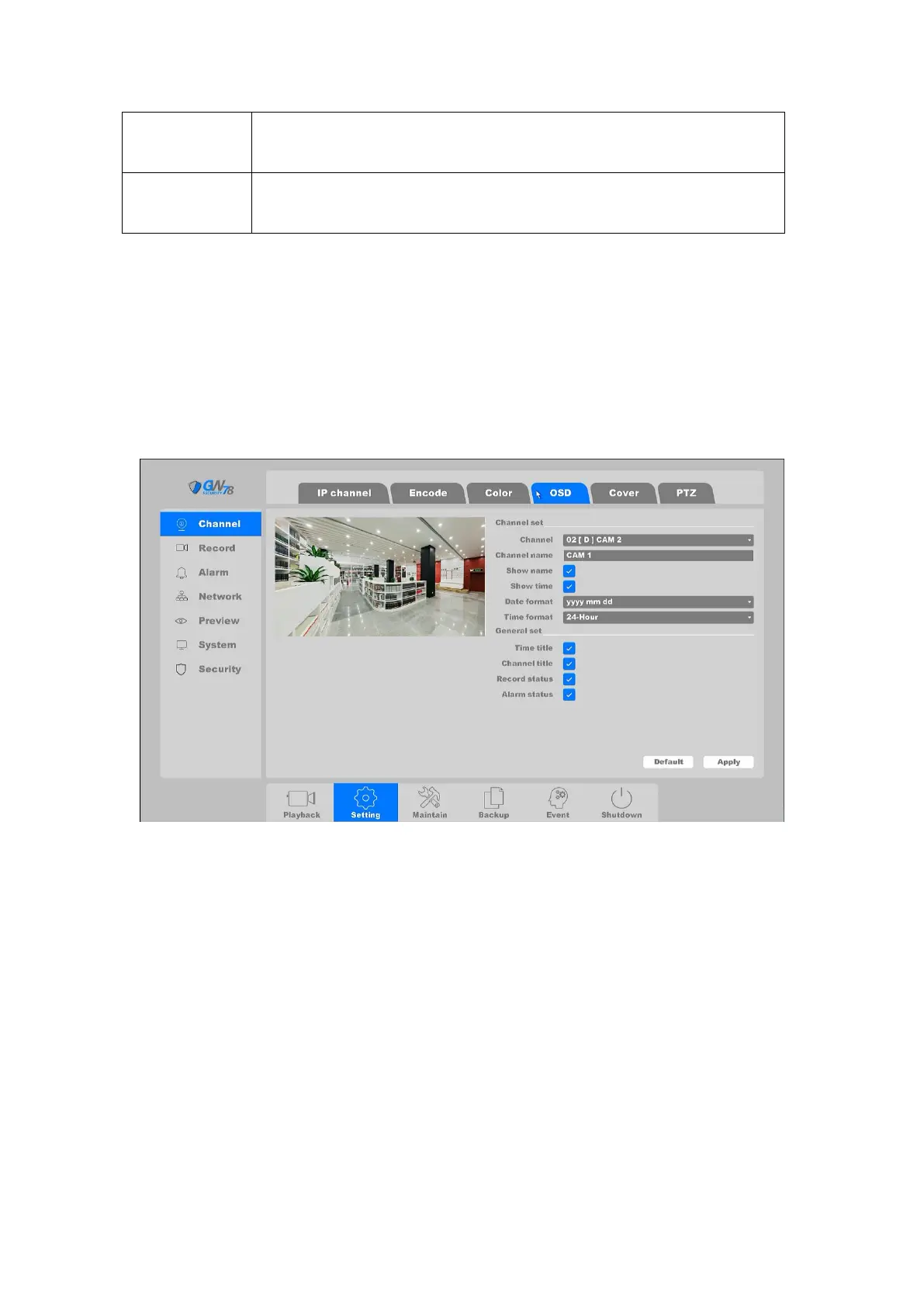
4.3.6.4 OSD
You can configure the OSD (On-screen Display) settings for the camera, including Channel Name,
Date/Time format, Record status, Alarm status, etc.
Click on the "Setting -> Channel ->OSD”, as shown in figure 4-57.
Figure 4-57 OSD Setting
There are two parts for the setting: Channel Set and General Set. For Channel Set, you can
configure the following items:
Channel: Select the channel to configure.
Channel Name: The name of the channel to be set.
Show Name, Show Time: Enable the information of channel name and time to be
displayed on the video stream.
Date Format, Time Format: Set the format of the date and time.
For the General Set you can configure the following items:
Time Title, Channel Title: Enable/disable the display of the time tile and channel title
on the monitor screen.
Record Status, Alarm Status: Enable/disable the display of the record status and alarm
status on the screen.



 To Next Page