111
7000056136-0
EN
5.5.3 - Connection to 230 VAC system
Connection to the 230 VAC system powers the vehicle and charges its
batteries.
1
1
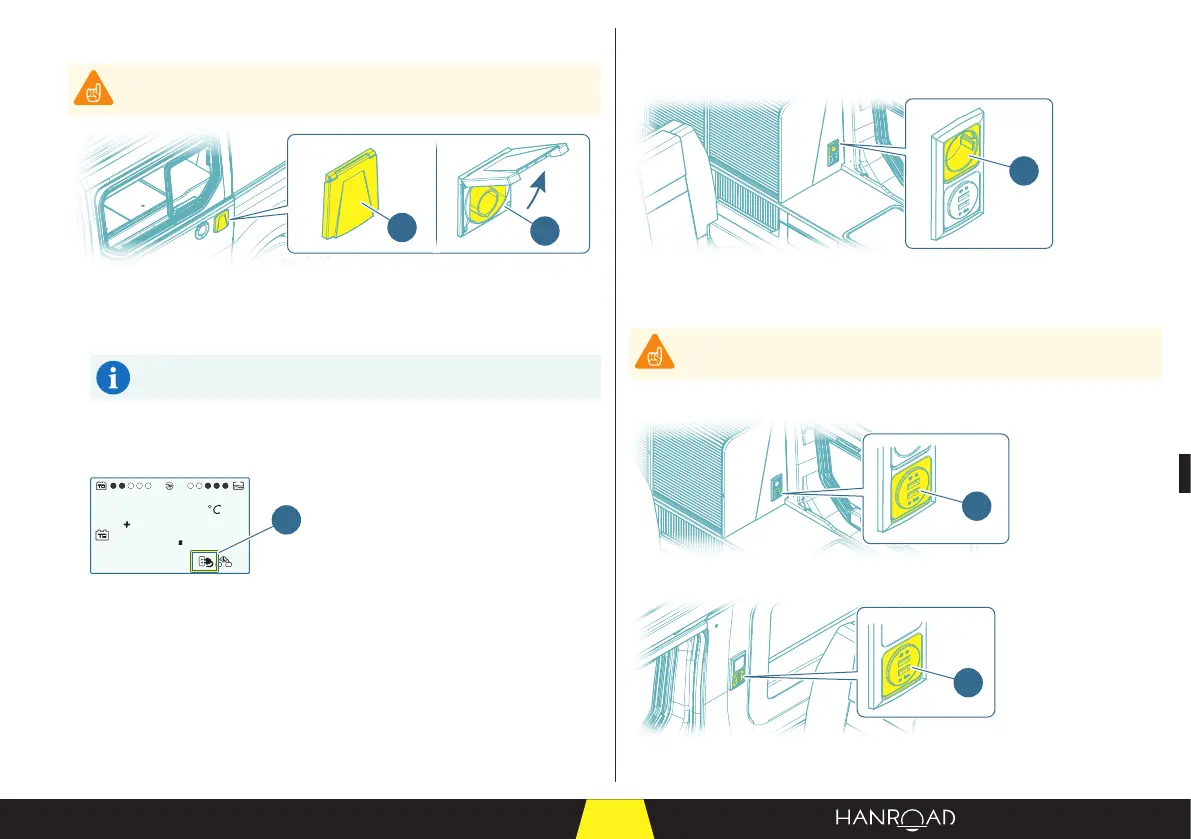
1 Exterior 230 VAC socket
The connector to the 230 VAC system is located on the driver side.
■ Use a 230 VAC system connector cable to connect the van to the main.
The 230 VAC mains connection cable is available from HANROAD
Customer Service.
■ Start by connecting the cable to the 230 VAC socket on the van.
■ Next, connect the cable to the 230 VAC system.
5
25
ext.
T
1
1 Connection to 230 VAC system
In the instrumentation and control interface, the connection to the system is
indicated by the "Connection to the 230 VAC system" pictogram.
■ Check on screen that the vehicle connection to the system is enabled.
5.5.4 - Interior USB sockets and 230 VAC sockets
Interior 230 VAC socket
1
1 Interior 230 VAC socket
The interior 230 VAC socket is located on the kitchen unit side.
This socket only has power when the vehicle is connected to the
230 VAC system.
USB sockets
1
1 USB socket (kitchen side)
2
2 USB socket (magazine rack side)


 To Next Page