115
7000056136-0
EN
If the control unit is in standby mode (display o), the active display
mode can be reactivated by briey pressing or turning the control
knob.
– The start screen is displayed if all heaters are switched o.
– If a heater is running, the current remaining operating time of the
heater is displayed.
– If several heaters are running, the current remaining operating
times are displayed alternately.
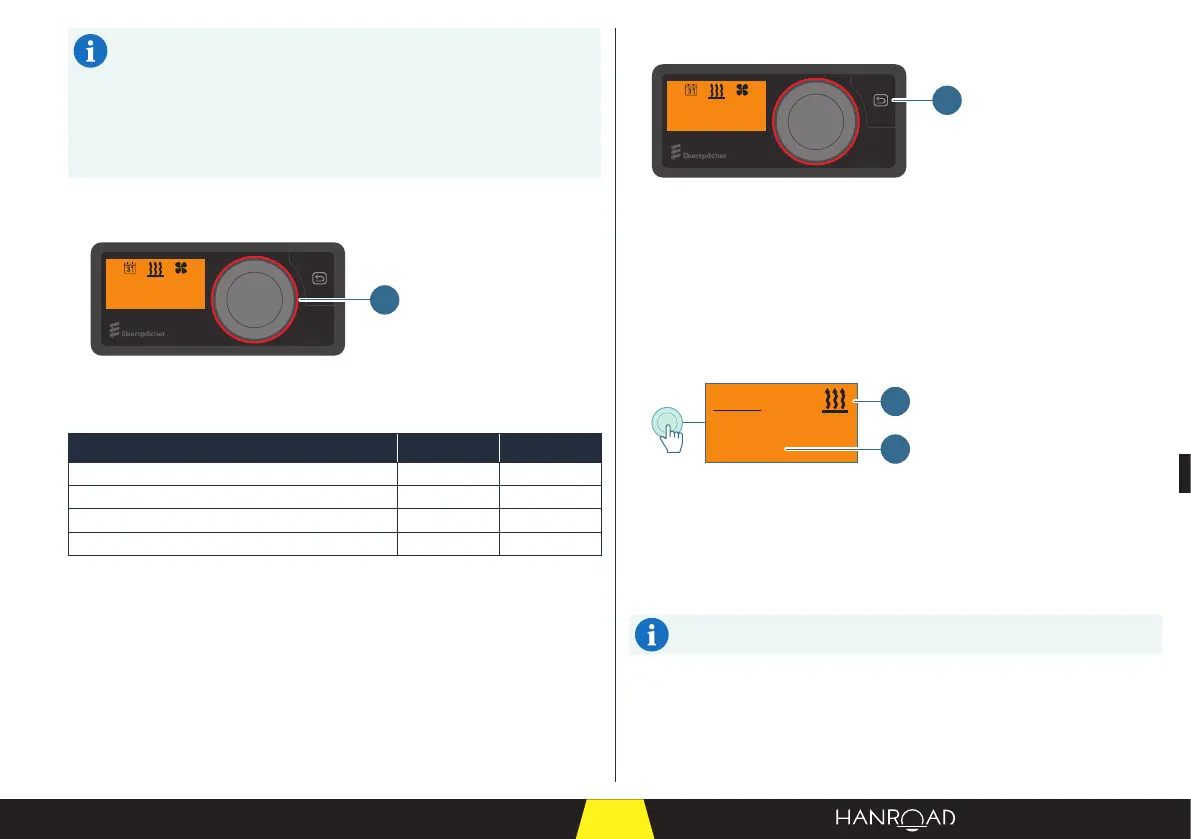
5.6.3 - Illuminated indication
22°C20min
1
1 Light ring
The light ring indicates the operating mode status.
Heater status Colour LED status
"Heating" mode. Red Continuous
"Ventilation" mode. Blue Continuous
System conguration. White Continuous
Heater fault. Red Flashing
5.6.4 - Description of the return button
22°C20min
1
1 Return button
The return button allows you to:
– Go back to the previous step in the setting.
– Cancel the setting.
5.6.5 - Heating
Immediate heating with a "Long press"
20min
Heater
> 2s
2
1
1 Heating mode
2 Operating duration
■ Press the control knob for more than 2 seconds (long press).
The heating starts with the operating time.
The light ring lights up red.
The operating time is the last one to be applied.


 To Next Page